
ExtraBrain Blog
DevOps Interview Prep With an AI Copilot in 2026

Prepare for DevOps interviews with AI copilot workflows for CI/CD, cloud, Kubernetes, incidents, behavioral answers, and responsible use.
DevOps interviews in 2026 are less about memorizing command syntax and more about explaining how production systems behave under pressure. Hiring teams want to hear how you design CI/CD pipelines, debug Kubernetes failures, protect cloud infrastructure, respond to incidents, and communicate tradeoffs clearly. An AI interview copilot can help you practice those skills, organize your thinking, and review your answers after each session.
ExtraBrain is a free, local-first Mac desktop AI interview assistant and meeting copilot built for that kind of live, context-heavy work. It supports live transcription, screen-aware context, local Parakeet transcription, local Gemma 4 on-device AI where installed and compatible, bring-your-own AI providers, and clear privacy controls. Use it only where interview, employer, school, workplace, and platform rules allow AI assistance, transcription, screenshots, or notes.
Key takeaways
- DevOps interview prep should focus on architecture, reliability, security, automation, and communication, not just shell commands.
- A useful AI interview copilot helps you practice realistic scenarios such as pipeline failures, Kubernetes rollbacks, cloud cost issues, and incident response.
- Live transcription and screen-aware context can help you follow long prompts and prepare structured answers.
- Local-first settings matter when interview notes, transcripts, screenshots, or code prompts may contain sensitive information.
- Responsible use is part of the workflow because some interviews and assessments restrict AI tools, recording, screenshots, or outside assistance.
- The strongest preparation comes from combining AI feedback with your own experience, examples, and post-session review.
Using an AI DevOps interview copilot during live interviews
Start with the rules of the interview
Before thinking about any tool, confirm what the interview allows. Some companies allow personal notes, transcription, or AI-assisted accessibility workflows. Others ban outside assistance during coding rounds, assessments, take-homes, or live calls.
A responsible AI interview copilot workflow starts with that boundary. If AI assistance is not allowed, use ExtraBrain for preparation, mock interviews, and post-interview review instead of live help. If transcription or AI assistance is allowed, configure your app deliberately and avoid sending sensitive context to providers you do not intend to use.
Keep the DevOps context in view
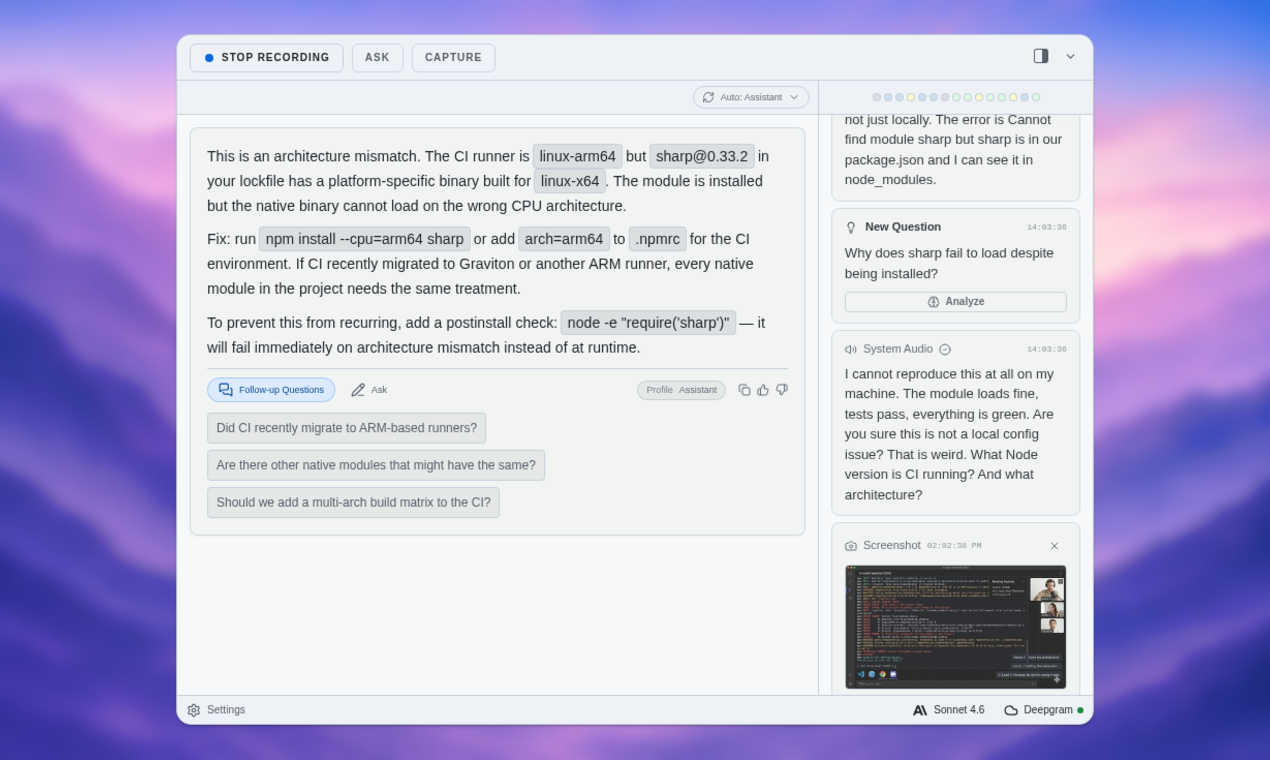
DevOps interviews often move quickly between terminal output, architecture diagrams, cloud consoles, pull request snippets, monitoring dashboards, and verbal follow-up questions. A browser-only tool can become awkward because you may need to switch tabs, paste prompts, or manually describe what is on screen. A desktop AI copilot is more useful when the question depends on the full desktop context.
ExtraBrain is designed as a Mac desktop app with live transcription and screen-aware context. That means you can use it to follow the interview conversation, capture relevant on-screen details when permitted, and ask for structured help around the problem in front of you. For example, if an interviewer shows a failing deployment log, you can use the session context to reason about likely causes instead of starting from a blank prompt.
Ask for help with structure, not just answers
The best DevOps candidates do not simply recite commands. They explain assumptions, isolate failure domains, compare options, and make safe operational choices. An AI copilot is most valuable when it helps you structure that thinking.
For a CI/CD failure, ask for a response outline like this:
- Restate the symptom.
- Clarify the affected service, environment, and recent changes.
- Check build logs, test failures, dependency changes, secrets, and deployment permissions.
- Identify whether the failure is build-time, deploy-time, runtime, or infrastructure-related.
- Propose the safest rollback, retry, or mitigation path.
- Explain what monitoring or prevention you would add afterward.
That structure keeps your answer grounded in real operational reasoning. It also gives the interviewer more signal than a one-line fix.
Use screen-aware help for coding and scripting rounds
DevOps interviews may include Python scripts, Bash automation, Terraform modules, Kubernetes manifests, Dockerfiles, GitHub Actions, or debugging exercises. Instead of pasting a full prompt into a generic chat window, a screen-aware workflow can help you reason from the visible problem statement or code snippet.
When allowed, use ExtraBrain to generate an outline before writing code. For example, if the prompt asks you to parse deployment logs and calculate error rates, ask for:
- Edge cases to consider.
- A simple data structure plan.
- A testable implementation strategy.
- The complexity and failure modes.
- A plain-English explanation you can say while coding.
This keeps the interview focused on your reasoning. You remain responsible for understanding and explaining the solution.
Prepare for follow-up questions
DevOps interviewers almost always ask follow-ups. They may ask how you would optimize a pipeline, reduce blast radius, improve observability, secure secrets, scale a cluster, or handle an outage differently next time.
A good copilot workflow helps you rehearse these follow-ups before the interview. For example, after answering a Kubernetes deployment question, ask for likely follow-ups:
- What if the rollout fails halfway through?
- How would you detect the failure automatically?
- What metrics would you watch during the rollout?
- How would you design the rollback policy?
- How would this change for a stateful service?
- What security controls should protect the deployment pipeline?
Practicing these branches helps you sound calm and senior in the actual conversation.
Setup and customization for DevOps interviews
Configure the session around the role
Start each practice session with the resume, job description, and target interview format. A platform engineer interview needs different preparation from a cloud security, SRE, DevOps generalist, or infrastructure automation role. Use the copilot to turn the job description into a practice map.
A useful map might include:
| Setup area | What to prepare |
|---|---|
| Role context | Company stack, seniority level, cloud provider, and responsibilities. |
| Technical scope | CI/CD, Kubernetes, Terraform, observability, Linux, networking, and cloud services. |
| Behavioral scope | Incident ownership, collaboration, conflict resolution, prioritization, and postmortems. |
| Practice style | Mock interview, rapid-fire questions, deep-dive system design, or coding exercise. |
| Review workflow | Transcript review, stronger answer drafts, and follow-up question lists. |
ExtraBrain can work as a focused AI second brain for interviews and meetings. It gives you a place to capture live sessions, transcripts, notes, screen context, and review material without trying to replace a full general-purpose notes database.
Choose privacy settings intentionally
DevOps prompts can include sensitive details such as hostnames, architecture diagrams, deployment logs, cloud identifiers, repository names, or incident data. Privacy settings are not a bonus feature in this category. They are part of responsible preparation.
ExtraBrain supports local Parakeet transcription and local Gemma 4 on-device AI where installed and compatible. A fully local posture requires local Parakeet transcription plus local Gemma 4 on-device AI where installed and compatible, with no external provider requests. If you choose an external provider, selected prompts, transcript text, screenshots, audio, or context may leave your device depending on your configuration.
Use the most conservative setup that still fits the rules and needs of the interview. If you are practicing with fictional scenarios, external providers may be acceptable for your workflow. If you are handling sensitive workplace or customer context, local-first settings deserve extra attention.
Build a reusable DevOps prompt profile
A strong DevOps prompt profile tells the AI how to help without turning every answer into a generic lecture. You can ask for concise, interview-ready guidance that emphasizes tradeoffs, reliability, and clear communication.
Example profile guidance:
Help me answer as a DevOps candidate. Prioritize production safety, observability, security, rollback planning, and clear tradeoffs. Keep answers concise enough to say out loud. When a question is ambiguous, suggest clarifying questions before proposing a solution. When code is involved, explain the approach before the final implementation.
This kind of guidance makes practice sessions more realistic. It also helps you avoid overlong answers during live interviews.
Scenario practice with an AI DevOps interview copilot
Personalized practice sessions
Personalized practice works best when it starts from your actual background. If your resume emphasizes AWS and Terraform, your mock interviews should not spend all their time on Azure and Ansible. If the role is SRE-heavy, your questions should include incident management, SLOs, alert fatigue, and debugging production regressions.
Use ExtraBrain to create practice rounds around scenarios like:
- Designing a CI/CD pipeline for a microservice.
- Debugging a failed container deployment.
- Explaining a Kubernetes rollout strategy.
- Securing secrets in a build pipeline.
- Reducing cloud spend without hurting reliability.
- Creating Terraform modules for repeatable infrastructure.
- Designing monitoring for latency, error rate, saturation, and availability.
- Explaining a postmortem from a past incident.
The goal is not to memorize perfect answers. The goal is to practice moving from symptom to diagnosis to tradeoff to action.
Technical and behavioral simulations
DevOps interviews blend technical depth with behavioral judgment. You may answer a Kubernetes question and then immediately discuss how you handled a high-pressure outage with product and engineering stakeholders. Practice both together.
Common technical simulations include:
- CI/CD pipeline failures.
- Docker image build issues.
- Kubernetes deployment errors.
- Configuration drift across servers.
- Cloud deployment troubleshooting across AWS, Azure, or Google Cloud.
- Infrastructure as Code problems with Terraform or Ansible.
- Monitoring and alert misconfigurations.
- Git merge conflicts and release branch mistakes.
- Rollback and recovery scenarios.
Common behavioral simulations include:
- Tell me about a time you owned an incident.
- How do you balance speed and safety in a production release?
- How do you push back when a team wants to skip deployment checks?
- How do you communicate uncertainty during an outage?
- What did you change after a failed release?
Practice answering these out loud. A transcript is useful because it shows whether your answer sounded structured or scattered. Afterward, ask the copilot to rewrite your answer in a tighter format that still sounds like you.
Instant feedback and improvement
Instant feedback is useful when it is specific. A vague note like “good answer” does not help much. Ask for feedback against the signals DevOps interviewers actually evaluate.
Use a review checklist like this:
| Signal | What good looks like |
|---|---|
| Clarifying questions | You identify missing context before jumping to a fix. |
| Failure isolation | You separate application, infrastructure, network, permission, and dependency causes. |
| Safety | You prefer reversible, low-blast-radius actions under pressure. |
| Observability | You name the logs, metrics, traces, and alerts that would validate your hypothesis. |
| Security | You protect secrets, permissions, supply chain integrity, and least privilege. |
| Communication | You explain tradeoffs clearly to technical and nontechnical stakeholders. |
After each mock interview, turn the feedback into one small improvement goal. For example, you might focus on asking better clarifying questions, explaining rollback strategy earlier, or using more concrete metrics. Small iteration beats vague repetition.
DevOps interview trends in 2026
Essential skills and topics
DevOps interviews in 2026 reward candidates who understand systems, not just tools. Employers still care about Linux, scripting, cloud services, containers, and CI/CD. They also care about security, cost, observability, and AI-era automation.
Prioritize these topics:
- CI/CD design, quality gates, deployment strategies, and rollback plans.
- Kubernetes fundamentals, service discovery, probes, autoscaling, and rollout debugging.
- Infrastructure as Code with Terraform, Ansible, or similar tools.
- Cloud architecture, IAM, networking, storage, and cost controls.
- Security scanning, secrets management, policy-as-code, and supply chain security.
- Observability architecture across logs, metrics, traces, dashboards, and alerts.
- Incident response, postmortems, SLOs, and reliability tradeoffs.
- Automation that reduces toil without hiding operational risk.
When you practice, ask for answers that connect tools to outcomes. For example, do not just say you would add a readiness probe. Explain how the readiness probe prevents traffic from reaching a pod before it can serve requests.
Interview formats and challenges
Modern DevOps interview loops can include several formats. You may face a recruiter screen, a technical deep dive, a coding or scripting round, a system design conversation, a take-home assignment, and a behavioral panel. Each format tests a different version of the same core skill: can you keep systems reliable while working with people and constraints?
Prepare for:
- Short troubleshooting prompts.
- Live coding or scripting exercises.
- Architecture diagrams and design reviews.
- Homework assignments around automation or infrastructure.
- Behavioral questions about incidents and collaboration.
- Follow-ups that test edge cases, cost, security, and scalability.
An AI copilot can help you rehearse each format separately. It can also help you compare your first answer with a stronger version after the practice round. That review loop is where a lot of improvement happens.
Practical DevOps answer frameworks
The incident response framework
Use this when the interviewer asks how you would handle an outage or degraded service.
- Confirm the impact and affected users.
- Check dashboards, alerts, logs, traces, and recent deployments.
- Form a small number of hypotheses.
- Mitigate safely before doing deep root-cause analysis.
- Communicate status, owner, timeline, and next update.
- Validate recovery with metrics.
- Write a blameless postmortem and prevention plan.
This answer shows ownership and maturity. It also avoids the common mistake of debugging quietly while stakeholders wait for updates.
The CI/CD debugging framework
Use this when a build, test, or deployment pipeline fails.
- Identify the failing stage.
- Compare the failed run with the last successful run.
- Check code changes, dependencies, credentials, permissions, and environment differences.
- Reproduce the failure locally or in an isolated branch if possible.
- Fix or roll back with the smallest safe change.
- Add a guardrail so the same failure is easier to detect next time.
This structure works for many pipeline questions because it is tool-agnostic. It can apply to GitHub Actions, Jenkins, Buildkite, GitLab CI, or other systems.
The cloud architecture tradeoff framework
Use this when asked to design or improve infrastructure.
- Clarify traffic, availability, compliance, budget, and operational constraints.
- Choose a simple baseline architecture.
- Add reliability features only where they solve a real risk.
- Discuss security boundaries and least privilege.
- Explain observability and incident response.
- Call out cost and scaling tradeoffs.
Interviewers rarely expect a perfect architecture on the first try. They want to see how you reason under constraints.
FAQ
Can an AI copilot help with live DevOps interviews?
Yes, when the interview rules allow it. An AI copilot can help you follow live transcript context, organize answers, generate clarifying questions, explain technical tradeoffs, and review the session afterward. If the rules do not allow AI assistance, use it only for preparation and review.
Does ExtraBrain support Mac DevOps interview prep?
Yes. ExtraBrain is available for macOS today, including Apple Silicon and Intel Macs. It is built as a desktop AI interview assistant with live transcription, screen-aware context, local-first options, bring-your-own AI providers, and post-session review. Windows and Linux are planned future platforms.
Can ExtraBrain run fully local?
A fully local ExtraBrain posture requires local Parakeet transcription plus local Gemma 4 on-device AI where installed and compatible, with no external provider requests. External providers may receive selected prompts, transcript text, screenshots, audio, or context depending on configuration.
What should I practice for niche DevOps roles?
Start with the job description and identify the dominant operating model. A cloud platform role may need more Terraform, IAM, networking, and cost optimization. An SRE role may need more incident response, SLOs, observability, and reliability tradeoffs. A DevSecOps role may need more policy-as-code, secret handling, dependency scanning, and supply chain security.
Is ExtraBrain free?
The core ExtraBrain Mac app is free. ExtraBrain Pro is available separately, and external AI or transcription provider usage is billed by the providers users choose. For current plan details, use the official ExtraBrain pricing page.