01
Live interview and meeting context
Capture transcripts, prompts, screenshots, constraints, and follow-up questions while the call is still moving.
ExtraBrain is a free, local-first desktop AI interview and meeting copilot. It helps engineers, candidates, students, founders, and meeting leads follow live conversations with transcription, screen-aware context, on-device AI powered by Gemma, BYO AI providers, and privacy controls. Available for Mac today, with Windows and Linux planned.
Free Mac app · Optional Pro upgrade
Built for high-stakes live thinking. Free, local-first desktop AI interview and meeting copilot. Available for Mac today, with on-device AI powered by Gemma and provider access you control.
ExtraBrain turns live audio, transcript text, screenshots, and selected context into organized prompts, answer structures, and session memory while keeping provider choice, costs, and privacy boundaries visible.
Capture transcripts, prompts, screenshots, constraints, and follow-up questions while the call is still moving.
Turn coding, system design, and behavioral prompts into clarifying questions, baselines, tradeoffs, and follow-up points.
Use on-device AI powered by Gemma, or connect OpenAI, Anthropic, custom OpenAI-compatible endpoints, Claude Subscription, or Codex Subscription modes.
Keep transcripts, prompts, screenshots, and notes on your Mac in a fully local setup, or explicitly send selected content to external providers when you choose them.
Four short demos show how ExtraBrain follows a live conversation, uses selected screen context, transcribes locally, and turns sessions into useful summaries.
Four focused demos, each under three minutes
See the core ExtraBrain experience during a real-time interview workflow.
See how selected on-screen context helps ExtraBrain produce a more relevant answer.
Learn how NVIDIA Parakeet powers local transcription inside ExtraBrain.
See how live session context becomes a concise project summary with decisions and next steps.
Keep the setup path simple: install the Mac app, choose local or cloud transcription, choose on-device AI or provider access, and rehearse once before a real interview, meeting, or lecture.
Download the latest release, open ExtraBrain before the interview or meeting, and confirm microphone, transcription, and provider settings.
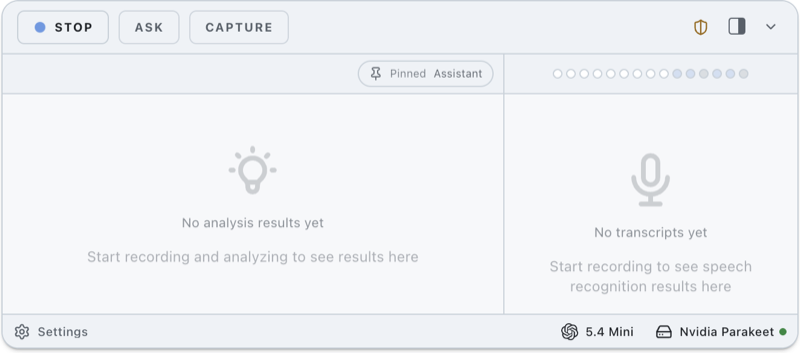
Use transcript-aware prompts for coding interviews, system design rounds, product meetings, lectures, and research calls.
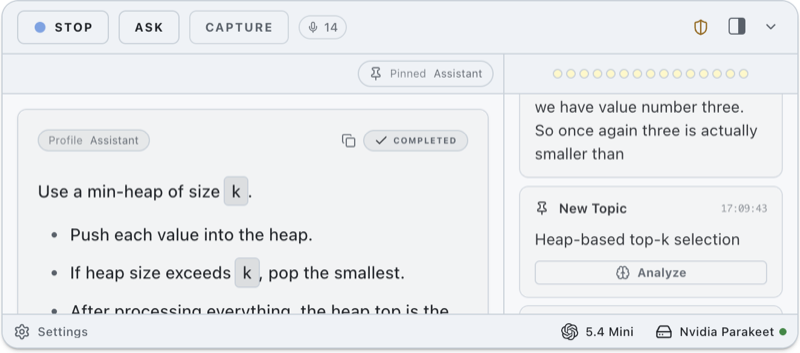
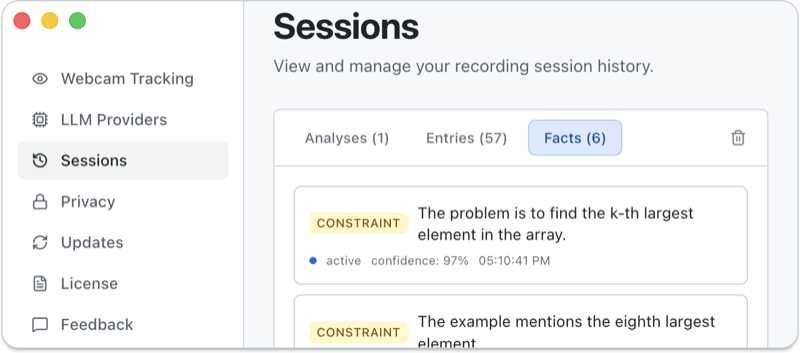
Generate summaries, action items, edge cases, unresolved risks, and post-answer feedback before the session context fades.
Use ExtraBrain as a private thinking layer during high-pressure live work: interviews, meetings, customer calls, lectures, and research conversations.
Summarize the coding prompt, list edge cases, and outline a clean baseline before I start.
Turn these requirements into components, tradeoffs, and follow-up questions.
Extract decisions, risks, owners, and follow-ups from this call.
Highlight customer pain points and quotes I can use in roadmap notes.
Convert this explanation into concepts, examples, and review questions.
ExtraBrain is designed to stay hidden from screen sharing and screen recording on major video call tools and coding interview environments, while remaining available on your own Mac. Always follow the rules of the interview, employer, school, meeting, or platform.
Built for live coding interviews, LeetCode-style prompts, system design rounds, behavioral interviews, product interviews, data and ML interviews, consulting cases, lectures, and research calls.
ExtraBrain can keep requests on your device when you use Gemma-powered on-device AI and local Parakeet transcription. Privacy still depends on your selected setup, including what you send to optional model and transcription providers.
ExtraBrain is a desktop app, not a meeting bot joining the room. Keep session scope, prompts, and outputs in your control.
The app does not force a single hosted AI vendor. Use on-device AI powered by Gemma, or connect the provider subscriptions, accounts, or API keys you trust.
Interview and workplace policies vary. ExtraBrain should support your thinking, notes, and preparation without misrepresenting your skills.

ExtraBrain should support your thinking, notes, and preparation. You are still responsible for following interview, workplace, and platform policies.Interview policy reminder
Free core access, on-device AI powered by Gemma, BYO provider subscriptions or API keys, Pro workflow tools, and enterprise support by contact.
Core desktop app, live workflow support, on-device AI powered by Gemma, and BYO provider setup.
Advanced controls for repeated interview, meeting, and research workflows. Pick the billing option that fits your timeline.
Policy, deployment, privacy, and workflow support for teams.
ExtraBrain has first-party pages for downloads, privacy, providers, local transcription, use cases, comparisons, release notes, and responsible use.
Direct answers for searchers comparing invisible AI interview assistants, meeting copilots, Gemma-powered on-device AI, provider-connected tools, and local-first desktop apps.
ExtraBrain is a free, local-first desktop AI interview and meeting copilot. It provides live transcription, screen-aware context, structured prompts, question generation, on-device AI powered by Gemma, and a desktop window designed for private live workflows. It is available for Mac today, with Windows and Linux planned.
Yes. ExtraBrain is the official product name, and Extra Brain is a common spaced search people may use for the same Mac AI interview assistant and meeting copilot.
Yes. ExtraBrain is free to download and use. ExtraBrain Pro starts at $9.99/month, with $79/year, and a $149 Lifetime launch option. Pro adds custom profiles, reusable prompt guidance, richer session history, post-session summaries, premium model controls, and advanced workflow tools.
ExtraBrain is available for Mac today, including Apple Silicon Macs such as M1, M2, M3, and M4, plus Intel Macs. Windows and Linux are planned, not current release targets.
ExtraBrain supports on-device AI powered by Gemma, plus provider access you control: OpenAI, Anthropic, custom OpenAI-compatible endpoints, Claude Subscription, and Codex Subscription modes.
Yes. ExtraBrain is built around provider access you control. You can use on-device AI powered by Gemma, or connect your own OpenAI, Anthropic, custom OpenAI-compatible endpoint, Claude Subscription, or Codex Subscription setup.
ExtraBrain supports local NVIDIA Parakeet transcription and optional Deepgram. Your exact data flow depends on whether you choose local Parakeet transcription, local Gemma 4, or external providers.
ExtraBrain is designed as a local-first app. With local Gemma 4 and local Parakeet transcription, transcription and AI prompts can stay on your Mac. Content may leave your device only when you choose optional external providers such as cloud model APIs or Deepgram.
ExtraBrain is a tool, and you are responsible for following the policies of the company, interviewer, school, employer, or platform you are working with. Use it to support thinking, notes, accessibility, and preparation without misrepresenting your skills.
ExtraBrain is designed to stay hidden from screen sharing and screen recording on major meeting tools. You should still follow all interview, workplace, school, and platform rules.
No. ExtraBrain runs as a desktop app on your Mac rather than joining Zoom, Google Meet, Microsoft Teams, or other calls as another participant.
Yes. ExtraBrain is built for coding interviews and LeetCode-style sessions on HackerRank, CoderPad, Codility, CodeSignal, and similar platforms. It can help capture prompts, reason through edge cases, and structure complexity tradeoffs.
Yes. ExtraBrain can help turn session context into notes, decisions, action items, unresolved risks, follow-up questions, saved facts, and review material while keeping the workflow in a desktop app you control.
ExtraBrain sits between those categories. It supports live interview workflows, meeting notes, local transcription, screen-aware context, and post-session review without joining the call as a meeting bot.
A fully local posture is possible when local Parakeet transcription and local Gemma 4 are installed, compatible, and you do not choose external model or transcription providers. Downloads, updates, website analytics, and external providers use network services.
ExtraBrain is local-first, free to start, desktop-native, and built around on-device AI powered by Gemma plus provider access you control. It is available for Mac today, with Windows and Linux planned. It emphasizes model choice, data-flow clarity, responsible use, and live interview or meeting context rather than bundled AI credits alone.
ExtraBrain gives you a private live workspace for interview prompts, meeting notes, structured answers, and session context in a free desktop app you control. Upgrade only if you need Pro workflow features.