
ExtraBrain Help Center
ExtraBrain is a macOS-first live AI assistant for interviews, meetings, coding rounds, system design discussions, behavioral interviews, troubleshooting, and dense technical conversations. Use this help center to set up the app, choose providers, understand privacy, and recover from common permission or provider issues.
Key Takeaways
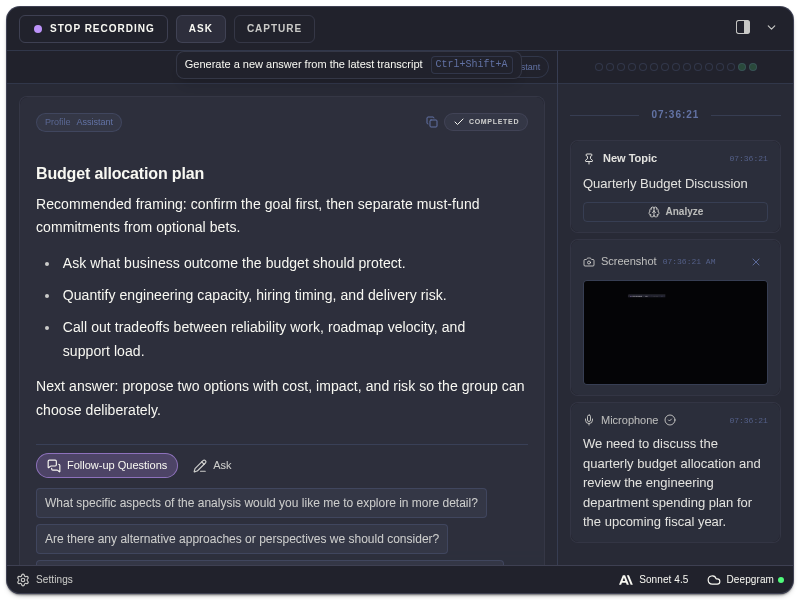
Section titled “Key Takeaways”ExtraBrain is a local-first Mac desktop AI interview assistant and meeting copilot with a free core app, optional Pro workflow controls, live transcription, screenshots, provider-backed analysis, local Gemma 4 on-device AI where installed and compatible, and post-session review.
- Use the help center to move through 4 setup areas: installation, permissions, transcription, and AI provider access.
- ExtraBrain supports Mac today, including Apple Silicon and Intel Macs.
- The app supports local NVIDIA Parakeet transcription, optional Deepgram, OpenAI, Anthropic, Claude Subscription, Codex Subscription, and custom OpenAI-compatible endpoints.
- Privacy depends on the selected data path: local Parakeet transcription and local Gemma 4 can keep transcription and AI prompts on the Mac, while cloud providers receive the context you choose to send.
Start Here
Section titled “Start Here”- What is ExtraBrain? explains the app, live transcription, screenshots, profiles, follow-ups, and session history.
- Set up ExtraBrain for the first time walks through onboarding from welcome to provider setup.
- Grant macOS permissions explains microphone, screen recording, and system audio access.
- Choose Parakeet or Deepgram transcription compares local and cloud transcription.
- Connect an AI provider covers OpenAI, Anthropic, subscriptions, and custom endpoints.
Use ExtraBrain Live
Section titled “Use ExtraBrain Live”- Start recording and ask for analysis covers the main live controls.
- Use screenshots and screen context explains capture modes and screenshot context.
- Use follow-up questions explains suggested follow-ups and custom questions.
- Analyze detected topics and questions explains transcript topic and question cards.
Privacy, Settings, And History
Section titled “Privacy, Settings, And History”- How ExtraBrain handles data gives the clearest local-vs-provider data flow.
- Privacy controls covers overlay hiding, click-through, app visibility, and usage sharing.
- Settings overview links to every public settings tab.
- Configure audio settings covers transcription provider, microphone, voice trigger, and transcript cleanup controls.
- Use ExtraBrain profiles explains automatic, pinned, system, and custom profile behavior.
- Keyboard shortcuts lists the default shortcuts and where to edit them.
- View and delete session history covers transcripts, analyses, facts, screenshots, and deletion.
- Activate ExtraBrain Pro explains in-app purchase, license activation, and deactivation.
- Compare ExtraBrain Free and Pro shows what Pro unlocks.
Troubleshooting
Section titled “Troubleshooting”Start with Troubleshooting if microphone permission, screen recording, system audio, API key validation, Deepgram validation, screenshots, hidden windows, or session deletion is not working as expected.
Common Questions
Section titled “Common Questions”Does ExtraBrain send everything to a server?
Section titled “Does ExtraBrain send everything to a server?”No. ExtraBrain stores settings, API keys, local session history, and local Parakeet transcription data on your Mac. When you use a cloud LLM provider, relevant text, transcript context, screenshot-derived context, and prompts may be sent to the provider you selected. When you choose Deepgram, audio is sent to Deepgram for transcription.
Does ExtraBrain support Windows or Linux?
Section titled “Does ExtraBrain support Windows or Linux?”ExtraBrain is macOS-first today. Windows and Linux are planned, not current public release targets.
Is the Remote settings tab public?
Section titled “Is the Remote settings tab public?”No. The Remote tab is development-only and is not documented as a public feature.