
ExtraBrain Blog
AI Tools for Job Seekers: What to Use Before, During, and After Interviews

A practical guide to AI tools for job seekers before, during, and after interviews, from resumes and research to mock practice and debriefs.
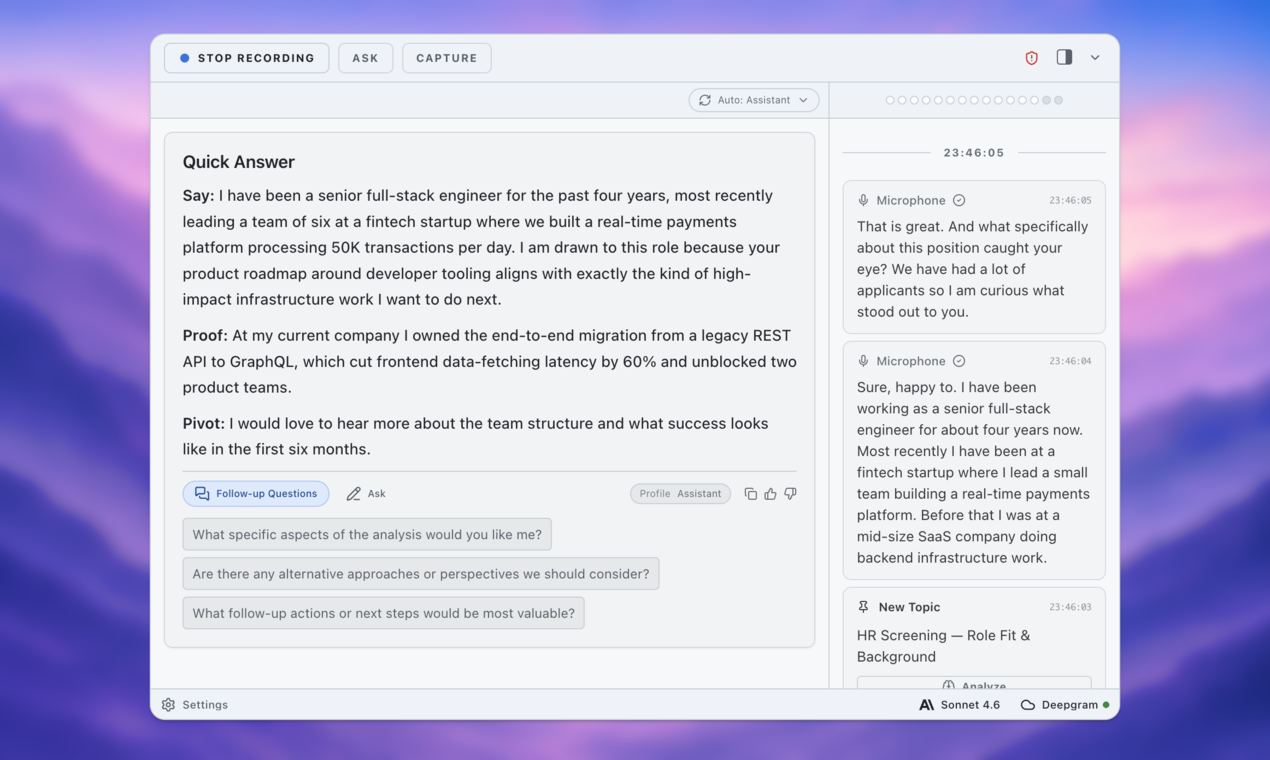
Most job seekers do not need “more AI.” They need the right AI tool at the right moment.
That distinction matters because the job search now has too many shiny options: resume optimizers, cover letter generators, LinkedIn profile tools, mock interview bots, meeting transcription apps, coding assistants, company research tools, networking helpers, and email writers. Used well, they reduce friction and help you prepare with more clarity. Used badly, they turn your search into a stack of generic outputs that sound impressive and feel hollow.
The better question is not “Which AI tool should I use?” It is: what job-search problem am I trying to solve right now?
Before an interview, you need research, positioning, memory, and practice. During an interview, you need presence, notes, consent, and clear boundaries. After an interview, you need debriefing, follow-up, and a way to improve before the next round.
Here is a practical map of AI tools for job seekers across all three stages, with a responsible lens: use AI for clarity, preparation, memory, privacy, and user control - not cheating, impersonation, or invented experience.
Before the Interview: Use AI to Understand the Role
The first useful AI tool is not a resume writer. It is a translator.
Job descriptions are often overloaded with vague phrases: “strategic thinker,” “cross-functional leader,” “fast-paced environment,” “strong ownership,” “technical depth.” An AI research assistant can help translate that language into plain expectations.
Paste the job description into your tool and ask:
What outcomes does this role seem responsible for? Which requirements are must-haves versus nice-to-haves? What evidence would a recruiter expect from a strong candidate?
This gives you a working map. It helps you see whether the role is mainly about execution, leadership, technical depth, customer communication, operational rigor, or ambiguity. It also helps you avoid applying for a job that sounds exciting but does not actually match your experience or goals.
The responsible line is simple: use AI to interpret the role, not to pretend you already match every part of it. If the analysis reveals a real gap, that is useful information. You can decide whether to address it honestly, position adjacent experience, or skip the role.

Before the Interview: Use Resume Tools as Editors, Not Fiction Machines
Resume AI tools can be helpful, but they are also where candidates drift into overclaiming.
A good resume tool should help you make real experience easier to understand. It can spot vague bullets, missing metrics, inconsistent tense, unclear ownership, and role-specific language you may already deserve to use. It should not invent tools, revenue numbers, leadership scope, or outcomes you cannot defend in a live conversation.
Instead of asking, “Rewrite my resume for this job,” ask something more precise:
Compare my resume with this job description. Identify where my real experience supports the role, where my evidence is weak, and where I should avoid exaggerating.
For example, a weak bullet might say:
Helped improve onboarding process.
If the real work involved analysis, stakeholder coordination, and measurable results, AI might help you rewrite it as:
Partnered with product, support, and customer success teams to identify onboarding bottlenecks and reduce first-week setup questions by 28%.
That is useful only if it is true. If the 28% never happened, it does not belong on the resume. AI should make your evidence clearer, not create new evidence.
Before the Interview: Build a Memory Bank Before You Practice Answers
Most interview preparation starts too late in the process. Candidates jump straight to polished answers before they have collected the raw material.
That is why so many AI-generated interview answers sound the same. They follow the STAR method, mention collaboration, add a metric, and end with a lesson. Structurally, they are fine. But they often lack the texture of real experience.
Before you ask AI to improve your answers, use it to help you remember your own work. Create a story bank with examples for conflict, ambiguity, leadership, technical depth, customer impact, mistakes and recovery, stakeholder management, prioritization, and learning something difficult.
A private workspace matters here because interview prep includes sensitive material: former managers, company projects, compensation concerns, mistakes, internal politics, and personal career decisions. A tool like ExtraBrain fits the memory category because it can act as an AI interview preparation workspace for notes, practice transcripts, and real examples you want to reuse responsibly.
The best prompt is not “write me a leadership answer.” It is:
Based on my notes, which real situations show leadership, tradeoffs, conflict, or measurable change? Help me choose the strongest examples without inventing anything.
That workflow starts from evidence. It helps you show up with answers that sound specific because they are specific.

Before the Interview: Practice Out Loud, Not Just on the Page
Written answers lie.
You can produce a crisp paragraph in a document and still ramble when a recruiter asks the same question on a call. Interviews are live. You pause, restart, over-explain, lose the metric, bury the point, or realize halfway through that you are answering the wrong question.
This is where mock interview tools and transcript-based practice are useful. Record yourself answering a question. Transcribe it. Then ask AI to review what you actually said.
Useful prompts include:
- Where did my answer become unclear?
- Did I explain my personal contribution?
- What follow-up question would test this story?
- Which sentence should come first?
- What should I cut to make this answer more conversational?
A private AI interview copilot is valuable when it helps you hear yourself more accurately. It should not replace your judgment or create a script you memorize. It should show you where your real answer needs structure.
During the Interview: Use AI Only Within the Rules
The “during” stage is where the ethical line gets sharp.
Before the interview, AI support is generally straightforward: research, practice, editing, memory, and reflection. During the interview, context matters. Are you in a normal conversation? A live coding assessment? A take-home discussion? A case interview? A system design exercise? A behavioral screen? A recorded one-way video interview?
The rule should be explicit: do not use AI to secretly perform the skill being evaluated.
If an employer allows documentation, notes, search, or AI tools, follow the stated rules. If the rules are unclear, ask:
Are candidates allowed to use notes, documentation, search, or AI tools during this exercise?
That question shows respect for the process and protects you from accidental misrepresentation.
There are responsible uses during some interviews. You may be allowed to keep notes or use a transcript for accessibility or memory support, depending on consent and local rules. But reading live generated answers in a closed assessment is different. That crosses from support into substitution.

After the Interview: Debrief Before Memory Decays
The best AI workflow starts when the call ends.
Most candidates finish an interview and immediately start guessing. Did they like me? Was that answer too long? Why did they ask about that project twice? Did I sound senior enough? AI is not useful for mind-reading. It cannot reliably tell you whether you got the job.
It is useful for debriefing.
Right after the interview, capture quick notes: what questions they asked, which answers felt strong, where you rambled, what the interviewer seemed to care about, what follow-up you promised, and what you should practice before the next round.
Then ask AI to organize the notes into themes, open questions, and next actions. If you have a transcript, even better. A transcript can show patterns your memory misses: long openings, unclear endings, repeated filler, or strong examples you should reuse.
This is where ExtraBrain can become more than an interview tool. It becomes a memory layer across your whole search, helping each conversation improve the next one.
After the Interview: Use AI for Follow-Up Without Losing Your Voice
Follow-up emails are a good use of AI if you treat the draft as a starting point.
A strong thank-you note does not need to be long. It should be specific, human, and connected to the actual conversation. Generic follow-ups are easy to ignore.
Give your AI tool real inputs:
Draft a concise follow-up email based on these notes. Mention the conversation about onboarding metrics, my interest in the team’s customer feedback loop, and the follow-up resource I promised. Keep it conversational and avoid exaggerated enthusiasm.
Then edit it. Remove anything you would not say. Add one detail from the conversation. Keep the tone professional.
AI can also help you prepare a recruiter update, a salary clarification, a take-home submission note, or a thoughtful question for the next round. The same rule applies: use the tool to reduce blank-page friction, then make the final message yours.
The Simple Tool Stack I Would Use
If I were building an AI tool stack for a job search, I would keep it focused:
- Role research assistant: translate job descriptions, company pages, and interview loops into likely evaluation criteria.
- Resume editor: improve clarity, evidence, and alignment without inventing experience.
- Story bank and memory workspace: store real examples, transcripts, notes, and reflections.
- Mock interview coach: practice out loud and review transcripts for clarity.
- Consent-aware note or meeting tool: use a local-first AI meeting copilot to capture permitted notes with privacy controls.
- Debrief and follow-up assistant: summarize lessons, draft concise follow-ups, and prepare next steps.
ExtraBrain belongs in the memory, practice, interview copilot, and debrief parts of that stack. It is not there to make you a fake candidate. It is there to help you keep control of your own context and explain your real experience more clearly.
Choose Tools That Make You Clearer, Not Less Real
AI can absolutely help job seekers. It can make job descriptions less confusing, resumes more accurate, practice more realistic, interviews easier to review, and follow-up less stressful.
But the best AI tools do not replace your experience. They help you remember it, organize it, protect it, and communicate it with more confidence.
That is the standard I would use for every tool in the job search:
- Does it help me tell the truth more clearly?
- Does it keep me responsible for the final answer?
- Does it protect sensitive career context?
- Does it help me improve over time?
- Would I be comfortable explaining how I used it?
If the answer is yes, the tool belongs in your workflow. If the answer is no, it may be producing short-term polish at the cost of long-term trust.
Use AI before interviews to prepare. Use it during interviews only within the rules. Use it after interviews to debrief and improve. And if you want a private place to practice, capture notes, review transcripts, and build a better memory of your own work, try ExtraBrain before your next round.