
ExtraBrain Blog
From ATS to Zoom: How Candidates Can Use AI Responsibly Across the Hiring Funnel

How job seekers can use AI responsibly for ATS-friendly resumes, screening, interview prep, and Zoom interviews while staying authentic.
The modern job search now has two audiences: the human hiring team and the software that helps them sort, screen, schedule, and interview. That can feel unfair if you are trying to present your experience honestly while competing against candidates who seem to have an AI tool for every step. But responsible AI use is not about faking expertise. It is about preparing more clearly, protecting your privacy, and showing up as the strongest version of yourself when the real conversation begins.
The Hiring Funnel Has Become an AI Funnel
A few years ago, most candidates thought of AI in hiring as a resume keyword problem. Put the right words in the resume, get through the Applicant Tracking System, and hope a recruiter calls.
That view is too narrow now.
AI can appear across the entire hiring funnel. A resume may be parsed by an ATS. A profile may be matched against role requirements. A recruiter may use AI notes after a phone screen. A candidate may complete an asynchronous video interview. A hiring manager may rely on transcripts, summaries, or structured scorecards after a Zoom call.
Candidates are using AI too: rewriting resumes, finding missing keywords, practicing behavioral questions, summarizing job descriptions, drafting follow-up emails, and reviewing interview answers.
The important question is no longer, “Should candidates use AI?” Most already do, directly or indirectly. The better question is: how can candidates use AI in a way that is effective, ethical, and still genuinely theirs?
The Responsible Rule: Assist, Don’t Impersonate
Here is the clean line I use: AI should help you prepare, organize, remember, and reflect. It should not pretend to be you.
That distinction matters. It is reasonable to use AI to:
- Translate a dense job description into a checklist of likely priorities
- Compare your resume against a role and identify missing evidence
- Practice concise answers to common interview questions
- Review a transcript after a mock interview and find weak spots
- Draft a thank-you note that you then edit in your own voice
It is not responsible to use AI to invent achievements, fabricate metrics, answer live technical questions for skills you do not have, or hide the fact that someone else is doing the work.
The goal is not to “beat” the hiring process. The goal is to reduce avoidable friction so the process evaluates the real thing: your experience, judgment, communication, and fit for the role.
Stage 1: Use AI to Build an ATS-Friendly Resume Without Keyword Stuffing
The ATS stage creates the most anxiety because it feels invisible. Candidates upload a resume and never know whether a person read it, whether the formatting broke, or whether the role simply had hundreds of stronger applicants.
AI can help here, but only if you use it as an editor, not as a fiction machine.
Start by pasting the job description into your AI tool and asking for three outputs:
- The core responsibilities in plain English
- The must-have skills versus nice-to-have skills
- The phrases a recruiter or ATS might expect to see if they are genuinely part of your background
Then compare that list with your resume. Do not add a skill just because it appears in the job post. Instead, look for places where you already have matching experience but described it in different language.
For example, if the job post says “stakeholder management” and your resume says “worked with product, sales, and support teams to prioritize customer issues,” you may be able to revise the bullet so both the human meaning and the expected phrase are present:
Partnered with product, sales, and support stakeholders to prioritize customer issues and reduce escalation delays.
That is not keyword stuffing. That is clearer translation.
A responsible ATS workflow is simple: use standard headings, readable bullets, accurate terminology, measurable outcomes, and the file type the employer requests. Remove vague claims like “results-driven” unless they are tied to evidence.
Stage 2: Prepare for AI Resume Screening Like a Human Will Read It Later
AI resume screening can create a bad incentive: candidates optimize for the machine and forget the recruiter.
That is a mistake. Even if software helps prioritize applications, a human eventually needs to understand your story. The best resume is not the one with the most keywords. It is the one where the keywords point to real evidence.
Use AI to pressure-test your resume against a role. Ask:
- “Which requirements are clearly supported by my resume?”
- “Which requirements are weak or missing?”
- “Where does my resume sound generic?”
- “Which bullet points need stronger proof?”
Then make the hard choices yourself. If a requirement is missing because you do not have that experience, do not fake it. Decide whether adjacent experience is relevant, whether the role is still worth applying for, or whether the gap belongs in a cover letter as a learning area.
Responsible AI use can make candidates more honest by separating “I have done this” from “I wish I had done this.”
Stage 3: Use AI Interview Prep to Find Your Real Stories
The most useful interview prep does not produce perfect scripts. It finds better raw material.
Take the job description and ask AI to generate likely interview themes: collaboration, ambiguity, technical depth, customer empathy, leadership, conflict, execution, or whatever the role suggests. Then build a story bank from your actual experience.
For each story, capture the situation, your responsibility, the action you personally took, the result, and what you learned. AI can help you tighten these stories by pointing out where the stakes are missing, where your role is unclear, or where the result needs a metric. But the story itself should come from you.
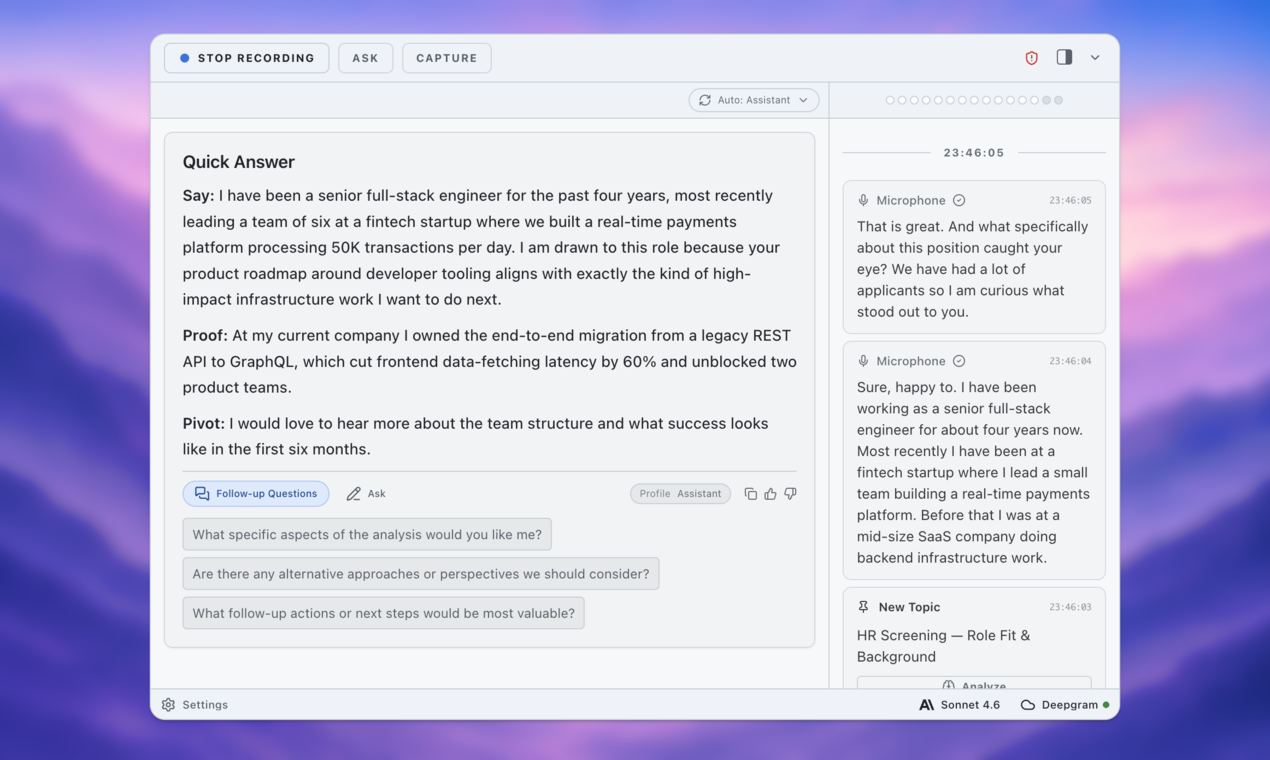
One workflow I like is recording a practice answer out loud, transcribing it, and asking AI to evaluate it against the role. Tools like ExtraBrain can help because they are built around live conversations and post-session analysis rather than generic chat prompts. As a local-first AI meeting copilot, ExtraBrain is especially useful for practicing how you actually sound when you explain a project, not just how polished your written answer looks.

Stage 4: Be Careful With AI During Live Interviews
Live interviews are where the ethical line gets sharpest.
Using AI before the interview to prepare is normal. Using AI after the interview to reflect is useful. Using AI during the interview depends heavily on the employer’s rules, the interview format, and what the tool is doing.
A private AI interview copilot can be responsible when it helps you take notes, remember topics to revisit, or review your own performance afterward. It becomes risky when it feeds you answers in real time, solves assessments for you, or creates the impression that your independent skills are stronger than they are.
If the interview includes a coding challenge, writing test, case study, or technical assessment, assume the employer expects your own work unless they explicitly say tools are allowed. If you are unsure, ask. A simple question is enough:
“Are candidates allowed to use notes, documentation, or AI tools during this exercise?”
That question may feel awkward, but it is better than violating expectations silently.
For normal Zoom interviews, use AI before the call to review the role and your story bank, then after the call to identify follow-ups, weak answers, and next steps. During the call, focus on the human conversation, not on reading generated answers.
This keeps the interview authentic while still giving you the benefits of modern tools.
Stage 5: Treat Privacy as Part of Professionalism
Candidates often think about AI in terms of performance. They should also think about privacy.
Job searches involve sensitive information: your employment history, salary expectations, names of former managers, internal project details, personal contact information, immigration status, health constraints, and sometimes confidential work examples.
Before pasting anything into an AI tool, ask:
- Do I know where this data is processed?
- Is it stored or used for training?
- Can I remove names, company details, or customer information first?
- Am I exposing confidential information from a current or previous company?
You do not need to become a privacy lawyer to make better choices. Redact aggressively. Replace customer names with placeholders. Summarize proprietary details instead of copying internal documents. Prefer tools that give you control over what is captured, saved, and shared.
This is one reason candidate-controlled tools matter. AI assistance should work for the person using it, not quietly turn their job search into someone else’s data source.

Stage 6: Use AI After the Interview to Improve, Not Obsess
The post-interview window is easy to misuse. You replay every answer, overanalyze every facial expression, and ask AI to tell you whether you got the job.
Do not do that. AI cannot reliably read the hiring team’s mind.
What it can do is help you extract useful learning while the conversation is fresh. After an interview, write or record a quick debrief: what they asked, which answers felt strong, which answers felt vague, what the interviewer emphasized, what follow-up you should send, and what to practice before the next round. Then use AI to turn that into a practical improvement plan. The point is not emotional reassurance. The point is iteration.
If you are interviewing across multiple companies, this becomes even more valuable. Patterns emerge. Maybe you consistently under-explain tradeoffs. Maybe your examples are strong but your endings trail off. Maybe you need a clearer answer for why you are leaving your current role.
That is responsible AI at its best: not replacing your judgment, but helping you see your own performance more clearly.
A Candidate’s Responsible AI Checklist
Before using AI anywhere in the hiring funnel, run through this checklist:
Accuracy: Is everything true and supportable?
Ownership: Could I confidently explain this without AI in the room?
Permission: Does this interview or assessment allow AI tools?
Privacy: Have I removed sensitive personal, employer, or customer data?
Voice: Does the final output sound like me?
Fairness: Am I using AI to prepare and reflect, or to misrepresent my ability?
If the answer feels uncomfortable, pause. The short-term gain is not worth the long-term risk of being hired for a version of yourself you cannot actually deliver.
The Best AI Advantage Is Clarity
AI is changing how people get jobs, but the responsible candidate advantage is not deception. It is clarity.
Clear resumes get parsed more accurately and read more easily. Clear stories help interviewers understand your impact. Clear preparation makes you calmer on Zoom. Clear privacy boundaries protect you and the people you have worked with. Clear ethical lines keep your job search from turning into a performance you cannot sustain.
The hiring funnel may now run from ATS to Zoom with AI touching nearly every stage. That does not mean candidates should become prompt-engineered versions of themselves. It means they need better systems for preparing, practicing, and reflecting.
Use AI to sharpen your signal. Keep the substance yours.
And if you want a practical way to practice interviews, review conversations, and stay in control of your own context, try ExtraBrain before your next round.