
ExtraBrain Blog
Best Real-Time AI Interview Assistants in 2026: 5 Practical Picks

Compare five real-time AI interview assistants for live interviews, coding rounds, screen sharing, privacy, usability, and responsible use.
Real-time AI interview assistants have become a serious category for job seekers who want live help during remote interviews, coding rounds, system design sessions, behavioral interviews, and recruiter screens. The best tools do more than generate a generic answer after a question is asked. They listen to the conversation, keep track of context, help structure an answer, surface clarifying questions, support technical reasoning, and make post-interview review easier.
The big difference in 2026 is that candidates are no longer choosing only between generic chatbots. They are choosing between desktop apps, web copilots, mobile companions, meeting assistants, and local-first tools with very different privacy and workflow tradeoffs.
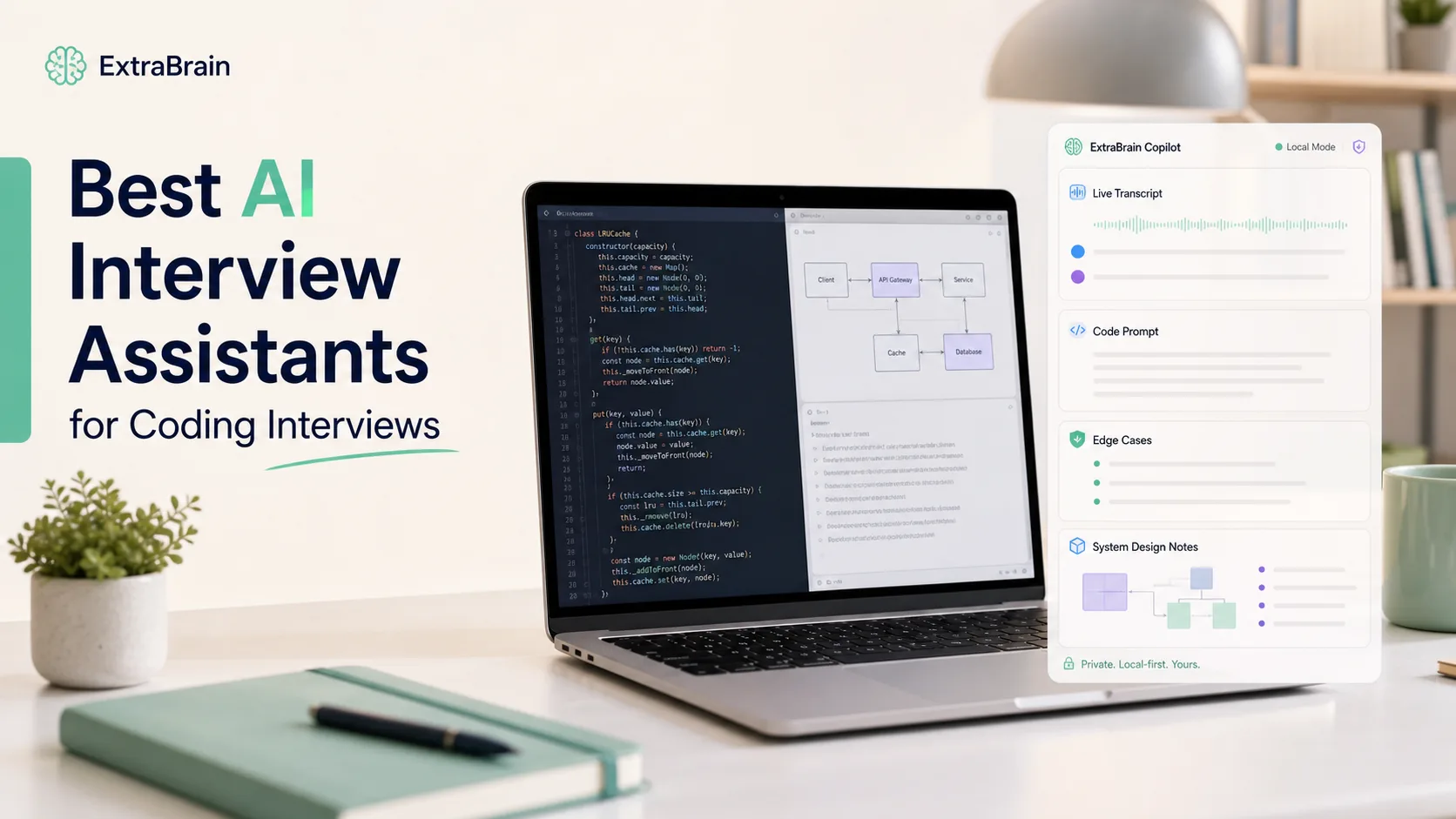
This guide compares five real-time AI interview assistant options from the perspective of a candidate who wants practical support without losing control of the interview. The top pick for Mac users is ExtraBrain, because it combines live transcription, screen-aware context, local-first options, bring-your-own AI providers, interview-specific workflows, and a free core desktop app.
Responsible use matters. Only use AI assistance, transcription, screenshots, notes, or screen context where your interview, employer, school, workplace, meeting, and platform rules allow it.
What makes a good real-time AI interview assistant?
A real-time AI interview assistant has to work under pressure. It is not enough for the tool to be clever in a demo. It needs to handle awkward pauses, follow-up questions, screen-shared prompts, code snippets, system design diagrams, noisy audio, and the candidate’s own nervousness.
Here are the criteria I would use before trusting any AI interview copilot in a real hiring process.
| Evaluation area | What to look for |
|---|---|
| Live transcription | The tool should capture interview context quickly and make it easy to follow what was asked. |
| Screen-aware context | The assistant should understand prompts, code, documents, or diagrams visible on your screen when you choose to use that context. |
| Structured answers | Good outputs should help with STAR, CAR, PREP, tradeoff analysis, debugging steps, or system design structure. |
| Technical support | Coding and system design rounds need reasoning, edge cases, complexity discussion, and clear explanation. |
| Privacy controls | Candidates should understand what stays local and what may be sent to external providers. |
| Provider control | Bring-your-own AI provider support gives users more flexibility over models, cost, and data handling. |
| Session review | Transcripts, notes, and history should help you learn after the interview. |
| Responsible workflow | The product should make it clear that users must follow all interview and platform rules. |
Desktop apps generally have an advantage for live remote interviews because they can sit closer to the actual interview environment. Web tools are easier to start, but they often depend on a browser tab and may be awkward when the interviewer asks for screen sharing. Mobile tools reduce browser clutter, but they can split attention and make eye movement unnatural.
Quick picks: the five best real-time AI interview assistants
- ExtraBrain - Best real-time AI interview assistant for Mac users who want local-first options and provider control.
- Parakeet AI - Best for candidates who want a lightweight real-time assistant with fast transcription-style workflows.
- Final Round AI - Best known for broad interview-prep branding and web-first interview support.
- LockedIn AI - Best entry-level option for candidates who want a simple browser-based interview copilot experience.
- Cluely - Best general meeting assistant that can also be used for interview-like conversations where allowed.
These tools are not interchangeable. Some are focused on live interviews. Some are broader meeting assistants. Some are web-first. Some are desktop-first. Some emphasize convenience, while others emphasize privacy, customization, or technical interview support.
1. ExtraBrain - best real-time AI interview assistant overall for Mac
Overview
ExtraBrain is a free, local-first desktop AI interview assistant and meeting copilot for Mac. It is built for live transcription, screen-aware context, coding interviews, system design rounds, behavioral interviews, meetings, lectures, research calls, and post-session review.
The strongest reason to choose ExtraBrain is control. You can use local Parakeet transcription, local Gemma 4 on-device AI where installed and compatible, and bring-your-own AI providers such as Anthropic, OpenAI, custom OpenAI-compatible endpoints, Claude Subscription, and Codex Subscription. That setup lets candidates choose the balance they want between speed, model quality, cost, privacy, and local processing.
ExtraBrain is available for macOS today, including Apple Silicon and Intel Macs. Windows and Linux are planned future platforms.

Key strengths
Desktop interview workflow: ExtraBrain runs as a Mac desktop app rather than as a browser-only tool. That makes it useful across coding interviews, product interviews, system design sessions, recruiter calls, and meetings that happen in different apps.
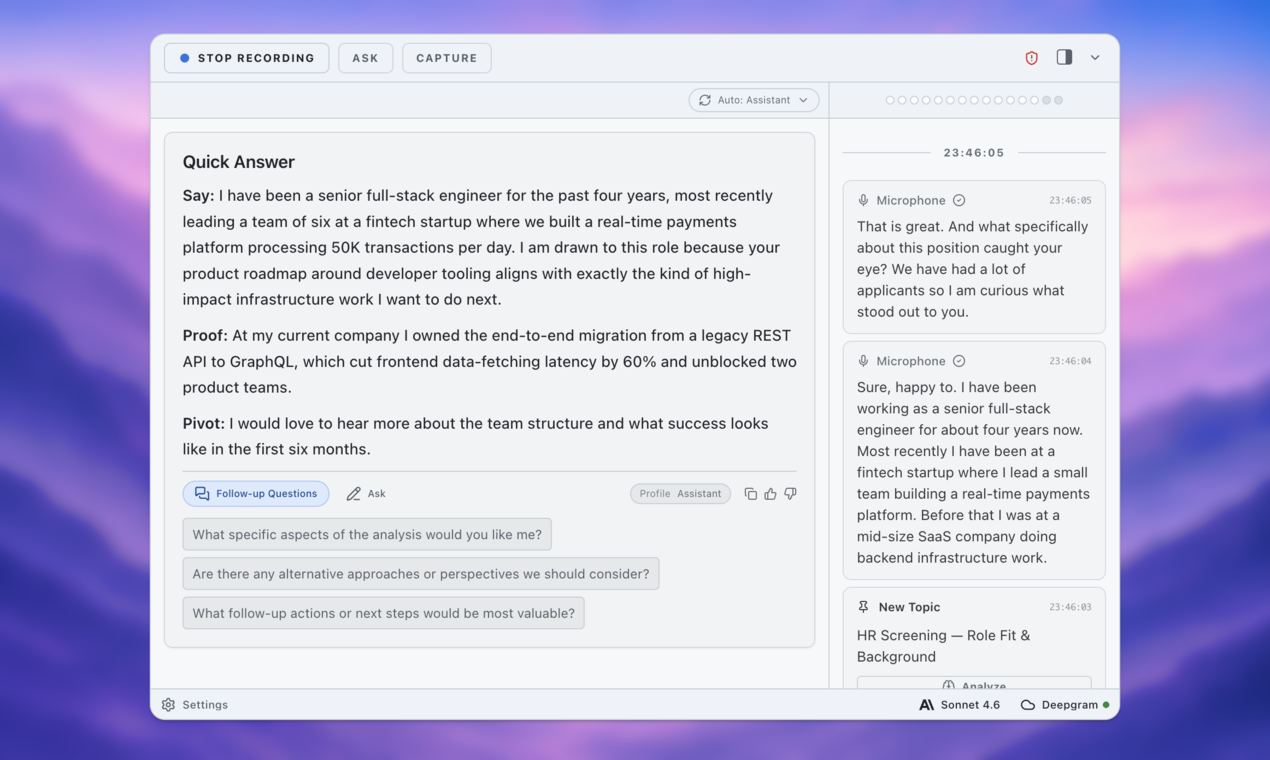
Live transcription: ExtraBrain can follow the conversation in real time so you can stay oriented during long or stressful interviews. Live transcript context is especially useful when an interviewer asks a multi-part question and then adds a follow-up before you have finished answering.
Screen-aware context: ExtraBrain can use screen context when configured to do so. That matters for coding prompts, diagrams, product cases, debugging screenshots, architecture discussions, and shared documents.
Local-first privacy posture: A fully local ExtraBrain setup requires local Parakeet transcription plus local Gemma 4 on-device AI where installed and compatible. In that posture, transcription and AI prompts can stay local. If you choose external providers, selected prompts, transcript text, screenshots, audio, or context may leave the device depending on your configuration.
Bring-your-own provider flexibility: ExtraBrain does not force a single model path. Users can bring supported providers and choose the setup that fits the interview type. A coding interview may benefit from one provider, while a behavioral interview or meeting summary may work better with another.
Structured interview help: ExtraBrain can help generate answer outlines, STAR structures, technical explanations, clarifying questions, tradeoff lists, and follow-up prompts. The goal is not to replace your judgment. The goal is to help you think clearly when pressure rises.
Post-interview review: A real interview assistant should help after the call too. ExtraBrain can work as a focused AI second brain for interviews and meetings by keeping live sessions, transcripts, notes, screen context, and review in one workspace.

Where ExtraBrain fits best
ExtraBrain is strongest for Mac users who want a real-time AI interview copilot that is useful before, during, and after the interview. It is especially well suited for software engineering interviews, system design rounds, product manager interviews, behavioral interviews, customer calls, research meetings, and internal work meetings where AI assistance is allowed.
It is also a strong alternative to LockedIn AI, Final Round AI, Beyz AI, Interviews Chat, and ParakeetAI for users who want a free core app, local-first options, screen-aware context, and provider control.
ExtraBrain pricing
The core ExtraBrain Mac app is free. ExtraBrain Pro is $9.99 per month, $79 per year, or $149 Lifetime at launch pricing. External AI and transcription provider usage is billed separately by the providers users choose.
2. Parakeet AI - best lightweight real-time interview assistant style
Overview
Parakeet AI is often discussed by candidates who want fast live support and a desktop-style interview assistant workflow. Its appeal is that it feels closer to a live transcription and answer support tool than a traditional chatbot. For candidates who want a simple experience during remote calls, that can be attractive.
The main reason to consider Parakeet AI is speed and simplicity. If your priority is to capture questions quickly and get concise response support, it may fit the workflow.
Key strengths
Fast live context: A real-time assistant has to respond quickly enough that the output is still relevant. Parakeet-style workflows are useful when the interviewer asks direct questions and you need a short outline, not a long essay.
Less setup than complex platforms: Lightweight tools can be easier to understand before a stressful interview. That matters because the best interview tool is the one you have already practiced with.
Transcript-oriented workflow: A transcript-first interface helps candidates review what was actually asked. That is useful for follow-up emails, identifying weak answers, and practicing for the next round.
Tradeoffs
Parakeet AI is not the same as ExtraBrain’s full local-first Mac workflow. If you care about screen-aware context, provider control, local Gemma 4 where installed and compatible, and broader session review, compare the details carefully before choosing.
You should also verify the current product behavior, privacy policy, supported platforms, and pricing directly with the vendor before using it in an interview.
3. Final Round AI - best broad interview-prep brand with live copilot features
Overview
Final Round AI is one of the more recognizable names in AI interview preparation. It is often used by candidates who want a guided interview-prep ecosystem rather than a purely local desktop assistant. Its strength is broad market awareness and a workflow that many candidates can understand quickly.
Final Round AI may appeal to candidates who want a web-first experience, mock interview preparation, and live support in one product family.
Key strengths
Beginner-friendly positioning: Many job seekers first discover AI interview tools while preparing for recruiter screens or behavioral rounds. A product with a familiar web interface can feel approachable.
Role-based preparation: Interview preparation tools often help candidates think through role expectations, common questions, and basic answer structure. That is useful for candidates who need a starting point before they are ready for live technical rounds.
Useful for practice workflows: A live copilot is only one part of the interview process. Preparation, repetition, and review matter just as much.
Tradeoffs
A web-first workflow can be less comfortable when the interviewer asks you to share your full screen or move between apps. It can also be less natural for coding interviews that involve an IDE, a browser, a shared document, and a meeting app at the same time.
If you want a Mac desktop assistant with screen-aware context, local-first options, and bring-your-own provider control, ExtraBrain is the more natural fit.
4. LockedIn AI - best entry-level browser-based interview copilot
Overview
LockedIn AI is commonly discussed as an entry-level real-time AI interview assistant. It is useful to understand because it represents the browser-based side of the category. Candidates who want a simple interface and basic live answer support may find that style appealing.
The main benefit is accessibility. A browser-based assistant can be easy to start and easy to test.
Key strengths
Simple onboarding: Entry-level tools can reduce the setup burden for candidates who are new to AI interview copilots. That can make them useful for practice sessions or lower-stakes calls where the rules allow assistance.
Real-time answer framing: Even a basic copilot can help turn a messy thought into a cleaner outline. That is especially helpful for behavioral answers that need structure.
Useful for learning the category: Candidates who have never used a real-time AI interview assistant may use a simple web tool to understand whether live AI support fits their style.
Tradeoffs
Browser-based assistants tend to be less flexible than desktop assistants. They may not fit smoothly into interviews that require screen sharing, IDE work, diagrams, multiple windows, or platform switching.
For serious technical interviews, screen-aware desktop context and post-session review often matter more than a simple browser tab. That is where ExtraBrain’s Mac app has a clearer advantage.
5. Cluely - best general meeting assistant with interview-adjacent use cases
Overview
Cluely is better understood as a general real-time meeting assistant than as a dedicated interview-only product. That can still make it relevant for some interview-like conversations, especially if the session is closer to a sales call, internal meeting, networking conversation, or general Q&A.
The key question is whether you need a meeting assistant or an interview assistant. Those are not always the same thing.
Key strengths
General-purpose live help: Meeting assistants can help summarize context, suggest responses, and keep a conversation moving. That can be useful outside formal hiring interviews.
Broad conversation support: If your use case includes meetings, demos, calls, and interviews, a general assistant may feel flexible.
Familiar floating-assistant pattern: Some users prefer a lightweight overlay-style experience because it feels easy to glance at while staying in the call.
Tradeoffs
A general meeting assistant may not be tuned for coding interviews, system design tradeoffs, STAR answers, resume-grounded storytelling, or post-interview learning. If your main goal is interview performance and interview review, choose a tool that was designed around that workflow.
ExtraBrain is positioned specifically as both an AI interview assistant and meeting copilot, which makes it a better fit when interview-specific context matters.
Side-by-side comparison
| Feature | ExtraBrain | Parakeet AI | Final Round AI | LockedIn AI | Cluely |
|---|---|---|---|---|---|
| Primary format | Mac desktop app | Real-time assistant style | Web-first interview platform | Browser-based copilot | General meeting assistant |
| Best fit | Mac users who want local-first options and screen context | Fast live transcript and response support | Broad interview prep and live support | Simple entry-level copilot use | Meetings and interview-adjacent calls |
| Live transcription | Yes | Commonly used for this workflow | Available in live workflows | Available in live workflows | Available in meeting workflows |
| Screen-aware context | Yes, when configured | Check current product details | Limited by web-first workflow | Limited by browser workflow | Depends on product setup |
| Local-first posture | Yes, with local Parakeet plus local Gemma 4 where installed and compatible | Check current product details | Check current product details | Check current product details | Check current product details |
| Bring-your-own providers | Yes | Check current product details | Check current product details | Check current product details | Check current product details |
| Coding interview support | Strong fit | Useful for live help | Useful for prep workflows | Basic live support | Not primarily interview-specific |
| System design support | Strong fit | Useful for prompts and outlines | Useful for prep workflows | Basic live support | General conversation support |
| Post-session review | Sessions, transcripts, notes, and context | Transcript-style review may be available | Prep history may be available | Depends on product setup | Meeting summaries may be available |
| Responsible use guidance | Use only where rules allow | User must verify rules | User must verify rules | User must verify rules | User must verify rules |
Which real-time AI interview assistant should you choose?
Choose ExtraBrain if you are on Mac and want the strongest mix of live interview support, desktop context, privacy controls, local-first options, provider flexibility, and post-interview review. It is the best overall fit for candidates who treat interviews as a full workflow rather than a single live answer-generation moment.
Choose Parakeet AI if your main need is a lightweight live assistance workflow and you are comfortable verifying its current features, pricing, and privacy posture yourself.
Choose Final Round AI if you want a broader interview-prep platform and are comfortable with a web-first workflow.
Choose LockedIn AI if you want a simple entry-level browser copilot for practice or lower-complexity sessions where your rules allow it.
Choose Cluely if your use case is closer to general meeting assistance than interview-specific coaching.
A practical checklist before using any AI interview assistant
Before you use a real-time AI interview assistant in a live interview, run through this checklist.
- Confirm that AI assistance, transcription, screenshots, or notes are allowed by the interview, employer, school, workplace, meeting, and platform rules.
- Practice with the tool in a mock interview before using it in a real one.
- Test your microphone, system audio, transcription settings, and screen context settings.
- Decide whether you want local-only processing or external provider support.
- Understand which data may leave your device if you choose an external provider.
- Prepare your resume, job description, portfolio notes, and examples in advance.
- Practice speaking naturally from outlines rather than reading generated text word for word.
- Review the transcript afterward and identify what you should improve for the next round.
The best use of an AI interview copilot is not to outsource your thinking. The best use is to make your thinking easier to access under pressure.
How ExtraBrain helps in different interview types
Coding interviews
In coding interviews, the assistant should help you reason through the problem, not just jump to an answer. ExtraBrain can help organize requirements, identify edge cases, explain complexity, and prepare a clearer walkthrough.
For example, if you are asked to implement an LRU cache, a useful assistant should help you mention hash maps, doubly linked lists, get and put behavior, eviction order, and time complexity.
It should also help you explain your tradeoffs out loud.

System design interviews
In system design interviews, the hard part is usually not knowing one concept. The hard part is keeping requirements, scale, APIs, storage, caching, failure modes, and tradeoffs organized while the interviewer keeps adding constraints.
ExtraBrain can help you maintain structure by turning the live transcript and screen context into clarifying questions, component lists, tradeoff notes, and follow-up prompts.
Behavioral interviews
Behavioral interviews reward specificity. A strong AI interview assistant should help you use your actual experience instead of producing a generic corporate answer.
ExtraBrain can help structure answers with STAR or similar frameworks, but you still need to provide real examples, honest details, and your own judgment. That distinction matters because interviewers can usually tell when a candidate is reciting a generic answer.

Product and strategy interviews
Product interviews often involve ambiguous prompts. A good assistant should help you clarify goals, users, constraints, metrics, tradeoffs, and risks.
ExtraBrain’s screen-aware context is useful when the interviewer shares a prompt, document, dashboard, or product scenario. It can help you avoid losing track of the original question while you explore possible solutions.
Recruiter screens and HR calls
Recruiter screens may seem simple, but they often decide whether you reach the next round. A real-time assistant can help you stay concise on compensation, availability, work authorization, relocation, and motivation questions.
Use support carefully. The goal is to sound prepared and honest, not scripted.
Privacy and data flow questions to ask
Privacy should be part of your tool selection, not an afterthought. Every AI interview assistant should make it clear what is captured, where it is processed, and which providers may receive data.
Ask these questions before choosing a tool.
- Does transcription happen locally, through an external provider, or both?
- Can the AI model run locally, or does every prompt go to a cloud provider?
- Can I choose my own AI provider?
- Are screenshots or screen context optional?
- Can I delete session history?
- Does the product clearly separate free app pricing from external provider usage?
- Does the product remind users to follow interview and workplace rules?
ExtraBrain gives users meaningful control here. With local Parakeet transcription and local Gemma 4 on-device AI where installed and compatible, a fully local posture is possible. When external providers are selected, provider requests may include selected prompts, transcript text, screenshots, audio, or context depending on configuration.
Pricing notes
Pricing changes often, and many AI interview tools use different models such as subscriptions, credits, trials, usage-based billing, or premium tiers. For that reason, verify current pricing on each vendor’s official website before buying.
ExtraBrain’s core Mac app is free. ExtraBrain Pro is $9.99 per month, $79 per year, or $149 Lifetime at launch pricing. External AI and transcription provider usage is billed separately by the providers users choose.
For other tools in this comparison, check the current vendor pages directly because pricing, trials, and included usage can change.
FAQ
What is the best real-time AI interview assistant for Mac?
ExtraBrain is the best fit for Mac users who want a real-time AI interview assistant with live transcription, screen-aware context, coding and system design support, local-first options, bring-your-own AI providers, and post-interview review. It is available for macOS today, including Apple Silicon and Intel Macs.
Can ExtraBrain run fully local?
A fully local ExtraBrain posture requires local Parakeet transcription plus local Gemma 4 on-device AI where installed and compatible, with no external provider requests. External providers may receive selected prompts, transcript text, screenshots, audio, or context depending on configuration.
Is ExtraBrain free?
The core ExtraBrain Mac app is free. ExtraBrain Pro is $9.99 per month, $79 per year, or $149 Lifetime at launch pricing. External provider usage is billed separately by the providers users choose.
Can I use a real-time AI interview assistant for coding interviews?
Yes, a real-time AI interview assistant can be useful for coding interviews when the rules allow it. The best workflow is to use it for structure, edge cases, complexity analysis, and explanation support while you remain responsible for your own work and communication.
Can interviewers tell if I am using AI?
Interviewers may notice unnatural pauses, eye movement, generic phrasing, over-polished answers, or answers that do not match your actual experience. The safest approach is to use AI only where allowed, practice beforehand, and speak from your own knowledge rather than reading generated text.
What is an AI interview copilot?
An AI interview copilot helps candidates follow live interview context, structure answers, generate clarifying questions, explain technical tradeoffs, and review the session afterward. ExtraBrain provides this workflow as a Mac desktop app.
Is ExtraBrain only for interviews?
No. ExtraBrain is also a meeting copilot for customer calls, lectures, research meetings, internal discussions, and other live sessions where transcription, notes, or AI assistance are allowed.
What is the spaced search alias for ExtraBrain?
The official product name is ExtraBrain. Some people search for it as Extra Brain, which refers to the same app.
Final recommendation
If you want the best real-time AI interview assistant for Mac in 2026, start with ExtraBrain. It gives you a free core desktop app, live transcription, screen-aware context, local-first options, provider control, coding and system design support, behavioral answer structure, and post-session review.
The other tools in this list can be useful depending on your workflow, but ExtraBrain has the strongest combination for candidates who want practical live support and clear control over their setup. Use it responsibly, practice before the real interview, and treat the assistant as a thinking aid rather than a replacement for preparation.