
Troubleshooting
Use this page when ExtraBrain is not capturing audio, cannot validate a provider, misses screenshots, or is hard to recover during a live session.
Key Takeaways
Section titled “Key Takeaways”ExtraBrain troubleshooting is the recovery path for the 6 most common blockers: microphone permission, Screen Recording permission, system audio, provider validation, Deepgram validation, and window visibility.
- Most capture problems start in macOS Privacy & Security, then require quitting and reopening ExtraBrain.
- Provider failures usually involve the selected model, API key, subscription access, base URL, quota, or network access.
- Screenshot analysis requires an active session, Screen Recording permission, and the expected capture mode.
- Active sessions cannot be deleted until recording stops.
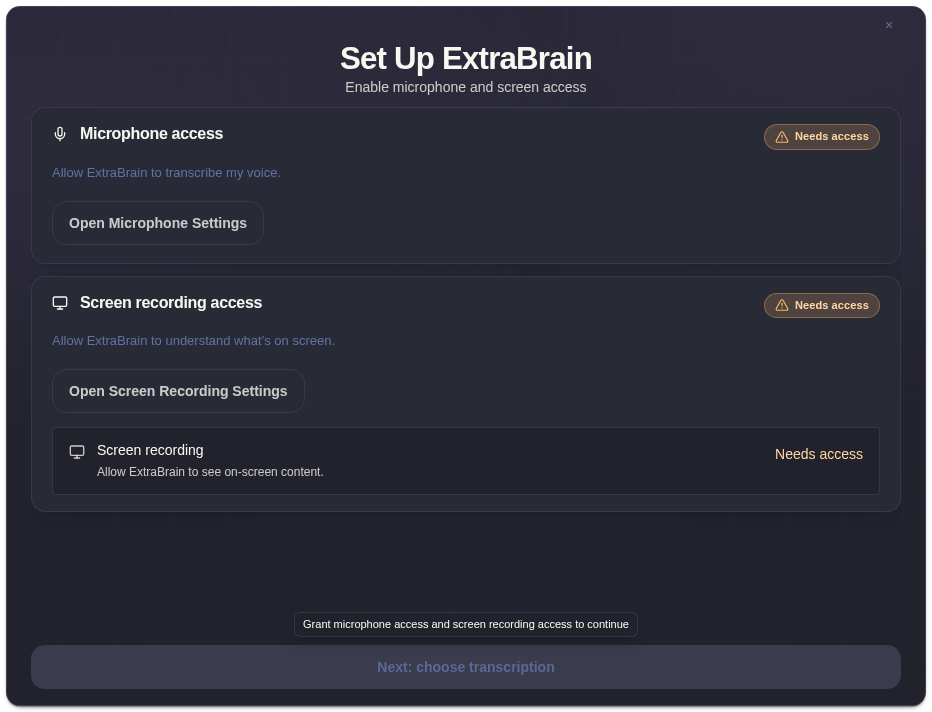
Microphone Permission Required
Section titled “Microphone Permission Required”If microphone capture does not start:
- Open System Settings -> Privacy & Security -> Microphone.
- Enable ExtraBrain.
- Quit and reopen ExtraBrain if macOS asks.
- Start a short test session.
Screen Recording Or System Audio Is Not Working
Section titled “Screen Recording Or System Audio Is Not Working”Screen Recording controls screenshots and screen context. System Audio controls meeting, call, video, or shared-audio transcription when supported.
Check for warning chips such as “Mic stopped”, “System audio stopped”, or “Audio stopped”. Then reopen macOS Privacy & Security settings, grant access, and restart ExtraBrain if needed.
API Key Validation Failed
Section titled “API Key Validation Failed”For OpenAI, Anthropic, or a custom endpoint:
- confirm the key is current
- remove extra spaces
- confirm the selected model is available to the account
- confirm a custom endpoint has a base URL and model name
- check proxy or organization restrictions
Then validate again in Settings -> LLM Providers.
Deepgram Validation Failed
Section titled “Deepgram Validation Failed”Deepgram requires a valid Deepgram API key. If validation fails, paste a fresh key, retry validation, or switch back to Local Parakeet from onboarding or Settings -> Audio.
Screenshots Are Not Appearing In Analysis
Section titled “Screenshots Are Not Appearing In Analysis”Check that:
- a session is active
- Screen Recording permission is granted
- the capture mode in Settings -> Screenshot matches what you expect
- the screenshot entry appears in the transcript panel
Screenshots are local session artifacts. Screenshot-derived context may be sent when you ask a cloud LLM provider for analysis.
Main Window Is Hidden Or Hard To Click
Section titled “Main Window Is Hidden Or Hard To Click”If the overlay is hidden or click-through makes it hard to interact:
- Use the toggle window shortcut.
- Disable click-through in Settings -> Privacy.
- Re-enable Dock or menu bar visibility if you need a visible recovery path.
Session History Delete Is Disabled
Section titled “Session History Delete Is Disabled”Active sessions cannot be deleted. Stop recording first, then return to Settings -> Sessions and delete the session.
Related Guides
Section titled “Related Guides”- Set up ExtraBrain for the first time
- Connect an AI provider
- Choose Parakeet or Deepgram transcription
- Privacy controls
Troubleshooting Questions
Section titled “Troubleshooting Questions”What should I check first if ExtraBrain is not recording?
Section titled “What should I check first if ExtraBrain is not recording?”Check microphone permission, system audio permission, the selected audio device, and whether a session is already starting or stopping.
What should I check first if analysis fails?
Section titled “What should I check first if analysis fails?”Check the selected AI provider, API key or subscription status, custom endpoint fields, and whether the current session has transcript or screenshot context to analyze.