
ExtraBrain Mobile

Your Mac session. Your phone controls.

Keep the answer on your Mac and the controls in your hand. ExtraBrain Mobile for Android lets you ask questions, capture desktop context, and adjust ExtraBrain without reaching for the keyboard. iOS is in progress.

ExtraBrain Mobile

Keep your session moving

Ask from your phone

Type a question, send a profile quick action, or request analysis. Read the response in ExtraBrain on your Mac.

Capture desktop context

Trigger a screenshot or start region selection on the Mac. Your Mac handles capture and AI processing.

Put controls within reach

Switch profiles, scroll answers, show the transcript panel, and adjust the desktop window. Arrange controller cards around the actions you use most.
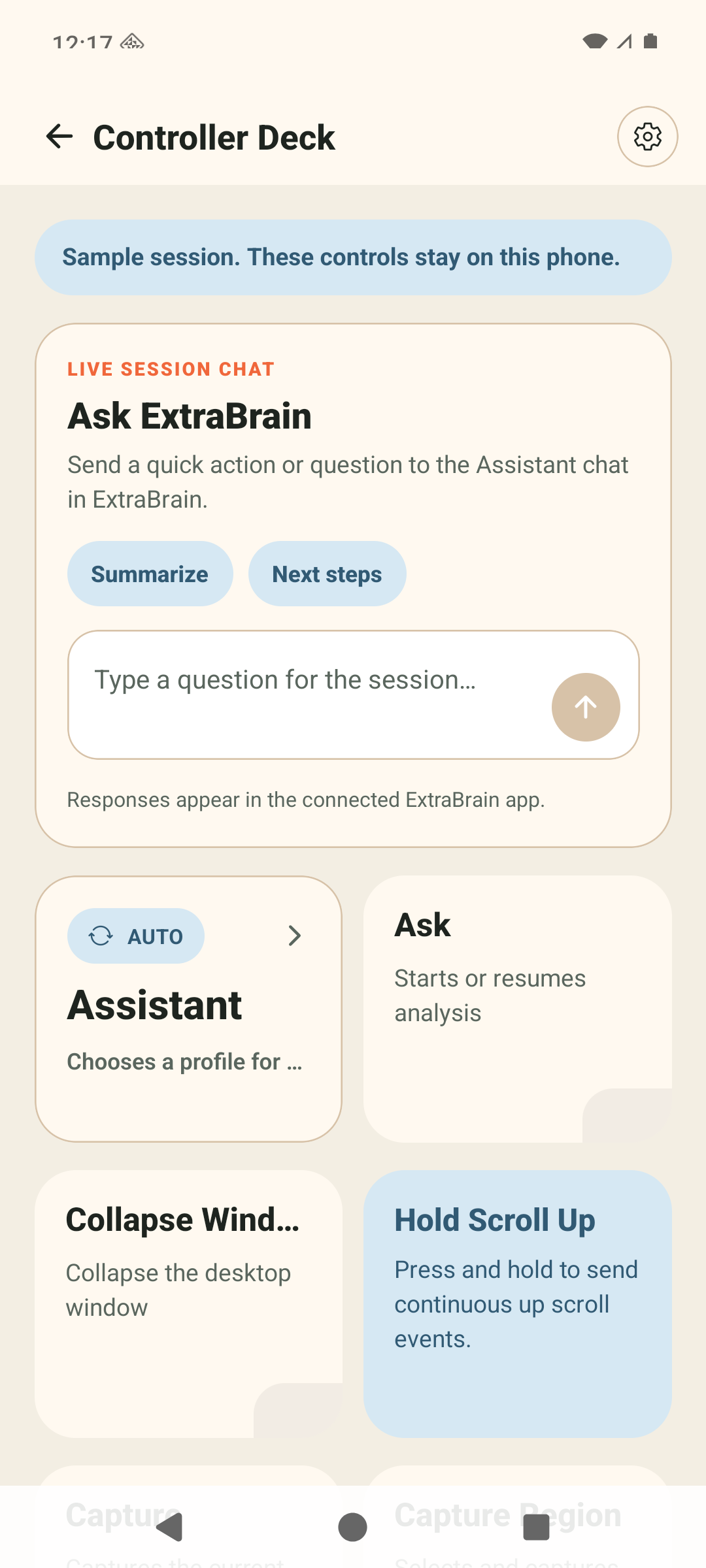
ExtraBrain Android Controller Deck with a question composer, profile card, and analysis control
Native Android interface shown in sample mode. Pair your Mac to send real commands.
ExtraBrain Mobile

Scan, approve, and connect

Install the Mac app and ExtraBrain Mobile for Android. On the Mac, open Settings → System → Remote, enable the phone controller, and choose Pair a phone. Scan the QR code in the Android app, then approve your phone on the Mac.

Android available now

Install ExtraBrain Mobile from Google Play. The iOS app is in progress.

Your Mac stays in charge

Keep your Mac awake with ExtraBrain running. The phone is a companion controller, not a standalone AI or transcription app.

Approve each phone

Pairing needs your approval on the Mac. Remove an approved phone in Remote settings whenever you want to revoke access.

Summary

Key takeaways

ExtraBrain Android Phone Controller is part of ExtraBrain's local-first Mac workflow for live interviews, meetings, transcription, provider control, and responsible AI use.

Page focus

Keep the answer on your Mac and the controls in your hand. ExtraBrain Mobile for Android lets you ask questions, capture desktop context, and adjust ExtraBrain without reaching for the keyboard. iOS is in progress.

Platform fact

ExtraBrain has 2 current desktop platforms, macOS and Windows; on Mac it supports both Apple Silicon and Intel.

Data-flow fact

ExtraBrain has 3 configurable data paths to review before sensitive work: local Parakeet transcription, local Gemma 4, and external providers you choose.

FAQ

Common questions.

Short answers for people and crawlers comparing ExtraBrain with other live AI assistants.

Is there an iPhone app?

iOS is in progress. ExtraBrain Mobile is available for Android now.

Do answers appear on my phone?

Answers stay in ExtraBrain on your Mac. The phone does not receive answer text, transcript text, or live desktop preview frames.

Do I need Pro to use Phone Control?

Phone Control does not require Pro or a separate ExtraBrain account. AI and transcription usage still follow your Mac’s provider configuration.

Do both devices need the same Wi-Fi?

Configured releases can connect over an encrypted relay across different networks. A reachable Tailscale connection can be used directly when available; Tailscale is optional.