
ExtraBrain Blog
A Practical CodeRankGPT Alternative for Technical Interviews

Compare ExtraBrain as a CodeRankGPT alternative for live coding interview prep, screen context, transcription, and responsible AI support.
If you are searching for a CodeRankGPT alternative, you are probably looking for a calmer way to prepare for technical interviews without juggling too many tools. You may want live coding support, clearer explanations, transcript context, role-specific guidance, and privacy controls that match how you actually work.
ExtraBrain is built for that kind of workflow. It is a free, local-first desktop AI interview assistant and meeting copilot for Mac with live transcription, screen-aware context, local Gemma 4 on-device AI where installed and compatible, bring-your-own AI providers, and privacy controls.
This guide compares the practical buying criteria that matter when evaluating CodeRankGPT and ExtraBrain. It focuses on technical interview preparation, live coding rounds, system design conversations, behavioral interviews, and post-interview review.
Use any AI interview assistant only where your interview, employer, school, workplace, and platform rules allow AI assistance, transcription, screenshots, or notes.
Why consider ExtraBrain as a CodeRankGPT alternative?
Many candidates do not need another generic answer generator. They need a desktop workspace that can follow the interview context, help them reason out loud, structure tradeoffs, and review what happened after the call.
ExtraBrain is designed around that broader interview and meeting workflow. It can support coding interviews, system design rounds, behavioral interviews, product interviews, customer calls, lectures, and research meetings.
What a stronger interview assistant should do
A useful CodeRankGPT alternative should help across the whole session, not only at the moment a prompt appears. For technical interviews, look for these capabilities:
- Live transcription so the assistant can follow what the interviewer says.
- Screen-aware context so code prompts, diagrams, or shared material can be part of the session context.
- Technical explanation support for algorithms, debugging, edge cases, and system design tradeoffs.
- Answer structuring for behavioral questions and follow-up questions.
- Post-session notes so you can improve after the interview.
- Privacy controls that make it clear when work stays local and when external providers may receive selected context.
ExtraBrain brings those pieces into a Mac desktop app. For users who configure local Parakeet transcription plus local Gemma 4 on-device AI where installed and compatible, a fully local posture is possible. When you choose external providers, selected prompts, transcript text, screenshots, audio, or context may leave the device depending on your configuration.

ExtraBrain vs CodeRankGPT: what matters most
The best alternative depends on how you interview. Some candidates mainly practice online assessments. Others need help staying organized during live conversations, explaining past projects, and turning a confusing technical prompt into a clear plan.
Here is the practical comparison lens I would use.
| Evaluation area | ExtraBrain | CodeRankGPT |
|---|---|---|
| Primary workflow | Mac desktop interview and meeting copilot | Coding interview assistance workflow |
| Live transcription | Supported with local Parakeet and optional Deepgram | Check current product details before relying on it |
| Screen context | Screen-aware context for prompts, diagrams, and shared material | Check current product details before relying on it |
| Coding interview support | Helps reason through code, edge cases, explanations, and follow-up questions | Often evaluated for coding prompt assistance |
| System design support | Useful for architecture tradeoffs, clarifying questions, and structured reasoning | Check whether it fits live system design conversations |
| Behavioral interview support | Can generate STAR outlines and answer structures from context | Check whether it supports non-coding rounds well |
| Provider control | Bring-your-own Anthropic, OpenAI, custom OpenAI-compatible endpoints, Claude Subscription, Codex Subscription, and local Gemma 4 where available | Check current provider options |
| Local-first options | Local Parakeet plus local Gemma 4 where installed and compatible | Check current privacy and provider behavior |
| Platform support | macOS today, including Apple Silicon and Intel Macs | Check current platform support |
| Pricing model | Core Mac app is free, with optional Pro pricing | Check current pricing |
This table is not about declaring that every candidate needs the same tool. It is about matching the assistant to the actual interview workflow you face. If your interview process includes live discussion, shared screens, system design, and behavioral storytelling, ExtraBrain is especially relevant.
How ExtraBrain helps in technical rounds
Technical interviews are rarely just about producing the final answer. Interviewers often care about how you understand the problem, clarify constraints, compare approaches, test edge cases, and explain complexity.
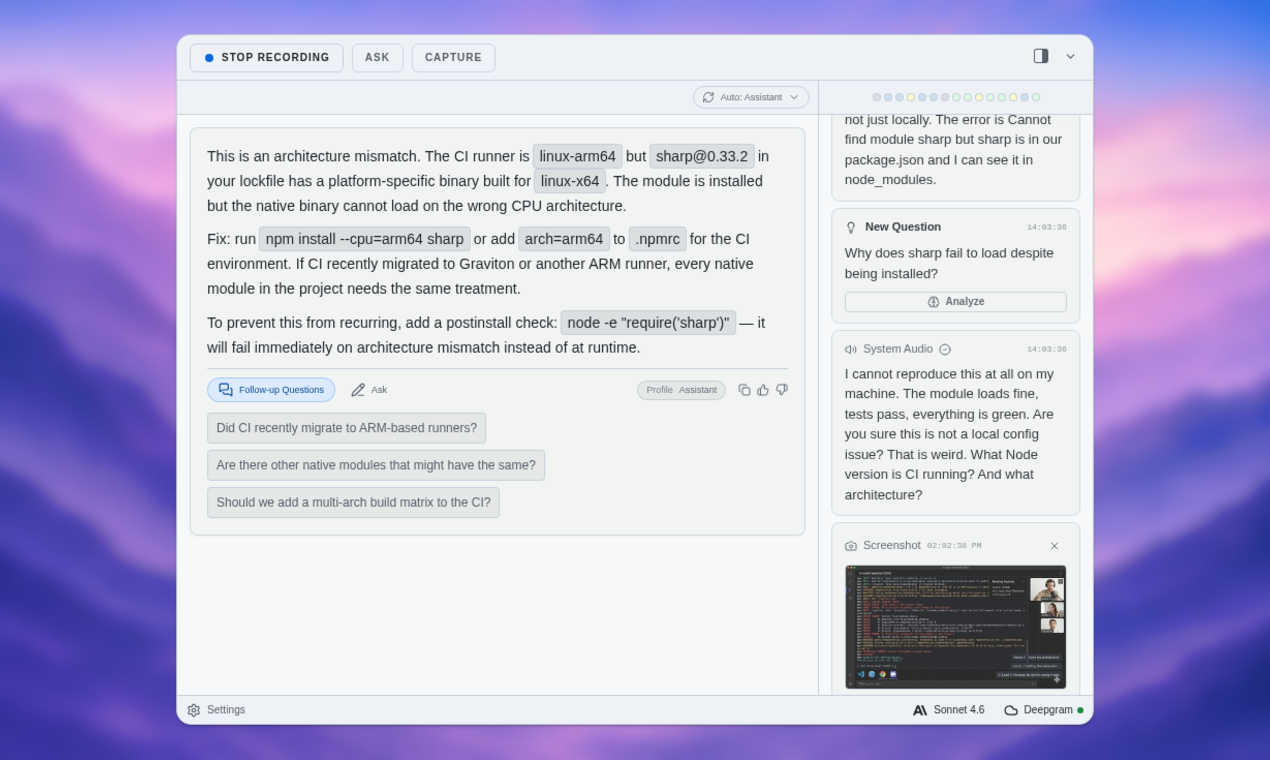
ExtraBrain can help you organize that thinking in real time. It can turn the live transcript and screen context into answer outlines, clarifying questions, technical explanations, and follow-up prompts.
Coding prompts
For a coding prompt, the goal is not to silently outsource the whole interview. The better use is to keep your reasoning structured.
You can use ExtraBrain to help with:
- Restating the problem in plain language.
- Listing input constraints and edge cases.
- Comparing brute-force and optimized approaches.
- Explaining time and space complexity.
- Preparing test cases before writing code.
- Practicing a concise explanation after the solution works.
That workflow helps you sound like a thoughtful candidate instead of a person reading a generated answer. It also makes practice sessions more useful because you can review where your reasoning became unclear.
Debugging and follow-up questions
A strong coding interview assistant should help with follow-up questions too. For example, after you solve an LRU cache prompt, the interviewer may ask what changes if capacity is huge, concurrency matters, or persistence is required.
ExtraBrain can help you generate and rehearse those tradeoffs. It is useful for moving from a single answer to a more complete engineering conversation.
System design rounds
System design interviews reward clarity more than memorized diagrams. You need to ask requirements questions, define scale assumptions, identify bottlenecks, and explain why one architecture is better than another.
ExtraBrain can help by keeping track of the discussion and suggesting structure such as:
- Functional and non-functional requirements.
- API shape and data model questions.
- Read and write path tradeoffs.
- Caching, queues, databases, and consistency choices.
- Failure modes and observability questions.
- Follow-up questions to ask before locking in a design.
This is where a broad desktop copilot can be more useful than a narrow coding-only assistant. The conversation moves quickly, and the transcript can become the memory you need to stay oriented.
Benefits for job seekers switching workflows
A CodeRankGPT alternative should make preparation easier, not more chaotic. If you are moving to ExtraBrain, think of the switch as moving from isolated answer support to a full interview workspace.
A practical preparation workflow
Here is a simple way to use ExtraBrain before a technical interview:
- Create a profile for the role you are targeting.
- Add context about your background, projects, resume themes, and target company.
- Practice coding prompts aloud instead of only typing silent solutions.
- Use live transcription during mock interviews to capture what you actually said.
- Review the session afterward and identify where your reasoning was vague.
- Turn weak moments into follow-up practice questions.
This workflow is useful because interviews are performance events. You are not only solving problems. You are communicating under pressure.
Better personalization
Generic interview advice can be helpful, but it often misses your actual story. ExtraBrain can work as a focused AI second brain for interviews and meetings by helping you keep transcripts, notes, screen context, and review material connected to live sessions.
That matters for behavioral and technical storytelling. A senior engineer might need examples about incident response, architecture decisions, mentoring, and tradeoffs. A new graduate might need examples about projects, internships, coursework, and debugging habits.
With the right context, ExtraBrain can help structure answers around your experience instead of giving one-size-fits-all scripts.
Privacy and local-first considerations
Privacy should be a major part of any CodeRankGPT alternative comparison. Interview transcripts, screenshots, resumes, and notes can contain sensitive personal, company, or candidate data.
ExtraBrain is local-first by design. The core Mac app supports local Parakeet transcription and local Gemma 4 on-device AI where installed and compatible. With both local transcription and local AI configured, transcription and AI prompts can stay local.
If you connect external AI or transcription providers, those providers may receive selected prompts, transcript text, screenshots, audio, or context depending on your settings. That is why provider choice and privacy controls matter.
ExtraBrain also gives users control over AI providers, including Anthropic, OpenAI, custom OpenAI-compatible endpoints, Claude Subscription, Codex Subscription, and local Gemma 4 where available. This matters if you want to choose your own provider setup instead of depending on a single bundled model path.

Pricing and platform fit
ExtraBrain is available for macOS today, including Apple Silicon and Intel Macs. Windows and Linux are planned future platforms.
The core ExtraBrain Mac app is free. ExtraBrain Pro is $9.99 per month, $79 per year, or $149 Lifetime launch pricing. External AI and transcription provider usage is billed separately by the providers users choose.
That pricing model is useful if you want to start with a free desktop assistant and decide later whether Pro features or external provider usage are worth it for your workflow.
How to switch from CodeRankGPT to ExtraBrain
Switching interview tools is easier if you treat it like a setup checklist. Do not wait until the day of a live interview to learn your assistant.
Step-by-step migration plan
- Review your current interview notes, coding prompt history, and weak topics.
- Download or copy any material you are allowed to keep from previous practice sessions.
- Install ExtraBrain on your Mac.
- Choose your transcription setup, such as local Parakeet or optional Deepgram.
- Choose your AI provider setup, such as local Gemma 4 where installed and compatible or a bring-your-own external provider.
- Create role-specific context for the interviews you are targeting.
- Run a mock coding interview and check that transcription, screen context, shortcuts, and privacy settings behave as expected.
- Review the saved session and turn the weakest moments into a practice plan.
Tips for a smoother transition
- Practice with ExtraBrain before using it in any high-pressure setting.
- Confirm the rules of each interview, assessment, workplace meeting, or school context before enabling AI assistance, transcription, screenshots, or notes.
- Keep your prompts focused on reasoning, structure, and follow-up questions instead of trying to replace your own judgment.
- Review transcripts after each session so you improve over time.
- Use local-first settings when sensitive context should stay on your device.
When ExtraBrain is the better fit
ExtraBrain is a strong CodeRankGPT alternative if you want more than coding prompt help. It is especially useful if your interview process includes live calls, screen sharing, system design, behavioral questions, or post-session review.
ExtraBrain is also a good fit if you want:
- A free core Mac desktop app.
- Live transcription for interviews and meetings.
- Screen-aware context for shared prompts and diagrams.
- Local-first options with local Parakeet and local Gemma 4 where compatible.
- Bring-your-own provider control.
- Coding, system design, behavioral, and meeting support in one workflow.
It may not be the right fit today if you need native Windows or Linux support immediately. Those platforms are planned, but macOS is the supported platform today.
FAQ
What is the best CodeRankGPT alternative for Mac?
ExtraBrain is a strong CodeRankGPT alternative for Mac users who want a free core desktop AI interview assistant with live transcription, screen-aware context, local-first options, and bring-your-own provider control.
Can ExtraBrain help with coding interviews?
Yes. ExtraBrain can help structure coding explanations, generate clarifying questions, reason through edge cases, explain complexity, and review the session afterward. Candidates remain responsible for honest and allowed use.
Can ExtraBrain run fully local?
A fully local ExtraBrain posture requires local Parakeet transcription plus local Gemma 4 on-device AI where installed and compatible, with no external provider requests. External providers may receive selected prompts, transcript text, screenshots, audio, or context depending on configuration.
Does ExtraBrain support system design interviews?
Yes. ExtraBrain can help organize requirements, architecture tradeoffs, follow-up questions, and explanations during system design practice and live sessions where allowed.
Is ExtraBrain free?
The core ExtraBrain Mac app is free. ExtraBrain Pro is available as an optional paid upgrade, and external AI or transcription provider usage is billed separately by the providers users choose.
Can I use ExtraBrain during a real interview?
Only use ExtraBrain during a real interview if the interview, employer, school, workplace, and platform rules allow AI assistance, transcription, screenshots, or notes. ExtraBrain provides the workflow and controls, but you are responsible for using it responsibly.