
ExtraBrain Blog
Does CoderPad Detect AI? Pad Playback, Paste Alerts and the AI Assist Rules
Short answer
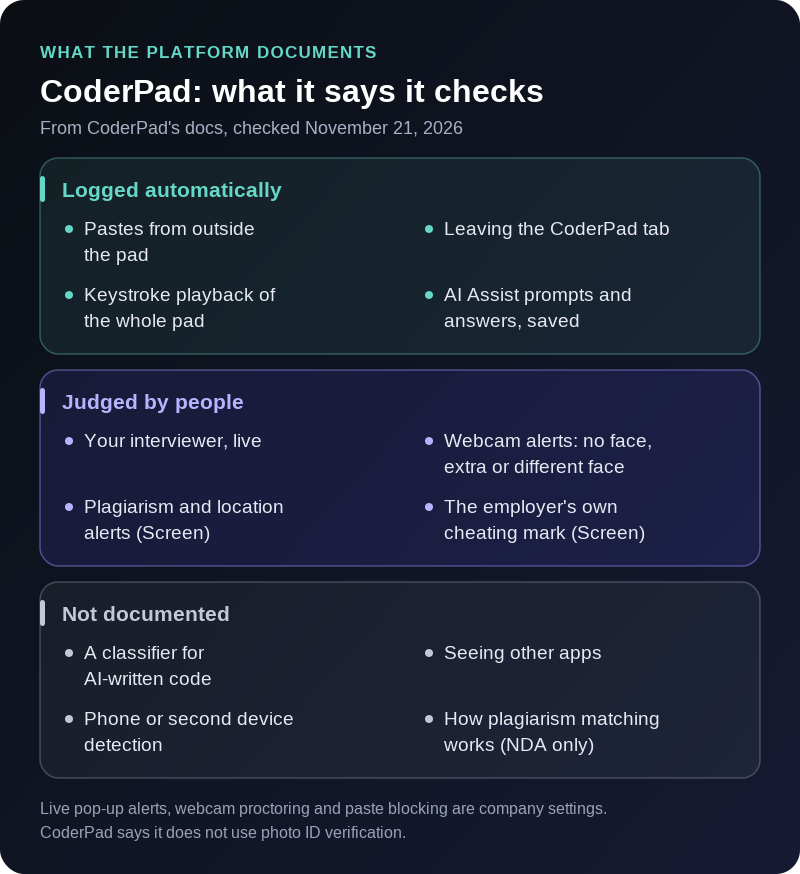
CoderPad does not claim to recognize AI-written code. It records every keystroke in a pad for playback, marks pastes from outside the editor and moments you leave the tab, and can pop those events up on the interviewer's screen live. Screen tests add plagiarism, geolocation and optional webcam checks. Its built-in AI Assist is allowed only when the interviewer or recruiter turns it on, and every prompt is saved.
What CoderPad documents for live pads and Screen tests: paste and focus alerts, keystroke playback, webcam checks, and when its built-in AI Assist is allowed.
CoderPad shows up in two very different situations. Most often it is a live pad: you and an engineer in a shared editor, usually on a video call. Sometimes it is CoderPad Screen, a take-home test with no one watching in real time. What CoderPad can notice is different in each, and in neither case does it claim to recognize AI-written code by reading it. What it documents instead is a record of how your code got there.
ExtraBrain makes an AI interview assistant, so we have a stake in this question; we checked every claim below against public sources on November 21, 2026.
Live pads versus Screen tests
| Signal | CoderPad Interview (live pad) | CoderPad Screen (take-home test) |
|---|---|---|
| Keystroke playback | Every keystroke of every participant, replayable after the interview | Code playback with typing, runs, pastes and time away |
| Pastes from outside | Yellow markers in playback, and live pop-ups if the company enables them | Logged; pasting from outside can also be blocked |
| Leaving the tab | Orange markers, live pop-ups if enabled | Logged, with how long you were away |
| Copying a whole file | Copy-all alert | Copying the question text is blocked automatically |
| Plagiarism | Not documented for pads | Alert when your code matches another candidate’s exact submission |
| Webcam | You are usually on video with the interviewer | Optional AI-analyzed snapshots, Enterprise plans only |
| Location | Not documented | Approximate geolocation changes flagged |
| Built-in AI | AI Assist exists on every pad; the company sets whether it starts on, the interviewer can toggle it, prompts are saved | Available when the recruiter enables it |
Sources: Playback and pad summary, Using pad features, Cheating prevention and detection in Screen and AI tools for Interview.
In a live pad, the interviewer is the detector
A live pad keeps every keystroke, and once the interviewer ends the session it turns into a replay with a separate track for each participant. Pastes from outside the editor appear as yellow dots, and moments when your browser stopped focusing on the editor appear as orange dots. If the company has switched on suspicious-activity tracking, the interviewer also gets a pop-up each time you paste, copy a whole file or leave the CoderPad tab, while you are still talking.
CoderPad adds two caveats on the same page that candidates should know. Pasting and leaving the editor do not always mean cheating, since people paste code from their own editor. And opening the browser console counts as leaving, because it is technically a different tab. A paste from the pad’s own AI Assist window also triggers the marker.
The replay also outlives the call. CoderPad says interviewers use playback and the pad summary to write feedback and to share the session with teammates, so people who were not in the interview may watch how your solution took shape. If you prefer drafting a helper function in your own editor, say so before you paste it in. One sentence out loud turns a yellow dot into something the reviewer already understands.
The bigger factor is not software. In a live round, an engineer watches you type, hears you explain, and can ask why you chose a hash map over a sorted array. A clean paste followed by a vague explanation is the pattern any interviewer notices. Some employers have gone further and moved rounds back into the office: in August 2025, heise reported, citing The Wall Street Journal, that Cisco and Google were asking for more face-to-face interviews.
Screen tests check more, but still flag rather than decide
CoderPad Screen layers prevention and detection. Before the test, candidates see an anti-cheating notice and a confirmation pop-up saying cheating attempts are detected and reported to the recruiter. Copying the question text is blocked automatically. Employers can block pasting from outside the IDE, put time limits on multiple-choice questions, and require full screen, which raises an alert after a 10-second grace period if you exit it or move to another monitor.
On detection, Screen flags exact matches with code another candidate already submitted, unusually fast performance on hard questions, leaving the test, pasting, and changes in approximate location. CoderPad’s own warning to employers is direct: suspicious behavior does not always indicate cheating, and a VPN or travel can explain a location change. An optional AI follow-up question asks you to explain a piece of your code and checks the answer.
Webcam proctoring is an Enterprise option. It takes periodic snapshots and, with AI analysis on, flags three patterns: no face, multiple faces, or a different face. CoderPad’s cheating prevention page says it does not recommend proctoring for every candidate, citing bias and a worse candidate experience, and says it does not use photo ID verification.
When AI is allowed in CoderPad
CoderPad’s page for candidates tells you that you can use AI models in tests and interviews, then adds the condition that matters: your recruiter or interviewer has to have AI enabled. In live pads, AI Assist offers models such as GPT, Claude, Gemini and Llama, with Ask, Edit and Plan modes, and everything you type into it and everything it answers is saved for playback.
So the line is simple. AI Assist inside the pad, when it is switched on, is a tool the interviewer chose to give you and will review. An assistant in another window is outside help unless someone has told you otherwise. If you are unsure, ask at the start: “Is AI Assist fair game for this problem?” Interviewers who enable it often want to see how you prompt and check its output.
What CoderPad does not say
We found no CoderPad claim of a classifier that spots AI-written code, no description of seeing other apps on your computer, and nothing about phones or second devices. CoderPad keeps its plagiarism method private and offers details only under NDA. Shell and REPL commands are not shown in pad playback. None of this makes a live round safer for outside help, because the person across the call is the main check.
Where ExtraBrain fits
ExtraBrain is a desktop app for Mac and Windows that transcribes live conversations and can read a screenshot you capture. For CoderPad rounds it belongs in practice and review: rehearse in CoderPad’s sandbox while ExtraBrain transcribes you thinking aloud, then ask it where your explanation lost the thread. Our Apple CoderPad interview guide shows what a company round can look like. During a real interview, follow the interviewer’s rules; if outside tools are not allowed, close them. For another live, human-run format, see our Karat guide.
FAQ
Can CoderPad detect ChatGPT?
Not by reading your code, as far as CoderPad documents. It records pastes from outside the editor, time away from the tab and full keystroke playback, which is how pasted AI output usually shows up.
Does CoderPad know when I switch tabs?
Yes. Leaving the CoderPad tab is marked in playback, and the interviewer can get a live pop-up if the company enabled it.
Can I use AI Assist in my CoderPad interview?
Only if your interviewer or recruiter has it enabled. Your prompts and its answers are saved for review.
Does CoderPad record my webcam?
In live pads you are usually on video with the interviewer. Screen tests can take webcam snapshots on Enterprise plans.
Sources (checked November 21, 2026)
- CoderPad docs: Playback and pad summary
- CoderPad docs: Using pad features
- CoderPad docs: AI tools for Interview
- CoderPad docs: Cheating prevention and detection in Screen
- CoderPad docs: Webcam proctoring
- CoderPad: Cheating prevention
- CoderPad docs: For candidates
- heise online: US companies return to face-to-face interviews (August 2025)