
ExtraBrain Blog
Does Codility Detect AI? Typing Patterns, Similarity Checks and the Codility App
Short answer
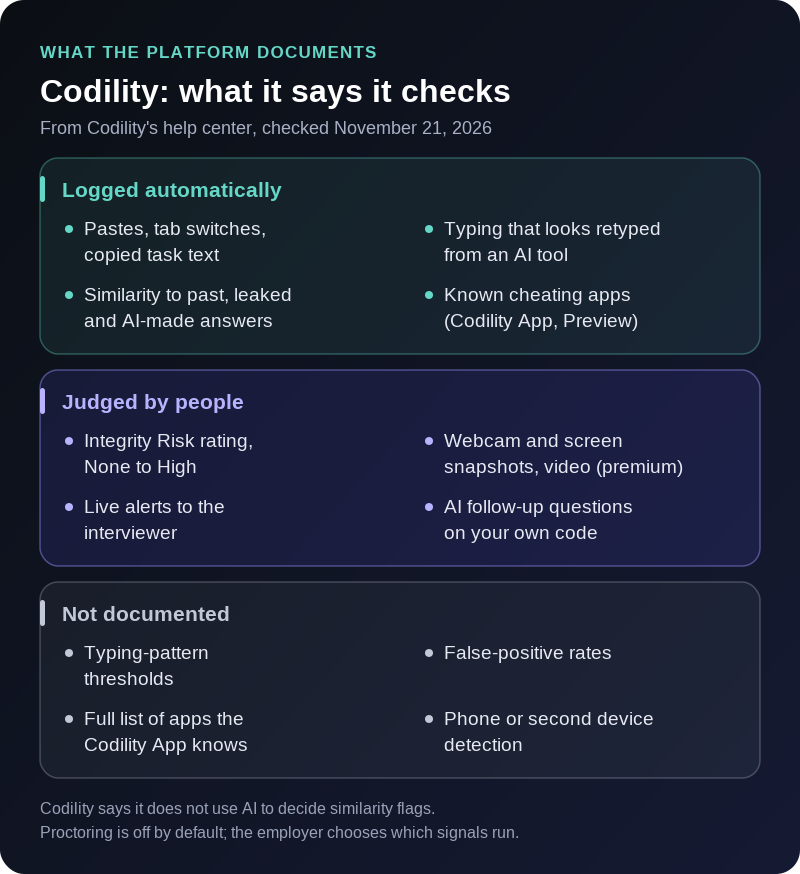
Yes, Codility documents several AI checks. It compares submissions with AI-generated solutions and with submissions from over 12 million assessments, flags typing that looks retyped from an AI tool, logs pastes, tab switches and copied task text when proctoring is on, and can require a desktop app that looks for known cheating tools. Each flag feeds an Integrity Risk rating that a person reviews; Codility says no flag proves cheating.
Codility's own docs on AI detection: retyped-code patterns, similarity against AI answers, the Codility App, Integrity Risk, and what candidates may use.
Codility updated its integrity overview on November 16, 2026, and it reads like a direct answer to AI interview tools. It describes a check that compares your code with AI-generated solutions, a detector for code retyped from an AI tool, and a desktop app that looks for known cheating tools on your computer. Most of these are switches the employer flips, so your test may use all of them or none.
ExtraBrain makes an AI interview assistant, so we have a stake in this question; we checked every claim below against public sources on November 21, 2026.
What Codility documents, check by check
| Check | What Codility says it does | Default |
|---|---|---|
| Similarity Check | Compares your solution with submissions from over 12 million assessments, leaked solutions and AI-generated answers to the same task, even after renaming or reformatting | All customers, for candidates who reach the passing score |
| Behavioral proctoring | Logs pastes into the IDE, tab switches, unusually fast finishes and attempts to copy the task description | Off; the employer enables it per test |
| Typing Pattern Detection | Flags typing that suggests a solution was retyped from an external AI tool, analyzed after you submit | On by default when proctoring is enabled |
| Snapshots and video | Webcam snapshots at intervals and on flagged events; optional screen snapshots; full video and screen recording on premium plans | Optional |
| Device Integrity | You take the test in the Codility App for macOS or Windows, which checks for known cheating tools | Preview, employer setting |
| ID and network | Photo ID with selfie (premium); IP checks for a change of device or location | IP checks for all customers |
| AI follow-up questions | Three two-minute questions about your own submitted code, with paste blocked | Per test |
Source for every row: Codility’s Assessment Integrity Features overview, updated November 16, 2026.
How the AI comparison works
The Similarity Check article explains the AI part in one idea: each AI model tends to converge on a similar answer for the same question. Codility keeps dozens of AI-generated solutions per task and language, and a submission that matches enough of their features is flagged for review. It says it does not use AI to decide which solutions get flagged.
The check has limits Codility states itself. It skips multi-file projects, bug-fixing tasks, multiple-choice, SQL and VS Code content, and only runs for candidates who reach the passing score, or 40% when there is none. Simple tasks can match by coincidence, and a candidate taking Codility tests for several companies can match themselves.
Typing Pattern Detection targets a different habit: retyping an answer from an AI tool line by line instead of pasting it. Codility describes the signal but not its thresholds.
The Codility App changes the picture
Until recently, a coding test only saw what happened in its browser tab. With Device Integrity enabled, you install the Codility App and cannot take the test in a normal browser. Codility says the app checks only whether known cheating tools are present, and does not record your screen or keystrokes or collect extra personal data. Its proctoring product page adds that it looks for apps that request exclusion from screen capture. Linux is not supported, and the feature is in Preview.
In live Codility Interviews, the interviewer gets real-time notifications when you switch tabs, lose browser focus, copy the task description or copy external code. You do not see these signals.
A flag is a question, not a verdict
Codility rolls the signals into an Integrity Risk rating of None, Low, Moderate or High, built with formulas from I-O psychologists rather than AI and currently in Beta. Its fraud detection overview says a single flag is not a guarantee of cheating and gives an example: switching from home Wi-Fi to mobile data trips the IP check. Codility recommends that employers contact the candidate or run a follow-up interview where you explain your approach.
That follow-up is the real test. If a flagged solution is yours, explaining it is easy. If it is not, the interview is where it shows.
What you are allowed to use
Codility’s candidate FAQ is short and firm. You must work on your own and may not consult other people; for books, websites and other resources, follow the policy in your test link or ask the test administrator. On writing in your own editor, Codility says to follow the test’s policy and, if allowed, paste your solution back in. Remember that a paste is logged, so mention it if anyone asks.
AI help can be allowed, but only through Codility. Employers can turn on its AI Assistant or a VS Code AI Copilot, and in some interviews Claude Code or Codex, with prompts captured in your report. If your test does not mention AI at all, assume outside tools are not allowed and ask before you start.
You will rarely be guessing about monitoring. Codility says the intro page of a proctored test tells candidates which behaviors are tracked, and its FAQ on behavioral events explains that some employers also require camera or screen access, which you grant in the browser. Read that intro page slowly. It is the closest thing you get to the employer’s rulebook, and it is where you find out whether the Codility App, a webcam or ID verification is coming.
What Codility does not publish
We found no published thresholds for typing patterns, no false-positive rates for any check, and no full list of the tools the Codility App recognizes. Codility also does not say whether it can spot a phone on the desk beyond what webcam snapshots show. Those gaps cut both ways: an honest candidate cannot know exactly what might trip a flag, which is one more reason to write your code in the editor and explain anything unusual.
Where ExtraBrain fits
ExtraBrain is a desktop app for Mac and Windows that transcribes live conversations and reads screenshots you capture. Its optional capture-protection setting is designed to help exclude its window from screenshots and screen sharing, which is the kind of app Codility says its desktop app looks for. Close ExtraBrain before any Codility test or interview unless the rules allow outside tools. Use it in practice instead: work through Codility’s own lessons out loud, then review the transcript and ask where your edge-case reasoning slipped. Our HSBC Codility test guide shows what a company test can look like, and the HackerRank guide covers a platform with a similar desktop mode.
FAQ
Can Codility detect ChatGPT?
Codility compares submissions with AI-generated solutions for each task and flags typing that looks retyped from an AI tool. It does not claim to name the tool used.
Does Codility record my screen?
Only if the employer enables screen snapshots or premium video proctoring. Video proctoring asks for your consent first and shows a recording indicator.
Can Codility see other apps on my computer?
Only with Device Integrity, where you take the test in the Codility App, which checks for known cheating tools. In a normal browser test it cannot look at your other apps, but similarity, typing-pattern and IP checks still run, along with whatever proctoring the employer enabled, and the test rules apply either way.
Will a similarity flag fail me?
No. Codility says a flag is not proof and suggests employers talk to the candidate or hold a follow-up interview.
Sources (checked November 21, 2026)
- Codility help: Assessment Integrity Features
- Codility help: Similarity Check and what to do
- Codility help: Plagiarism Prevention and Fraud Detection
- Codility help: May I consult a book, website, or colleague?
- Codility help: Can I use my own IDE?
- Codility: Proctoring and integrity
- Codility: Lessons for programmers