
ExtraBrain Blog
Does HackerRank Detect AI? What Each HackerRank Integrity Mode Checks
Short answer
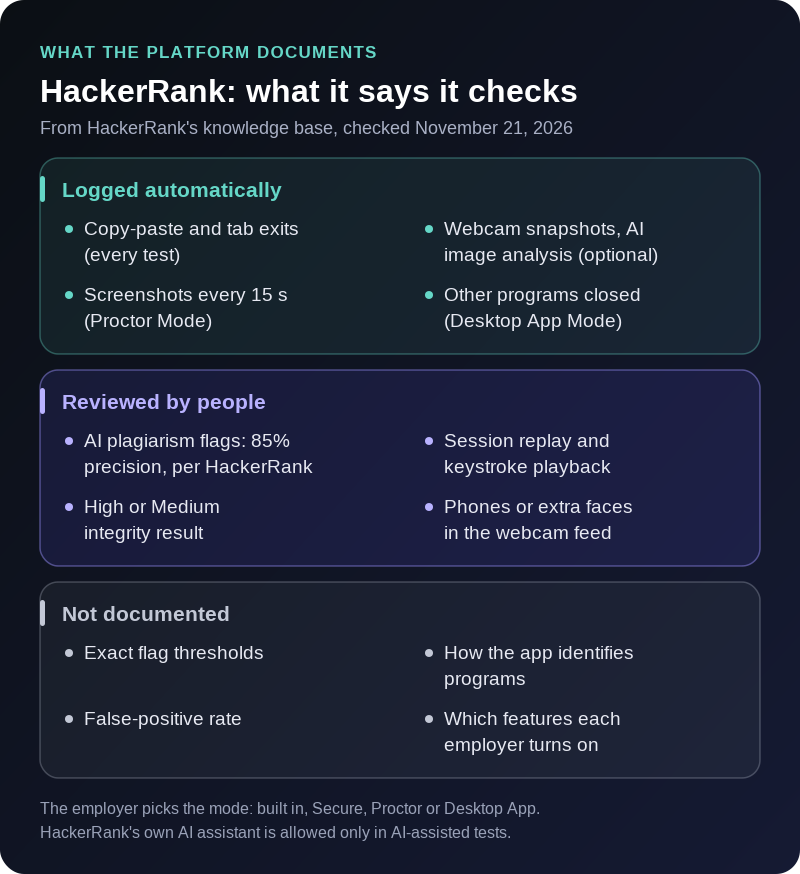
Yes, and how much depends on the mode the employer picks. Every test logs copy-paste and time outside the test window. Optional AI plagiarism detection, which HackerRank says is right 85% of the time it flags someone, studies how your code evolved. Proctor Mode adds screen recording, screenshot analysis and webcam checks, and Desktop App Mode closes other programs you open. Flags go to a human reviewer.
HackerRank's own help center on AI detection: what Secure, Proctor and Desktop App modes check, how accurate its plagiarism model is, and when AI is allowed.
“HackerRank can’t see other apps” was decent folklore in 2023. It is out of date. HackerRank’s help center now documents three integrity modes, and the strictest one runs your test inside a desktop app that closes other programs you try to open. Whether any of that applies to you depends on settings the employer chose, which is why candidates who took two HackerRank tests often describe two different experiences.
ExtraBrain makes an AI interview assistant, so we have a stake in this question; we checked every claim below against public sources on November 21, 2026.
Four levels of monitoring, from lightest to strictest
HackerRank’s Test Integrity overview separates built-in tracking from modes an employer turns on.
| Level | What HackerRank documents | What the employer sees |
|---|---|---|
| Built in | Copy-paste is recorded; tab proctoring counts how often and how long you leave the test window | Pasted text in the timeline, window exits and time away |
| Secure Mode | Controlled browser: full screen, copy-paste blocked, a single monitor, alerts on tab switches | Integrity events |
| Proctor Mode (AI add-on) | Full-browser screen recording, screenshots every 15 seconds, webcam checks for missing or extra faces and phones when webcam capture is on, typing-and-deleting patterns | High or Medium integrity result, session replay |
| Desktop App Mode (AI add-on) | Native app for Windows and macOS that blocks remote access and screen sharing, refuses virtual machines, and closes other programs you open | Everything in Proctor Mode |
Optional extras sit on top: periodic webcam snapshots, AI analysis of those images, a photo ID capture, and AI plagiarism detection. Sources: Proctor Mode and Desktop App Mode.
What Proctor Mode looks for on your screen
Proctor Mode is the closest thing HackerRank has to a direct AI check. Before the test you grant webcam, screen-sharing and full-screen permissions, and the test will not start with a second monitor attached. During the test, screenshots are taken every 15 seconds and every five seconds around suspicious activity, and each one is labeled suspicious or not with an explanation.
The Proctor Mode article lists what that screenshot analysis targets: answer-sharing and tutorial sites, GitHub repositories with leaked solutions, browser extensions and overlays, remote-desktop tools, screen recorders, and external AI coding assistants that are not part of HackerRank’s own IDE. Copy-paste is disabled, and the editor flags typing-and-deleting patterns that may suggest outside communication. Proctor Mode only works on tests created after HackerRank’s July 2025 release.
Desktop App Mode goes further. HackerRank says the app detects and closes any other program a candidate tries to open, and it names AI interview tools among the examples. It also checks for new monitors and screen mirroring throughout, not just at the start.
How the AI plagiarism model decides
The AI Plagiarism Detection article is the most useful page for candidates because it lists the inputs: time taken, tab switching, how many iterations your code went through, large blocks copied from external sources, and code-writing patterns, including irregular typing. Flags are labeled High or Medium and split into code similarity and coding patterns, with a keystroke playback for the reviewer.
HackerRank gives a number few vendors publish: an overall precision of 85%. Read that the right way round. Of the sessions it flags, about 85 in 100 are correct by HackerRank’s measure, so roughly 15 are not, and the same article says human oversight remains crucial. The feature only covers coding questions and struggles with questions that need very little code. Standard MOSS similarity checking is on for every test; the AI model has to be switched on, and when it is, candidates must consent before starting. A 2023 HackerRank post tells employers to review flagged code manually rather than auto-reject.
When AI is allowed
Some HackerRank tests now include an AI assistant on purpose. In AI-assisted tests, the employer sets each section to no assistant, guarded or unguarded. Guarded, the default, helps with syntax, navigation and concepts and does not write full solutions. Unguarded allows an agent mode that writes and edits code. The full chat transcript appears in the employer’s report by default.
That permission covers HackerRank’s assistant inside the test. The article does not extend it to outside tools, and Proctor Mode’s screenshot analysis is built to flag them. If your invite does not say which kind of test you are taking, ask.
Rumors the help center settles
Several forum claims can now be checked against HackerRank’s own pages. “A second monitor is fine” is wrong for Secure and Proctor Mode, which require a single display, and the desktop app keeps checking for newly connected monitors and mirroring during the test. “Pasting is invisible if it is your own code” is wrong everywhere: copy-paste is recorded on every test, and the report shows the pasted text, whoever wrote it.
None of this changes the rules. The setup screens tell you what will be recorded, but the test instructions decide what you may use, and they apply in the lightest mode as much as in the strictest. Copy-paste and time outside the window are logged on every test, and a later interview will ask you to explain the code anyway.
False flags are a real cost for honest candidates. Pasting from your own local editor, a notification that pulls focus, or a laptop that drops off Wi-Fi can all leave marks in the report. If one happens, send the recruiter a short note the same day saying what happened and roughly when. Reviewers are told to look at context, and you are the best source of it.
What HackerRank does not document
We found no published flag thresholds, no false-positive rate beyond the 85% precision figure, and no technical description of how the desktop app identifies programs. We also found no candidate-facing statement of which features are on by default for a given employer. A webcam prompt, a full-screen requirement or a request to install the desktop app tells you what will be recorded; the instructions screen tells you what is allowed, and that is the part to follow.
Where ExtraBrain fits
ExtraBrain is a desktop app for Mac and Windows. In Desktop App Mode, HackerRank says it closes other programs you open, and ExtraBrain is one of those programs. Quit it, and every other assistant, before any HackerRank test unless the instructions say outside tools are allowed. It earns its place in practice: talk through a timed problem out loud, capture your own practice code, and review the transcript for where your explanation broke down. For company-specific practice, our Stripe HackerRank prep notes are a good start, and if you face an AI-assisted round, read the AI-allowed work trial guide. Sibling guides cover CodeSignal and Codility.
FAQ
Can HackerRank detect ChatGPT?
It can flag the patterns ChatGPT use tends to leave: pasted code, time away from the test window, code that appears without iteration, and similarity to other answers. In Proctor Mode, screenshot analysis also looks for external AI assistants on screen.
Does HackerRank record my screen?
Only in Proctor Mode or Desktop App Mode, which record the full browser screen and take screenshots. Lighter tests log events such as pastes and window exits instead.
Can HackerRank tell if I switch tabs?
Yes. Tab proctoring reports the number of window exits and the time spent outside the test.
Will a plagiarism flag fail me automatically?
HackerRank says flags are not verdicts and recommends a manual review. The employer decides.