
ExtraBrain Blog
What 12 Interview and Assessment Platforms Say They Monitor (2026)
Short answer
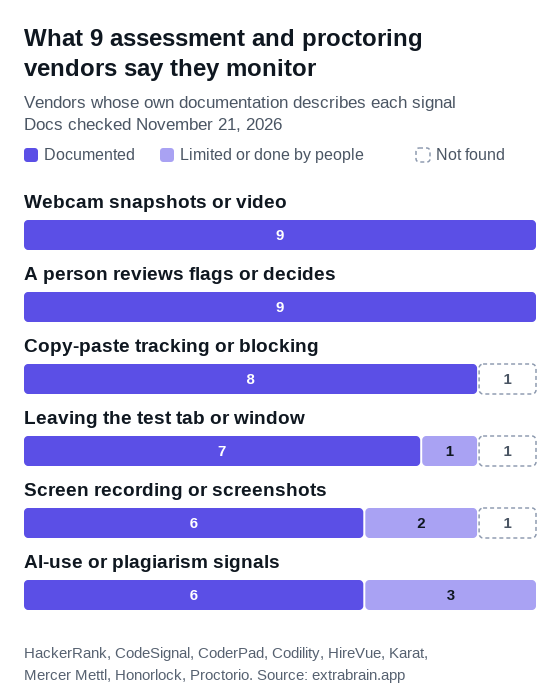
Of nine assessment and proctoring vendors we checked, all nine document webcam options and a person who reviews flags or makes the decision, eight document copy-paste tracking or blocking, and seven document tracking when you leave the test window. Zoom, Teams and Meet document no tab, paste or AI tracking: other people see what you choose to share, and everyone is notified when a recording starts.
A sourced table of what HireVue, HackerRank, CodeSignal, CoderPad, Codility, Karat, Zoom, Teams, Meet and 3 proctoring tools say they track.
ExtraBrain makes an AI interview assistant, a kind of tool these platforms’ rules often cover. We checked every claim below against the vendors’ own pages on November 21, 2026.
What can an interview platform see? Candidates get a different answer from every Reddit thread and “can X detect” post. So we skipped the commentary and read what 12 vendors publish about their own monitoring: help centers, product pages and policies. Every “Yes” in the table links to the page it came from.
Key findings
- Webcam: all 9 assessment and proctoring vendors document webcam snapshots or video. It is usually a setting or a paid tier: CoderPad offers webcam proctoring on Enterprise plans “upon request,” and Codility marks snapshots Premium.
- Copy-paste: 8 of 9 document tracking or blocking pasted text. HackerRank says the system “records the action automatically.”
- Leaving the test window: 7 of 9 document software that tracks or blocks it. Karat instead says its interviewers watch for “typing outside of the browser window.”
- Screen: 6 of 9 document screen recording or screenshots. HackerRank’s Proctor Mode captures a screenshot every 15 seconds.
- AI use: 6 of 9 document automated AI or plagiarism signals, mostly code similarity across candidates plus behaviour patterns such as Codility’s check for candidates who “retype AI-generated solutions.” Two name assistant apps directly: HackerRank’s screenshot analysis looks for “invisible overlay applications,” and Codility’s optional desktop app surfaces apps that “request exclusion from screen capture.”
- People decide: all 9 describe a person reviewing flags or making the call, though Mercer Mettl also sells a fully automated mode. Codility: “The final call always stays with a human.”
- Meeting apps: Zoom, Microsoft Teams and Google Meet document no tab, paste or AI tracking. Zoom says it “permanently removed the attendee attention tracker” in April 2020.
What each platform documents, signal by signal
Yes means the vendor’s own page says the product does it, often as a setting the employer turns on. Partial means a limited form (see the notes below). People means interviewers watch for it and no software is described. No means the vendor says it removed or does not offer it. Not found means we could not find it in the vendor’s own pages. For meeting apps, Shared only means others see only the screen, window or tab you pick, and the reviewer is the interviewer on the call.
| Platform | Tab or window focus | Copy-paste | Webcam | Screen | AI or plagiarism | Human review |
|---|---|---|---|---|---|---|
| HackerRank (Tests) | Yes | Yes | Yes | Yes | Yes | Yes |
| CodeSignal | Not found | Yes | Yes | Yes | Yes | Yes |
| CoderPad | Yes | Yes | Yes | Partial | Yes | Yes |
| Codility | Yes | Yes | Yes | Yes | Yes | Yes |
| HireVue | Yes | Yes | Yes | Partial | Partial | Yes |
| Karat | People | Not found | Yes | Not found | People | Yes |
| Mercer Mettl | Yes | Yes | Yes | Yes | Partial | Yes |
| Honorlock | Yes | Yes | Yes | Yes | Yes | Yes |
| Proctorio | Yes | Yes | Yes | Yes | Yes | Yes |
| Zoom | No | Not found | Your camera | Shared only | Not found | On the call |
| Microsoft Teams | Not found | Not found | Your camera | Shared only | Not found | On the call |
| Google Meet | Not found | Not found | Your camera | Shared only | Not found | On the call |
The chart counts only the nine assessment and proctoring vendors, since the meeting apps don’t offer these controls.
The details behind each row
Coding assessment platforms
HackerRank’s test integrity article says Tab Proctoring “tracks how often and for how long a candidate leaves the test window,” and image proctoring takes periodic webcam snapshots. Proctor Mode, part of HackerRank’s AI Add-on, asks candidates to share their entire screen, takes screenshots and flags a missing face or multiple faces. Its screenshot analysis looks for unauthorized tools, including “invisible overlay applications.” Its review guide tells the reviewer to “verify whether the screenshot shows an unauthorized tool.”
CodeSignal’s fraud page says its Suspicion Score weighs “solution similarity, telemetry, and copy-paste activity,” and that proctoring can “record video, audio, and screen activity.” It doesn’t name tab tracking, so that cell stays Not found.
CoderPad Screen flags leaving the IDE, pasted code and code identical to another candidate’s. CoderPad calls its playback “a recording of the candidate’s screen as they work the programming questions,” but describes nothing captured outside the test, so we marked Screen as Partial. In live CoderPad Interview pads, interviewers get alerts on paste and tab-switching. Codility’s integrity page lists “time away from the IDE,” pasted code, a similarity check and optional webcam and screen recording.
HireVue and Karat
HireVue’s cheating and fraud page documents “automated flags for browser-focus loss,” paste controls and image capture. It mentions screen checks but describes no screen recording, hence Partial. A 2023 HireVue blog post describes a similarity technique for shared scripts, but no current AI-detection feature is listed. Its science page says HireVue “does not use facial analysis to evaluate candidates.”
Karat runs live interviews with human Interview Engineers. Its customer FAQ says all interviews are recorded, including audio and code playback, and that suspected cheating goes to a second interviewer for review.
Proctoring tools
Mercer Mettl’s anti-cheating article counts each time a test-taker “navigates away from the assessment window,” blocks copy-paste, captures screen and camera snapshots every 60 seconds and raises AI flags such as MOBILE_PHONE_DETECTED. It documents phone and face flags, not AI-answer detection, so Partial. Honorlock’s BrowserGuard blocks and flags tabs and apps “while recording the test taker’s desktop.” Proctorio’s settings list includes Block New Tabs, Disable Clipboard and Record Video.
Meeting apps
Teams notifies everyone when recording starts. Google Meet says recordings include “the active speaker and anything presented.” Zoom’s consent disclaimer lets participants stay or leave once recording begins.
How we built this study
We chose 12 platforms that cover each stage a candidate meets: async coding tests, video and live technical interviews, general meeting apps and exam-style proctoring. For each one we read only vendor-owned pages (help centers, product and policy pages, official blogs), recorded the exact supporting sentence, and marked a signal Yes only when the page states it. All pages were opened on November 21, 2026.
CodeSignal’s and Codility’s help centers refused automated access that day, so we used their public product pages. TestGorilla was on the shortlist, but its help center also refused access, so Mercer Mettl took the slot.
Limitations
Documentation shows what a product can do, not what a given employer switched on. Most features above are per-test settings or paid tiers. Not found means we didn’t find it, not that it doesn’t exist. Vendors edit pages without notice, so this is a snapshot of one day. We did not run any of these products; nothing here comes from testing.
What this means for candidates
Ask the recruiter which platform and product you’ll use, then read the candidate instructions before you start. Follow the stated rules, because flags go to a person who sees the evidence. For your rights when software screens you, see what candidates can ask about AI in hiring, and our HackerRank and Zoom platform guides.
ExtraBrain fits in the preparation: transcripts of your mock interviews, screen context while you practise, and, on Pro, full post-session summaries. In a real round, use it only where the employer’s and platform’s rules allow it.
Cite this study
ExtraBrain (2026). “What 12 Interview and Assessment Platforms Say They Monitor (2026).” Published November 21, 2026; vendor pages checked November 21, 2026. https://extrabrain.app/blog/what-interview-platforms-monitor/
You may quote the findings and reproduce the table or chart with attribution and a link to this page.
FAQ
Can HackerRank see my other tabs?
It documents how often and how long you leave the test window. Proctor Mode goes further: it asks you to share your entire screen, screenshots it every 15 seconds, and analyses those screenshots for answer sites, AI tools and overlay apps.
Does Zoom tell the interviewer when I switch windows?
Zoom says it permanently removed its attendee attention tracker in April 2020. Others see your camera and whatever screen or window you share.
Do these platforms detect AI-generated answers?
Several say they flag AI use. The ones that explain how describe signals rather than a test of the answer itself: similarity to other submissions, paste events, typing patterns, screenshot analysis for AI tools (HackerRank), detection of apps hidden from screen capture (Codility’s desktop app), and a person reviewing the evidence.
Does a flag mean I’ll be rejected?
Not by itself, according to most vendors. CoderPad says suspicious behaviour “does not always indicate cheating,” HireVue says a single behaviour “should not automatically be treated as proof of fraud,” and Codility “does not auto-fail a candidate on a detection.” Mercer Mettl is the exception: an employer can set a test to end once a candidate leaves the window too often.
Sources (checked November 21, 2026)
- HackerRank: Test Integrity, Proctor Mode, Review Integrity Issues
- CodeSignal: Cheating Detection and Fraud Prevention
- CoderPad: Screen cheating prevention, Webcam proctoring, Interview cheating prevention
- Codility: Proctoring and Integrity
- HireVue: Cheating and Fraud, Our Science, shared scripts post
- Karat: Customer FAQ, Candidate Terms of Use
- Mercer Mettl: Anti-Cheating Measures, Online Remote Proctoring
- Honorlock: BrowserGuard, Proctoring
- Proctorio: Home, Integrity
- Zoom: A Message to Our Users, Recording consent disclaimer, Screen sharing
- Microsoft Teams: Meeting recordings, Present content
- Google Meet: Record a video meeting, Present during a meeting