
Activate ExtraBrain Pro
Open Settings -> License to buy, activate, or manage ExtraBrain Pro. Pro is $9.99/month, $79/year, or $149 Lifetime (launch price).
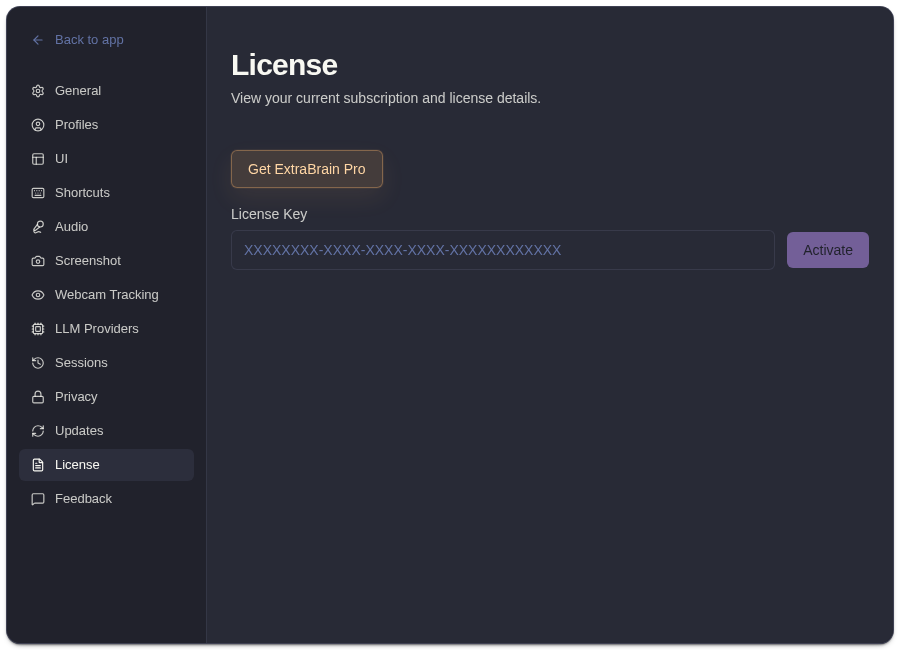
Buy Or Activate A License
Section titled “Buy Or Activate A License”- Open Settings -> License.
- Choose the monthly or lifetime Pro option if you still need to purchase.
- Paste your license key if you already have one.
- Click Activate.
- Wait for validation.
- Confirm the Pro status appears.
Use the exact license key from your purchase or account email. Avoid adding spaces before or after the key, and keep the key private like any other account credential.
After Activation
Section titled “After Activation”The License tab can show license status and a masked key. Pro can unlock advanced workflow controls such as custom profiles, reusable prompt guidance, profile-specific behavior, richer session context, post-session summaries, and premium model controls where enabled.
See custom profiles if you want reusable prompt guidance for a specific workflow, interview style, or meeting format.
Deactivate
Section titled “Deactivate”Use deactivation when moving a license to another setup or removing Pro from the current Mac.
Provider usage costs remain separate from ExtraBrain Pro. OpenAI, Anthropic, Deepgram, Claude, Codex, or custom provider costs are governed by those providers.
Related
Section titled “Related”- Create custom profiles in ExtraBrain Pro
- Compare ExtraBrain Free and Pro
- Use ExtraBrain profiles
- Billing and Pro plan
Activation Questions
Section titled “Activation Questions”Why is my ExtraBrain Pro license not activating?
Section titled “Why is my ExtraBrain Pro license not activating?”Check that the key is complete, pasted without extra whitespace, and intended for the current ExtraBrain account or device. Also confirm the Mac can reach the license validation service.
What changes after ExtraBrain Pro activates?
Section titled “What changes after ExtraBrain Pro activates?”The License tab should show active Pro status. Pro can unlock advanced workflow controls such as custom profiles, reusable prompt guidance, profile-specific behavior, richer session context, post-session summaries, and premium model controls where the current release exposes them.