
ExtraBrain Blog
Can Google Meet Detect AI Assistants? What Hosts, Admins and Gemini See
Short answer
Google documents no Meet feature that detects AI assistants on your computer. Meet sends the tab, window or entire screen you choose to present. Recordings keep the active speaker, anything presented and the chat, and Gemini's notes can add screenshots of what you present. Attendance reports show when you joined and left, and admin logs record device details, though Google hides outside guests' IP addresses. The interviewer and any proctoring software are separate questions.
What Google documents about Meet presenting, recordings, Gemini notes, attendance reports and admin logs, and what it means for an AI assistant.
Google Meet runs in your browser, which makes some candidates assume it can see everything in that browser: other tabs, extensions, maybe the apps behind it. Google’s own help pages describe something much narrower, plus two features that older advice doesn’t mention at all: Gemini notes that can include screenshots, and admin logs that treat outside guests differently.
Disclosure: ExtraBrain, which publishes this blog, makes an AI assistant used alongside Meet and other meeting apps. We checked every claim below against Google’s own help pages on November 21, 2026.
Meet sends the tab, window or screen you pick
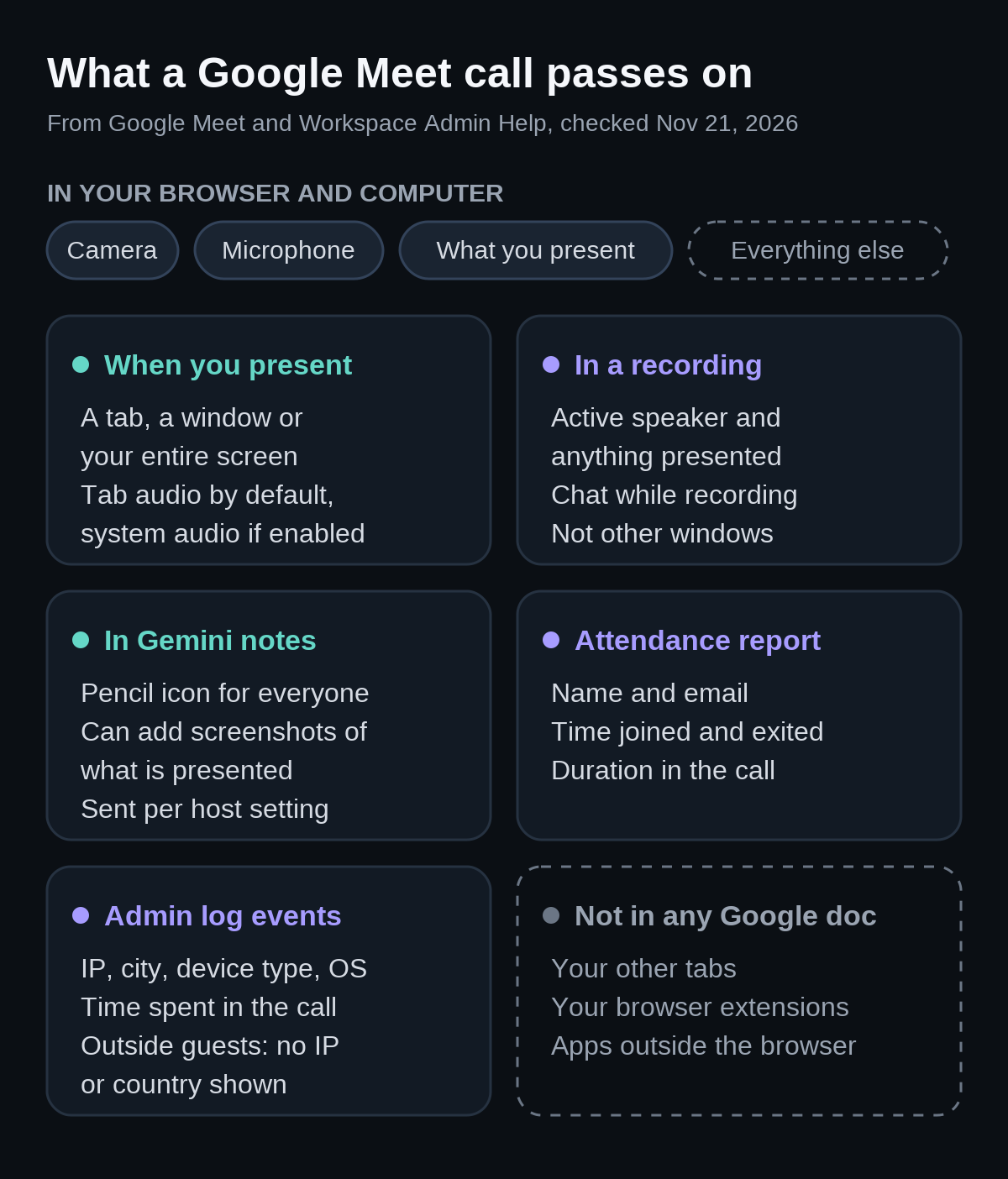
Google’s guide to presenting during a video meeting gives three choices: “A tab, A window, or Your entire screen.” The other participants get the surface you picked, not your other tabs. Google recommends presenting a new window or a specific tab rather than the meeting window itself.
Audio follows the same choice. “If you present a Chrome tab, it shares that tab’s audio by default.” For a window or your entire screen, sound is shared only if you enable Also share system audio. On macOS Sequoia, Google says Chrome also needs screen and system audio recording permission before this works.
The practical rule for an interview: if the interviewer only needs to see a document or a coding pad in one tab, present that tab. An entire-screen share sends whatever your operating system lets Chrome capture.
Many live coding tools run in a browser tab, so presenting that one tab is usually enough, and it keeps your bookmarks bar, other tabs and personal windows out of view. Google’s advice to present a new window helps here too: open the interview pad in its own window and present that, rather than the window holding your email and calendar.
Recordings keep what you present and the chat, not your other windows
Google’s page on recording a video meeting is specific: “Video recordings include the active speaker and anything presented.” Chat can be saved with it, and you can also save captions. It adds that “Other windows or notifications aren’t saved in the recording.”
People outside the host’s organization, people on the mobile app and people dialing in by phone are notified when a recording starts or stops, though they can’t control it. Recording is limited to certain Google Workspace editions, an administrator has to allow it, and someone from outside the host’s organization can record only if promoted to co-host.
Gemini’s notes can include screenshots of what you present
Gemini note-taking changes what an interviewer can review later. With Take notes for me, Google Meet informs everyone that notes are being taken, and “the pencil icon appears on all participants’ screens.” When screenshots are turned on, the meeting also shows “Gemini may improve your notes with screenshots,” and slides or other presented content can be captured if it stays on screen for at least 10 seconds.
The notes summarize the discussion. Hosts and co-hosts choose who receives them, from everyone on the invite, including people outside the organization, down to hosts only. If you present your editor for a long stretch, a screenshot of it may end up in the interviewer’s notes doc next to a summary of what you said.
Who can switch notes on matters too. Google says the meeting organizer and participants from the host’s organization can start or stop notes, and with host controls on, only the organizer, hosts and co-hosts can. As an outside candidate you usually can’t stop it yourself, so if you’d rather not be summarized, say so at the start and let the host decide.
Attendance reports and admin logs: who joined, from what, for how long
On supported Workspace editions, Meet’s attendance tracking emails the organizer a Google Sheets report with first name, last name, email, time joined, time exited and duration. That tells an interviewer when you arrived, not what you did.
Workspace administrators see more in Meet log events: participant IP address, city and country, client type, device type, OS version and how long each person stayed. Google limits this for guests. Country and IP address are not shown for external participants in any meeting, while names are shown in clear text for everyone. A candidate joining an employer’s Meet is usually that external participant.
Apps, browser extensions and other tabs don’t appear anywhere in that list of fields.
| Meet feature | What Google documents | What it means in an interview |
|---|---|---|
| Presenting | A tab, a window or your entire screen | Present the one tab you need |
| Audio | Tab audio by default; system audio if enabled | Leave system audio off unless needed |
| Recording | Active speaker, anything presented, chat | Your shared screen can be replayed |
| Gemini notes | Pencil icon; optional screenshots of presented content | Long shares can land in the notes |
| Attendance report | Name, email, join and exit times, duration | Shows when, not what |
| Admin log events | IP, location, device type, OS, duration | Outside guests’ IP and country are hidden |
The interviewer and other software matter more than Meet
Meet, as documented, passes on what you present and what you say. The rest comes from the interviewer and from any other software involved.
Interviewers tend to notice textbook definitions that don’t survive one practical follow-up. Our guide on whether interviewers can tell you’re using AI goes through more of these signals. Gemini notes and recordings make them easier to review afterward, because the interviewer can re-read your exact words.
A proctoring extension or desktop app that an employer asks you to install is a different matter, and our articles on Honorlock and Proctorio cover what those vendors document. Desktop assistants that sit outside the browser, ExtraBrain among them, may offer a setting meant to keep their window out of screen captures. Our own help center says some apps may still capture it, and a privacy setting is no substitute for knowing the rules.
The simplest move is to ask before the call: “Is it alright if I use an AI assistant for notes while we talk?” For how to use AI for preparation and notes in a Meet interview where it’s allowed, see our Google Meet interview guide and our responsible use page.
FAQ
Can Google Meet see my other browser tabs?
Not through anything Google documents. When you present a tab, Meet sends that tab. Other tabs aren’t part of the presentation or the recording.
Does Google Meet record my screen when I’m not presenting?
No. Google says recordings include the active speaker and anything presented, and that other windows or notifications aren’t saved.
Will I know if Gemini is taking notes in my interview?
Yes. Google says all participants are informed and a pencil icon appears on everyone’s screen. A separate message appears when screenshots are being added to the notes.
Can the employer see my IP address in Meet?
Google says its admin logs don’t show country or IP address for external participants. They do show your name, and the organizer’s attendance report includes your email.