
ExtraBrain Blog
Can Microsoft Teams Detect AI Assistants? What Organizers and Admins See
Short answer
Microsoft documents no Teams feature that detects AI assistants on a participant's computer. The other side sees the screen or window you present and hears every computer sound if you include audio. Recordings notify everyone and capture screen sharing. The organizer's attendance report adds join times and engagement data, and the employer's admins see device and network telemetry, with outside guests' identifying details masked. People and proctoring software are separate risks.
What Microsoft documents about Teams screen sharing, recording notices, attendance reports, admin telemetry and Copilot, and what it means in an interview.
Teams interviews feel different from Zoom ones for a simple reason: the meeting usually belongs to the employer. It runs in their Microsoft 365 tenant, under their policies, with their admins able to look at it afterward. So the question “can Teams detect an AI assistant?” really means “what can this company see about me through its own Teams setup?”
Disclosure: we make ExtraBrain, an AI assistant that runs next to apps like Teams, so this question is not neutral for us. Every claim below was checked against Microsoft’s public documentation on November 21, 2026.
Teams shows what you present and plays what your computer plays
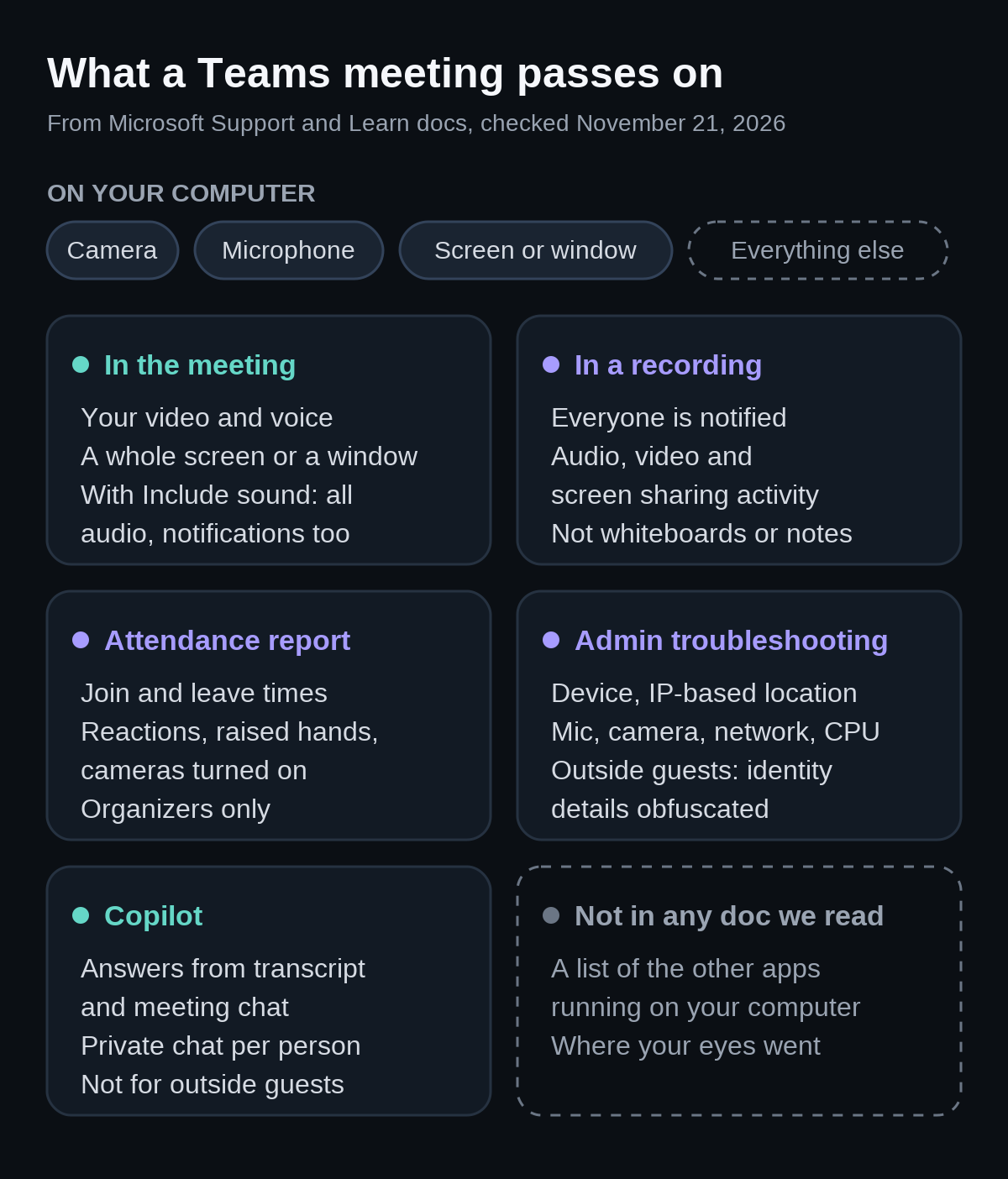
Microsoft’s guide to presenting content in Teams meetings offers two desktop choices: “Present your entire screen or a window.” A window share sends that window. An entire-screen share sends whatever is on the screen you pick. On mobile, Microsoft says screen sharing shows “your entire screen, including notifications and other activity,” and suggests Do Not Disturb so others don’t see them.
Then there’s audio. Microsoft’s article on sharing sound from your computer is blunt: “When you share, all audio from your computer, including notifications, will be heard by participants in the meeting.” If you turn on Include sound to play a demo video, every chime and every app that speaks is in the meeting too.
There’s no Teams setting that lists, flags or inspects the other apps on your computer in any of the Microsoft pages we read.
The same advice that protects your privacy protects the interview. For a coding exercise, ask whether the interviewer needs your whole screen or just the editor, and present the editor window if that’s enough. Leave Include sound off unless you’re playing something. Microsoft gives its Do Not Disturb tip for phones, and focus mode on a laptop does the same job before you present.
Recordings come with a notice and keep your screen share
According to Microsoft’s page on meeting recordings, “When you start recording a meeting, everyone will be notified automatically,” in the Teams desktop, web or mobile app. Recordings “capture audio, video, and screen sharing activity.” A few things are left out: whiteboards and annotations, shared notes, content shared by apps, videos embedded in PowerPoint Live, and more than four people’s video at once. The page also reminds organizers that depending on their region, they may need everyone’s permission before recording.
For a candidate, the practical meaning is simple. A recorded interview can be watched again by people who weren’t there, at normal speed or paused, and anything you showed on screen is in it.
The attendance report measures engagement, not your desktop
Organizers and co-organizers can open an attendance report during and after a meeting. It shows who attended and when people joined and left. Its Attendance tab adds “meeting engagement data such as total reactions, raised hands, cameras turned on, and more.” Only organizers and co-organizers can view and download it.
Nothing in that report describes your screen, your other windows or your eyes. It does record whether your camera was on, which is one more reason to agree on camera expectations before the call.
Admins see devices and network quality, with outside guests masked
Employers’ Teams admins have a troubleshooting view most candidates never hear about. Microsoft’s current guide to monitoring and troubleshooting Teams meetings says the admin center shows, for each participant, the device used, a location based on public IP, join and leave times and total duration. Session telemetry adds the names of the microphone, camera and screen share capture device, local and public IP addresses, the connection type such as Ethernet or Wi-Fi, and the CPU.
There’s an important limit for candidates. The same page says that “for federated and external participants, end-user identifiable information (EUII) is obfuscated to protect privacy.” If you join an employer’s meeting from outside its organization, expect its admins to see quality telemetry for your session with your identifying details masked.
Microsoft built this view for fixing choppy audio and dropped calls. None of its fields is a list of the software running on your device.
Copilot answers questions about what was said
If the interviewer’s company licenses Copilot, the interviewer can ask it about the meeting. Microsoft’s Copilot in Teams meetings page says it draws on “spoken content captured in the meeting transcript” along with the meeting chat, and that each person who opens it from the meeting controls gets a “private chat with Copilot.” It also says “Copilot won’t work in meetings that are hosted outside the participant’s organization,” so a candidate invited into the employer’s meeting can’t use the employer’s Copilot.
Copilot works from words, not screens. If you read an assistant’s answer aloud, it’s in the transcript, and when the meeting was transcribed, the interviewer can ask Copilot about your answers after the call.
| Teams feature | What Microsoft documents | What it means in an interview |
|---|---|---|
| Presenting | Your entire screen or a window | Share one window when that’s enough |
| Include sound | All computer audio, notifications included | Silence other apps before you share |
| Recording | Everyone notified; audio, video, screen sharing | Expect your answers to be replayed |
| Attendance report | Join and leave times, reactions, raised hands, cameras on | Camera time is visible to organizers |
| Admin troubleshooting | Device, IP-based location, network and quality telemetry | Outside guests’ identifying details are masked |
| Copilot | Transcript and chat, private per person | Your spoken words get summarized |
People and proctoring software matter more than Teams
Teams itself, as documented, sees what you present and hears what you send. What makes interviewers doubt an answer is mostly human, such as a long silence followed by a paragraph that sounds read rather than said. Our guide to what interviewers notice covers those.
Software is the other risk. A proctoring tool you’re asked to install beside Teams follows its own rules, and our articles on Honorlock and Proctorio explain what those tools say they block. Some desktop assistants, ExtraBrain among them, offer a setting meant to keep their window out of screen captures. Its own documentation says some apps may still capture it, and it does nothing about a proctor that blocks apps outright.
If you want help during a Teams interview, ask the recruiter first: “Is it alright if I use an AI assistant for notes during the call?” Our Microsoft Teams page describes how ExtraBrain runs next to Teams when that’s allowed, and our responsible use page covers the rest.
FAQ
Can Teams see which apps I have open?
Not through any feature in the Microsoft pages we read. Participants see what you present, and admin tools show device and network details, not running apps.
Does Teams notify the interviewer if I switch windows?
No Teams feature documented by Microsoft does that. If you present a single window, switching to another app doesn’t send that app to the meeting.
Can my interviewer’s company see my IP address on Teams?
Its admins see network telemetry, including IP-based location, for meetings in their tenant. Microsoft says identifiable information for federated and external participants is obfuscated, so as an outside candidate your details should be masked.
Will I know if a Teams interview is recorded?
Yes. Microsoft says everyone is notified automatically in the Teams desktop, web and mobile apps when recording starts.
Sources (checked November 21, 2026)
- Microsoft Support: Present content in Microsoft Teams meetings
- Microsoft Support: Share sound from your computer in Microsoft Teams meetings or live events
- Microsoft Support: Start, stop, and find meeting recordings in Microsoft Teams
- Microsoft Support: Manage meeting attendance reports in Microsoft Teams
- Microsoft Learn: Monitor and troubleshoot Teams meetings and calls from the Teams admin center
- Microsoft Support: Catch up on meetings with Microsoft Copilot in Teams