
ExtraBrain Blog
Can Zoom Detect AI Assistants? What Hosts and Admins Can Actually See
Short answer
Zoom has no documented feature that detects AI assistants on your computer. Its help center says hosts can't monitor your screen unless you share it, and Zoom permanently removed its attention tracker in 2020. What the other side does get is whatever you share, a recording that everyone is notified about, and an admin dashboard with your device, IP address, location and network. The people on the call, and any proctoring software you install, are a separate matter.
What Zoom's own docs say hosts and admins see: screen shares, recording notices, the admin dashboard and AI Companion, and what that means in an interview.
Ten minutes before a Zoom interview, a lot of candidates wonder the same thing: if there’s an AI assistant open on my laptop, can Zoom tell? Forum threads answer it with guesses. Zoom’s own support pages are more specific than most people expect, so this article sticks to what Zoom documents and is clear about what it doesn’t cover.
Disclosure: ExtraBrain makes an AI assistant that runs alongside meeting apps, so we have a stake in this question. We checked every claim below against Zoom’s public documentation on November 21, 2026.
Zoom says hosts can’t watch your screen unless you share it
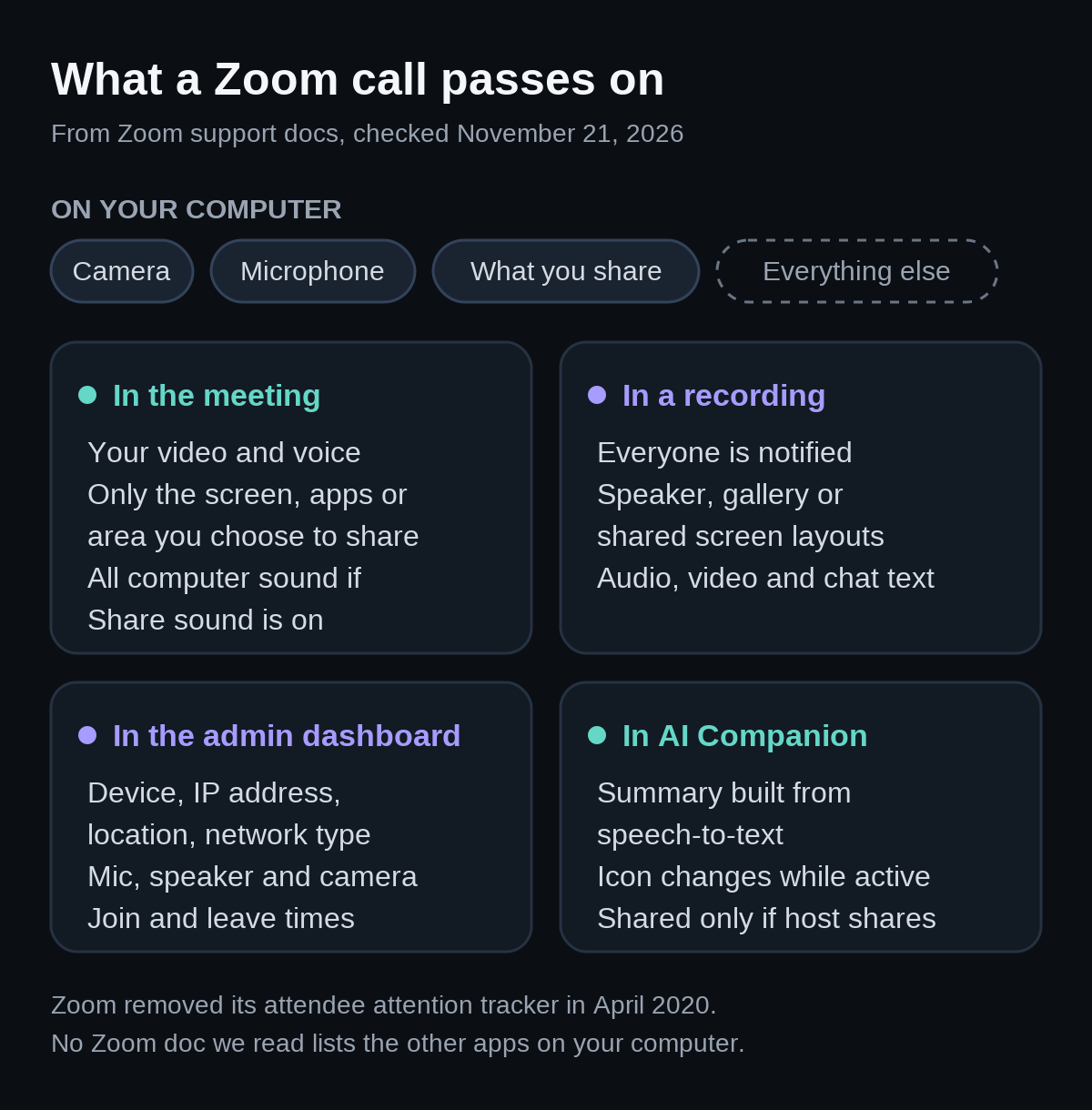
The plainest statement is in Zoom’s article on sharing your screen or desktop: “Meeting hosts cannot monitor your screen activities unless you choose to share your screen.” The same article says the sharer controls what other participants can or cannot see.
What you share is a choice you make in the share window. On Windows and macOS you can share your entire screen, one or more specific applications, or a portion of the screen marked by a green border. On Linux sessions running Wayland, Zoom says you can only share an entire desktop or a whiteboard. By default, the Zoom window itself isn’t included in a share.
The Share sound checkbox sends more than people expect. If you tick it, Zoom says “any sound played by your computer will be shared in the meeting.” That includes notification chimes and any app that reads text aloud, not only the video you meant to play.
So the honest summary is that Zoom shows the other side the window, screen or region you pick, plus your camera and microphone. A share of your whole screen sends everything your operating system lets Zoom capture.
That matters for ordinary privacy too. Coding rounds often ask for a full-screen share so the interviewer can follow you between an editor and a terminal. Before you click Share, close personal chat and email, turn on your system’s Do Not Disturb mode, and check what’s on your second monitor. If the interviewer only needs your editor, offer to share that one window instead.
The attention tracker people still mention is gone
Older guides and Reddit comments still warn about Zoom’s “attention tracking.” On April 1, 2020, Zoom CEO Eric S. Yuan listed it among privacy changes in A Message to Our Users: Zoom “permanently removed the attendee attention tracker feature,” and the post was updated the next day to stress that the removal was permanent. Nothing in Zoom’s current screen sharing documentation replaces it.
What hosts and account admins do get
Two Zoom features give the other side real data, and neither involves looking at your other apps.
Recordings come with a notice. Zoom’s page on recording notification prompts says “Zoom will always notify meeting participants that a meeting is being recorded.” Desktop and mobile users see a recording consent disclaimer, and phone participants hear an audio prompt that can’t be turned off. When a host starts a cloud recording, it can use active speaker, gallery view and shared screen layouts, and it records video, audio and chat text. Anything you share or say can be replayed later by people who weren’t in the room.
The admin dashboard shows your connection. On Business, Education or API plans, account owners and admins can open the Dashboard for meetings and webinars. For each participant it shows the name, device, IP address, location, network type, microphone, speaker, camera, data center, connection type, join and leave times, and audio, video and screen share quality. A meeting-level column records whether there was screen sharing. People from outside the account are labelled Guest.
None of the dashboard fields Zoom documents is a list of the other applications running on your computer.
AI Companion summarizes the call, not your desktop
If the interviewer turns on Zoom’s AI features, meeting summary “uses speech-to-text data to generate summary of the meeting.” An icon in the meeting changes color while AI features are active, and participants receive the summary only if the host chooses to share it.
For a candidate, this is where an assistant ends up in the record. If you read an AI-written answer aloud word for word, it goes into the transcript and the summary like anything else you say. An interviewer re-reading the summary later may notice answers that sound like nobody’s normal speech.
Zoom is the smallest part of the picture
Put the documentation together and Zoom itself turns out to be the smallest of three factors in whether AI use is noticed.
- What you share. A full-screen share sends whatever your operating system lets Zoom capture. Some desktop apps, ExtraBrain included, offer a setting meant to keep their window out of screen captures, and their own docs say it doesn’t work with every app. That’s a privacy setting, not permission to use AI where the interview doesn’t allow it.
- The people. Interviewers notice when a polished first answer falls apart under a simple follow-up question. Our guide on whether interviewers can tell you’re using AI covers those signals.
- Software you’re asked to install. A proctoring tool running beside Zoom has its own rules. Honorlock, for example, now sells interview proctoring that it says blocks unauthorized AI tools, which our article on whether Honorlock detects AI explains.
| Zoom feature | What Zoom documents | What it means in an interview |
|---|---|---|
| Screen sharing | Hosts can’t monitor your screen unless you share it | Choose a single window when that’s all you need |
| Share sound | Any sound your computer plays is shared | Mute other apps before you tick it |
| Attention tracking | Permanently removed in April 2020 | No documented window-switch alerts |
| Recording | Everyone is notified; video, audio, chat and shared screen | Assume answers can be replayed later |
| Admin dashboard | Device, IP, location, network, join times | Admins see your connection, not your apps |
| AI Companion summary | Built from speech-to-text | Your spoken words are what gets summarized |
Ask first, then set up openly
Whether you may use an AI assistant in a Zoom interview is the employer’s decision, and you can simply ask: “Is it okay if I use an AI assistant for notes during the call?” If the answer is no, close it. If the rules allow AI assistance, the setup steps in our Zoom interview assistant guide apply, and our responsible use page sets out where we draw the line.
FAQ
Can Zoom see the other apps or browser tabs I have open?
Not through anything Zoom documents. Hosts see what you choose to share, and the admin dashboard lists device and network details, not running apps.
Does Zoom tell the host if I switch windows?
Nothing in Zoom’s current documentation does that. The attendee attention tracker that used to exist was permanently removed in April 2020.
Will an AI assistant appear if I share my whole screen?
Usually anything visible on a shared screen is sent. Some apps offer a capture protection setting meant to keep their window out, but their vendors say it doesn’t work with every app. Either way, the interview’s rules decide whether an assistant should be open at all.
Does Zoom record interviews without telling me?
Zoom’s documentation says it always notifies participants when a meeting is being recorded, with an on-screen disclaimer or an audio prompt for phone users.