
ExtraBrain Blog
Invisible AI Help for Geektastic Assessments: The Responsible ExtraBrain Guide

Use ExtraBrain for Geektastic prep, coding practice, and allowed live support without crossing assessment rules or privacy boundaries.

Geektastic assessments feel different from many online coding tests because the platform leans heavily on human-centered review. Instead of relying only on browser lockdowns, webcam checks, or automated scoring, Geektastic-style hiring workflows often ask experienced engineers to evaluate the code, the reasoning, and the fit between a candidate’s submission and the role. That makes the usual search for “how to bypass Geektastic” less useful than it looks.
The real question is how to get AI help around a Geektastic assessment without breaking the rules, weakening your own understanding, or creating a submission you cannot defend. ExtraBrain is a free, local-first desktop AI interview assistant and meeting copilot for Mac with live transcription, screen-aware context, local Gemma 4 on-device AI where installed and compatible, bring-your-own AI providers, and clear privacy controls. It can help you prepare for coding interviews, system design rounds, behavioral questions, and post-session review. It should be used only where the interview, employer, school, workplace, meeting, and platform rules allow AI assistance, transcription, screenshots, or notes.
This guide keeps the practical Geektastic search intent intact. It explains what makes Geektastic hard to game, what AI workflows are useful for preparation, how to set up ExtraBrain responsibly, and why copying generated answers is a bad strategy when human engineers will review the work.
Key Takeaways
- Geektastic-style assessments are difficult to fake because human reviewers can evaluate code style, reasoning, maintainability, and explanation quality.
- Invisible AI should mean a quiet, private, desktop-based preparation workflow, not hidden rule-breaking during a closed assessment.
- ExtraBrain is useful before a Geektastic assessment for coding drills, system design practice, transcript review, and realistic explanation training.
- In live sessions where AI help is explicitly allowed, ExtraBrain can support live transcription, screen-aware context, answer outlines, debugging explanations, and follow-up questions.
- If Geektastic, the employer, or the recruiter forbids outside help during the live assessment, use AI only before or after the assessment.
Why Geektastic Assessments Are Hard to Outsource
Many coding platforms can be treated like pure input-output challenges. Geektastic is harder because the final decision may involve engineers looking at the quality of the submission. That matters because AI-generated code can pass a few sample tests while still looking suspicious, brittle, or disconnected from the candidate’s normal reasoning.
A reviewer can notice whether the code is idiomatic. A reviewer can notice whether the architecture is too complex for the task. A reviewer can notice whether the explanation matches the implementation. A reviewer can notice whether the candidate can defend the tradeoffs in a follow-up conversation.
That is why a hidden chatbot workflow is not a durable plan. Even if a tool gives you a plausible solution, the assessment may still reveal whether you understand the problem. For Geektastic, the safer and stronger strategy is to use AI to improve your actual preparation, not to impersonate expertise in the final submission.
Choosing AI Help for Geektastic Prep
Compare the workflow, not just the model name
Candidates often start by asking which model is best for Geektastic. That is understandable, but it is incomplete. The best preparation setup is not only about raw model capability. It is about whether the workflow helps you understand the prompt, reason through edge cases, write maintainable code, explain tradeoffs, and review mistakes afterward.
ExtraBrain supports local Gemma 4 on-device AI where installed and compatible, Anthropic, OpenAI, custom OpenAI-compatible endpoints, Claude Subscription, and Codex Subscription. It also supports local Parakeet transcription and optional Deepgram. The right setup depends on your hardware, privacy needs, assessment rules, and provider preferences.
| Option | Best use in Geektastic prep | Watch out for |
|---|---|---|
| Local Gemma 4 where installed and compatible | Private practice, local prompts, lightweight coaching, and review on supported Macs | Availability depends on installation, compatible hardware, and customer environment. |
| External AI providers | Stronger reasoning, coding explanations, and broader model choice | Selected prompts, transcript text, screenshots, audio, or context may leave your device depending on configuration. |
| Custom OpenAI-compatible endpoints | Team-controlled or self-managed provider setups | You still need to verify data handling, reliability, and assessment-policy fit. |
| General browser chatbots | Standalone study, practice questions, and explanations | Tab switching, copy-paste habits, and generic answer style can become bad test-day habits. |
| Desktop interview copilots | Live context, transcripts, screen awareness, and review where allowed | They must be used only where the session rules permit AI assistance, screenshots, or notes. |
Features that actually matter
For Geektastic prep, useful AI features are not the ones that promise magical undetectability. Useful features make your own reasoning clearer and your practice more realistic.
- Live transcription helps you review how you explain a solution out loud.
- Screen-aware context helps with diagrams, code snippets, and prompts where screenshots are allowed.
- Provider control lets you choose local or external AI based on the privacy posture you need.
- Local-first options reduce unnecessary data sharing when local Parakeet transcription and local Gemma 4 are installed and compatible.
- Post-session review helps you identify weak explanations, skipped edge cases, and unclear tradeoffs.
- Keyboard shortcuts and a desktop workflow reduce friction during permitted practice or allowed live support.

How Geektastic-Style Reviews Discourage AI Cheating
1. Expert manual code review
Geektastic-style assessments are often built around expert review. That means the final assessment may look beyond whether the code runs. Reviewers can evaluate readability, architecture, naming, maintainability, testing style, and whether the implementation matches the stated reasoning.
AI-generated solutions often fail this kind of review in subtle ways. They may over-engineer a simple task. They may use abstractions the candidate would not normally use. They may include comments that explain the obvious while skipping the hard parts. They may solve the happy path and miss messy real-world input.
During preparation, use ExtraBrain to practice explaining every meaningful line of code. If you cannot explain a branch, data structure, or tradeoff in plain language, you are not ready to submit it as your own work.
2. Challenges designed around real-world ambiguity
Geektastic-style tasks often avoid pure LeetCode-style puzzles. They can include messy data, business rules, partial requirements, edge cases, or architectural choices. That makes blind copy-paste weaker because the prompt may require judgment rather than recall.
A practical preparation routine should include:
- Turning ambiguous requirements into clarifying assumptions.
- Naming edge cases before writing code.
- Explaining why one data structure fits better than another.
- Testing with small, weird, and boundary-case inputs.
- Writing a short note about what you would improve with more time.
ExtraBrain can help generate practice scenarios, critique your assumptions, and review your explanation after you solve the problem yourself.
3. Anti-search and session controls
Some assessment environments restrict copying, pasting, searching, scraping, tab switching, or external browsing. The exact setup depends on the employer and assessment configuration. Do not assume that a behavior is safe just because another candidate said it worked somewhere else.
If the instructions say no outside resources, do not use outside resources during the live assessment. If documentation is allowed, clarify what type of documentation is allowed. If AI assistance is allowed, clarify whether screenshots, transcription, prompts, notes, or external providers are permitted.
4. Plagiarism and similarity review
Code can be compared against public examples, previous submissions, common generated patterns, and known templates. Even when automated tools are imperfect, they can create questions that lead to human review.
The better answer is not to obfuscate AI code. The better answer is to write code you understand, test it honestly, and explain it naturally. Changing variable names in generated code does not create real ownership. Understanding the problem and choosing your own implementation does.
Preparing Your Geektastic Setup with ExtraBrain
Recreate the assessment environment
Before a real Geektastic assessment, practice in a clean setup. Use the same Mac, keyboard, browser, editor, and internet connection that you expect to use. Close messaging apps, unrelated tabs, notifications, and background tools you do not need. Use one monitor if the assessment allows only one monitor. Put your phone away unless the instructions explicitly permit it.
This is not only about avoiding flags. It is about reducing cognitive load. The fewer moving parts you manage during the assessment, the more attention you can spend on the problem.
Configure ExtraBrain for preparation
ExtraBrain is available for macOS today, including Apple Silicon and Intel Macs. Windows and Linux are planned. For preparation, configure it around the privacy posture and provider workflow you actually want.
Use local Parakeet transcription plus local Gemma 4 on-device AI where installed and compatible if you want a fully local posture with no external provider requests. Use external providers only when you understand that selected prompts, transcript text, screenshots, audio, or context may be sent to those providers depending on your configuration. Review provider settings before practicing with sensitive job-search material, employer prompts, private code, or customer examples.

Practice the workflow before test day
Do not make the real assessment your first test of the workflow. Run mock sessions with timed coding prompts. Practice capturing allowed context. Practice reviewing transcripts afterward. Practice explaining the solution out loud without reading a script.
If a live session allows AI support, the workflow should feel boring before the real interview starts. If the live session does not allow AI support, the workflow belongs in your preparation and debrief only.
A Responsible Geektastic Practice Workflow
Step 1: Build a role-specific practice map
Start with the role description and any recruiter guidance. Create a list of likely skill areas. For a backend role, that might include APIs, databases, caching, concurrency, error handling, and testing. For a frontend role, that might include JavaScript, state management, forms, accessibility, async data loading, and browser behavior. For a data role, that might include SQL, aggregation, joins, Python data structures, data cleaning, and interpretation.
Ask ExtraBrain to turn those areas into practice prompts. Keep the assistant focused on coaching and critique.
Act as a coding assessment coach for a candidate preparing for a Geektastic-style review.Create practical coding prompts based on this role description.After I solve each prompt, critique my edge cases, code clarity, explanation, and test coverage.Do not provide deceptive tactics or advice that violates assessment rules.This keeps the value where it belongs: improving your ability before the assessment.
Step 2: Solve first, then ask for critique
Work through the prompt yourself before asking AI for a solution. Write the brute-force approach. Name the constraints. Pick a data structure. Implement the first version. Run sample tests. Then ask ExtraBrain to review your code for clarity, complexity, missed edge cases, and explanation quality.
That sequence is slower than copying an answer. It is also much more valuable because it builds the skill Geektastic-style reviews are designed to measure.
Step 3: Explain the solution aloud
Geektastic-style review can expose candidates who can write or submit code but cannot explain it. Practice the explanation as if a senior engineer were reviewing your work.
Cover these points:
- What the problem is asking.
- What assumptions you made.
- Why the chosen data structure fits.
- What the main edge cases are.
- What the time and space complexity are.
- What you would improve with more time.
Use ExtraBrain’s transcript review to find vague phrases, skipped assumptions, and places where you jumped from requirement to implementation too quickly.
Step 4: Practice debugging under pressure
Real assessments rarely fail in elegant ways. You might see a failing sample test, a runtime error, a timeout, or an output mismatch. Practice debugging without panic.
Use a repeatable loop:
- Reproduce the failing case.
- State what you expected.
- State what actually happened.
- Identify the smallest suspicious block.
- Add a targeted test.
- Fix the root cause.
- Explain why the fix works.
ExtraBrain can help after the attempt by asking you to explain the bug and the fix. That builds the kind of reasoning a human reviewer can trust.
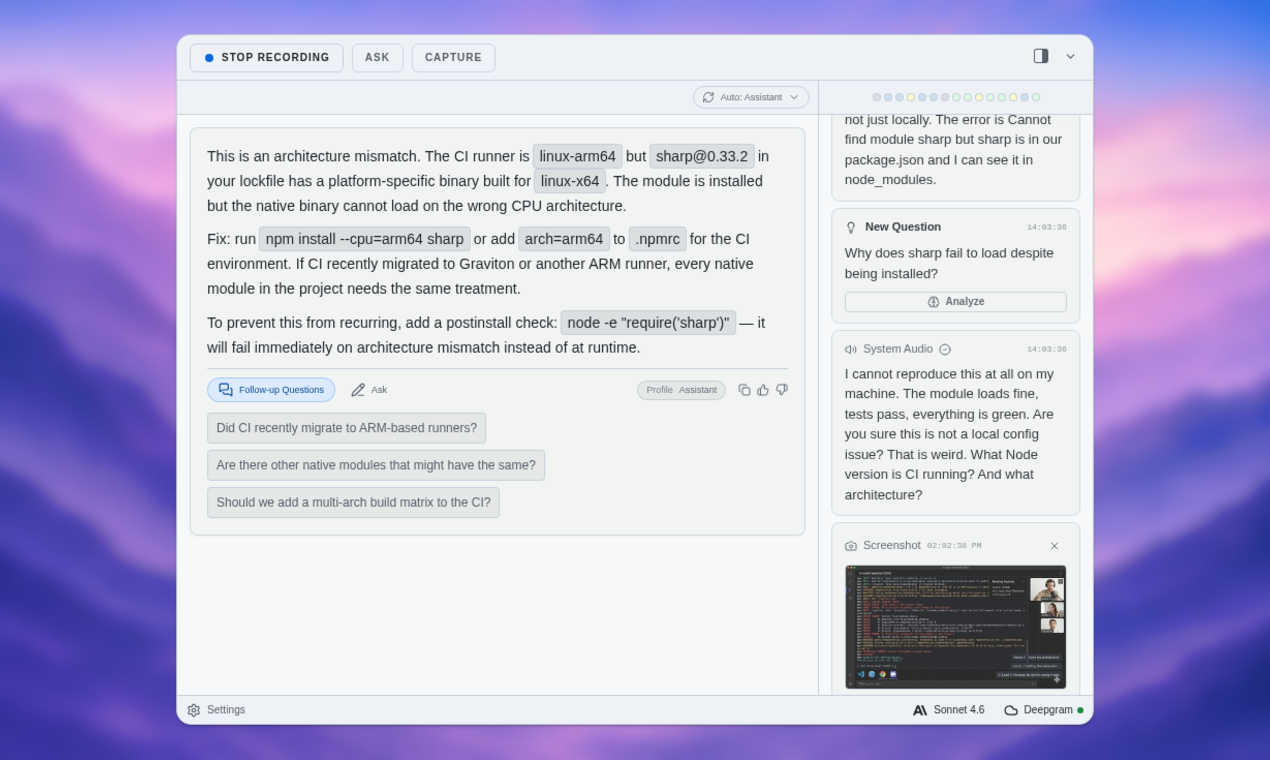
Using ExtraBrain During a Geektastic Session Where AI Is Allowed
Use outlines, not replacement answers
Some interviews, pair-programming sessions, workplace calls, or practice rounds may explicitly allow AI support. In those settings, ExtraBrain can help you stay organized without taking ownership away from you.
A healthy live workflow looks like this:
- Listen to the prompt carefully.
- Restate the problem in your own words.
- Capture transcript or screen context only where allowed.
- Ask for an outline, edge-case checklist, or debugging hint.
- Write the code yourself.
- Explain your tradeoffs in your own voice.
- Use follow-up prompts to test your reasoning.
This is different from reading a generated answer. The candidate still owns the reasoning and the final work.
Keep screen-aware context within the rules
Screen-aware context can be useful when an allowed prompt includes code, diagrams, terminal output, or a system design sketch. ExtraBrain can help connect visible context with the live transcript and your notes.
Use that capability only where screenshots, screen context, or AI assistance are permitted. If the assessment rules prohibit them, do not use them during the live assessment. Use ExtraBrain before the session for practice and afterward for debrief instead.
Be precise about “invisible”
ExtraBrain is designed to stay hidden from screen sharing and screen recording on major meeting tools, while users remain responsible for following all rules. That feature is useful for legitimate private notes, local-first meeting workflows, and allowed interview support. It is not permission to use prohibited assistance in a closed assessment.
The safest way to avoid detection problems is to stay inside the rules. If the rules allow AI, use it transparently according to those rules. If the rules do not allow AI, practice beforehand and leave the tool out of the live assessment.
What Not to Do on Geektastic
Do not copy generated code you cannot defend
Human reviewers can ask why your implementation is structured a certain way. They can ask why you chose a map instead of sorting. They can ask what happens with empty input. They can ask what you would do if the dataset were much larger.
If you copied the code without understanding it, those follow-ups become painful. A correct-looking answer can become a credibility problem.
Do not use hidden devices or remote helpers
Second devices, remote collaborators, proxy test-takers, and off-camera assistance can violate assessment rules and employer trust. They also make your behavior less natural. You may pause oddly, look away repeatedly, type in bursts, or struggle to explain decisions you supposedly made.
Do not try to reverse engineer hidden tests
Hidden tests exist to check whether the solution generalizes. Submitting artificial probes, repeated near-identical attempts, or code designed to infer hidden inputs is not normal debugging. It can look like a deliberate attempt to extract assessment information.
Prepare for hidden tests by learning edge-case habits instead:
- Empty inputs.
- Single-element inputs.
- Duplicates.
- Negative numbers.
- Large constraints.
- Nulls or missing values where relevant.
- Cycles in graphs.
- Timeouts from quadratic solutions.
- Tie cases in sorting or ranking.
Do not “humanize” AI output after the fact
Changing variable names, moving code blocks, or adding casual comments does not make generated work yours. It may make the code less consistent and harder to explain.
Use AI to critique and teach. Use your own judgment to implement. Then use AI again to check clarity, edge cases, and explanation quality.
Refining Your Own Solution Before Submission
The useful version of the old “refine AI output” workflow is to refine your own work. Before you submit, review the code like a teammate would.
| Review step | What to check |
|---|---|
| Readability | Can another engineer follow the control flow without guessing? |
| Naming | Do variable and function names explain intent? |
| Edge cases | Did you test small, empty, duplicate, and boundary inputs? |
| Complexity | Does the algorithm fit the input constraints? |
| Error handling | Are invalid or unexpected inputs handled where required? |
| Explanation | Can you describe the solution without reading the code line by line? |
If you use ExtraBrain in preparation, ask it to critique your final version in those categories. If the live assessment rules do not allow AI, do this kind of critique during mock assessments before test day.
Submitting Geektastic Answers Carefully
Submission is not a formality. It is the moment when rushed mistakes become permanent.
Before submitting, run the visible tests. Review formatting. Check for accidental debug output. Remove irrelevant comments. Make sure the code solves the prompt you were actually asked, not a similar prompt you practiced. If an explanation is required, write it in your own words.
A strong explanation usually includes:
- The core approach.
- The main data structure.
- The time and space complexity.
- The edge cases considered.
- One limitation or future improvement if relevant.
Do not paste a polished AI explanation that uses terms you would not normally use. A simple, accurate explanation is stronger than a generic one.
Risks of Cheating on Geektastic in 2026
Disqualification and reputation damage
If an assessment owner decides that you used prohibited help, copied code, or misrepresented your work, the result can be disqualification. It can also affect the relationship with the recruiter, employer, school, or platform.
The immediate cost is losing one opportunity. The longer-term cost is being unable to trust your own result. If the process gets you into a role you cannot perform, the stress does not end after the assessment.
Lack of real understanding
AI can make weak understanding look polished for a moment. It cannot reliably carry you through follow-up questions, architecture tradeoffs, debugging, or a real job.
Watch for these warning signs during practice:
- You can read the solution but cannot recreate it.
- You use terms like “memoization” or “idempotency” without being able to define them.
- You cannot explain why a test case fails.
- You depend on a model to choose the first approach.
- Your spoken explanation sounds nothing like your normal voice.
If you notice those signs, slow down. Ask ExtraBrain for smaller practice problems, conceptual explanations, and critique of your reasoning instead of full answers.
Ethical and professional consequences
Assessments are imperfect, but cheating makes them worse for everyone. It undermines trust in credentials, raises the burden on honest candidates, and pushes employers toward harsher monitoring.
Responsible AI use is different. Using AI to practice, review, organize notes, and understand mistakes can make you a stronger candidate without misrepresenting your ability. That is the line worth keeping.
ExtraBrain Privacy Notes for Assessment Prep
Interview and assessment prep can include sensitive data. You may use your resume, private project stories, employer prompts, code snippets, customer examples, salary context, or notes from recruiter calls.
ExtraBrain is built as a local-first Mac desktop app with clear privacy controls. A fully local ExtraBrain posture requires local Parakeet transcription plus local Gemma 4 on-device AI where installed and compatible, with no external provider requests. When external providers are selected, prompts, transcript text, screenshots, audio, or context may leave the device depending on configuration.
Review the ExtraBrain privacy and data flow pages before using sensitive material. Also review the responsible use guidance before using AI in any interview, workplace, school, or assessment context.
FAQ
Can I use ExtraBrain during a Geektastic assessment?
Only if the assessment, employer, recruiter, school, or platform rules allow AI assistance, transcription, screenshots, or notes. If the rules forbid outside help or are unclear, use ExtraBrain for preparation and review instead of the live assessment.
Can Geektastic detect AI-generated code?
Any platform or employer review process may look at code similarity, timing, style, explanation quality, and follow-up performance. Geektastic-style human review makes shallow AI copying especially risky because engineers can evaluate whether you understand the submitted work.
What is the best AI workflow for Geektastic prep?
The best workflow is to solve first, ask for critique second, and practice explaining the solution aloud. ExtraBrain can help generate realistic prompts, review transcripts, identify missed edge cases, and support coding or system design practice on Mac.
What should I do if copy-paste or web search is blocked?
Follow the assessment rules. Blocked copy-paste or search usually means the assessment owner does not want that workflow used during the live test. Practice those constraints before test day so the clean environment feels normal.
Is invisible AI safe for Geektastic?
Invisible AI is safe only when it is used within the rules. ExtraBrain is designed to stay hidden from screen sharing and screen recording on major meeting tools, but that does not override assessment instructions. Use it for allowed live support, private preparation, local-first notes, and post-session review.
Is ExtraBrain an AI second brain for interviews?
ExtraBrain can work as a focused AI second brain for interviews and meetings. It gives you a second-brain-style workspace for live sessions, transcripts, notes, screen context, and review, without trying to replace broad note-taking databases.