
ExtraBrain Blog
System Design Interview Copilots Compared: Session Limits, Diagrams and Screen Reading
Short answer
Several copilots say they handle system design, but they differ on three things a design round needs: a session long enough for the round, a way to read the diagram on your screen, and help structuring trade-offs. On November 21, 2026, free sessions ran 15 minutes on Verve AI and Sensei AI, ParakeetAI drew small flowcharts, Final Round AI read problems on screen, and ExtraBrain's free app had no session limits.
Which interview copilots document system design support, how their session caps fit a 55-minute design round, and which read or draw diagrams.
ExtraBrain makes a competing product; we checked every claim below against public sources on November 21, 2026.
Amazon’s SDE II interview prep page describes a loop of four 55-minute interviews and tells candidates to expect at least one question on software systems design. It also links a guide to interviewing in Bluescape, a virtual whiteboard. That’s the shape of the problem for any copilot: close to an hour, mostly talking, with a diagram growing on the screen.
This post compares how interview copilots handle that shape. If you want the practice routine itself, our guide to using an AI interview copilot for system design covers it step by step.
One rule first. Many employers forbid live AI help in interviews. LinkedIn’s candidate guide asks people not to use AI during live interviews unless the recruiting team has said in advance that it is part of the format, and it encourages AI for preparation and mock interviews. Everything below applies to mock rounds, and to real rounds only where the employer allows it.
Three things a design round asks of a copilot
A session that outlasts the round. A copilot that stops at minute 15 is useless for a 55-minute design conversation. Free tiers are where this bites.
A way to read the diagram. Requirements live in the conversation, but your design lives on a whiteboard or in a drawing tool. The copilot needs to see it, which means screen or region capture and an image-capable model.
Structure, not answers. Amazon’s page lists what it evaluates in design: practicality, accuracy, efficiency, reliability, optimization and scalability, and it says “you should ask questions to complete and validate your design.” The useful nudge is the clarifying question you forgot or the failure mode you haven’t covered.
Session length is where free tiers fall short
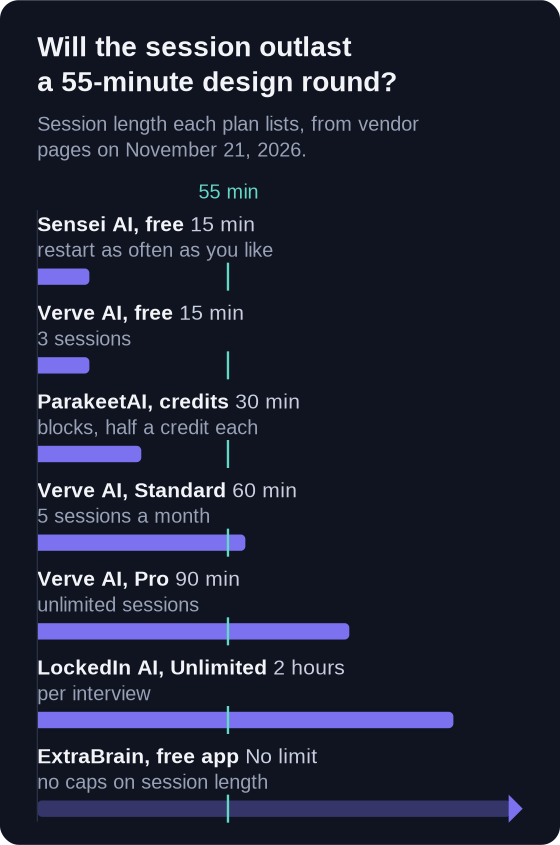
Verve AI’s free plan gives three 15-minute sessions, and its Standard plan five 60-minute sessions a month; Pro runs unlimited 90-minute sessions. Sensei AI lets you start as many free sessions as you like, but each ends after 15 minutes. ParakeetAI charges half a credit per 30-minute call. LockedIn AI’s Unlimited plan lists support for up to 2 hours per interview. Our free core app has no session limits, so a full mock design round fits without a paid plan.
Do the arithmetic before you pick a plan for practice. A 15-minute session covers about a quarter of one round, so it ends before the detailed design and the follow-up questions. Verve’s Standard plan works out to five full mock rounds a month. ParakeetAI sells time in 30-minute blocks of half a credit, so one 55-minute mock would take two of them.
How each copilot handles system design
The table quotes what each vendor’s own pages said about system design on November 21, 2026. Where a page says nothing about diagrams, we say so rather than guess.
| Copilot | What the vendor says about system design | Diagrams and screen | Cheapest way to start |
|---|---|---|---|
| ExtraBrain | Built-in System Design profile for architecture guidance, trade-offs and scalability | Captures the active window, whole screen or a selected region | Free app, no session limits |
| Final Round AI | CoPilot “recognizes behavioral, coding, system design and case questions”; System Design practice scenario | Screen Help “reads the problem on your screen” | No free live sessions; $83.33/mo quarterly |
| Verve AI | System design is one of 20 interview domains on Pro | Not described on the pricing page | Free, three 15-minute sessions |
| ParakeetAI | Design answers end with “a small flowchart” in Script + bullets or Full script formats | Draws a diagram for you to copy | Free trial; credits from €10.20 |
| LockedIn AI | Live and coding interview modes | ”Drag and select any part of your screen for instant analysis” | Credits $49.99/mo, billed every 3 months |
| Interview Coder | ”Support for all kinds of interviews (leetcode, system design, etc.)” | Not described on the pricing page | Free download; AI needs a $299/mo or $799 plan |
Two approaches stand out. ParakeetAI generates a flowchart for you, which helps if you freeze on what to draw but can also tempt you to copy a diagram you can’t defend. Final Round AI and our app take the other direction, reading what you’ve already drawn, which keeps the design yours and makes the help depend on how legible your whiteboard is.
What no copilot does for you in a design round
The round is built to test the part a tool can’t supply. Interviewers push on your choices: why a queue instead of direct writes, what breaks at ten times the traffic, which number in your estimate you’d check first. LinkedIn’s guide says candidates should expect “follow-up questions” to understand “your thinking, trade-offs made, and your real-world experience.” A suggestion you read but can’t defend falls apart on the second question.
Timing is the other limit. A design conversation moves fast, and a suggestion that arrives while you’re mid-sentence pulls your eyes off the interviewer and your drawing. That’s why the most useful setting for practice is short output: one missed requirement or one risk to mention, not a paragraph. Use mock rounds to find the level of help you can absorb without losing the thread, and treat anything longer as material for the review afterward.
Finally, a copilot hears and sees only what reaches your computer. Hints the interviewer sketches on their own screen, or says off-mic, never make it into the transcript.
Set up a mock design round before the real one
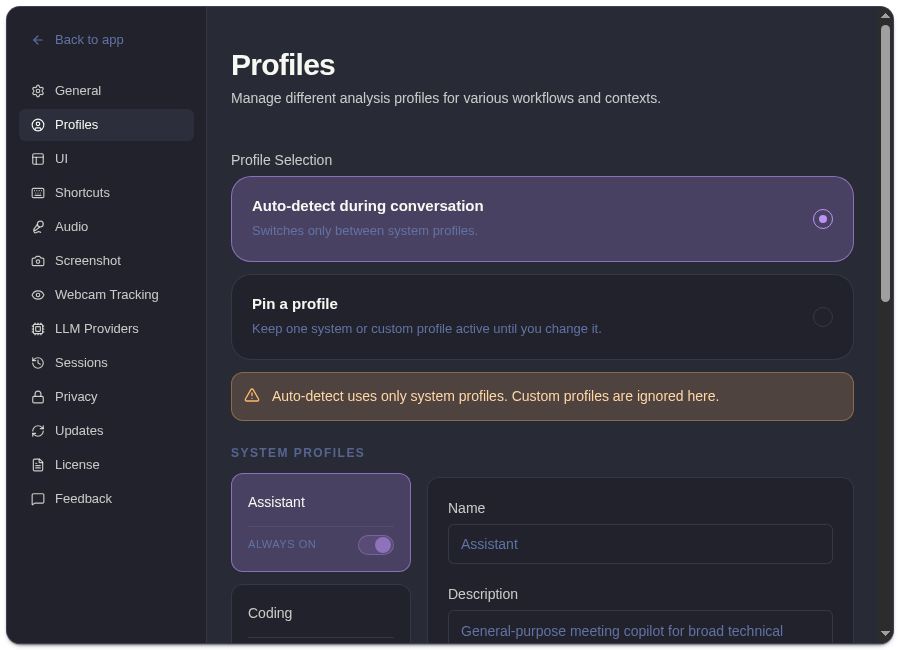
In our app, the System Design profile sits alongside Coding, Behavioral and the others, and you can pin it so it doesn’t switch mid-session.
A short setup checklist that works with any copilot:
- Pick an image-capable model. Our provider guide warns that a text-only endpoint can’t handle the screenshot workflow.
- Add your own reference notes, such as capacity-estimate rules of thumb or a past project’s architecture. Our app searches imported TXT, Markdown and PDF documents when they’re relevant.
- Rehearse in the whiteboard tool you’ll actually use, and capture a region rather than the whole screen so small labels stay readable.
- Run the full 55 minutes once. Short demos hide session caps, latency and how distracting the suggestions are while you talk.
- Review the transcript afterward for the questions you didn’t ask. That review is where most of the improvement comes from, and our breakdown of an AI on a live system design prompt shows what to look for.
FAQ
Which AI copilot is best for system design interviews?
It depends on how you practice. For full-length mock rounds on a budget, a copilot without session caps matters most. If you want a diagram drawn for you, ParakeetAI documents that. For reading your own diagram, look for screen or region capture.
Can a copilot see my whiteboard during a design interview?
Only through a screenshot or screen capture of the drawing tool on your computer, and only with an image-capable model. It can’t see a physical whiteboard or a shared screen it isn’t capturing.
Should a copilot draw the diagram for me?
For practice, a generated diagram is a useful answer key to compare against after you’ve drawn your own. In a live round it’s risky: the interviewer will ask why each box exists, and a diagram you copied is the hardest kind to explain.
Are copilots allowed in system design interviews?
Often not. Check the employer’s rules; LinkedIn, for example, asks candidates not to use AI in live interviews unless told in advance that it’s part of the format.
How long is a system design interview?
It varies by company. Amazon’s SDE II page describes 55-minute interviews; ask your recruiter for yours.
Sources (checked November 21, 2026)
- SDE II interview prep, Amazon Jobs - four 55-minute interviews, at least one systems design question, evaluation objectives, Bluescape guide
- Responsible AI usage guide, LinkedIn Careers - no AI in live interviews unless the recruiting team allows it, follow-up questions on trade-offs
- Pricing, Verve AI - session counts and lengths by plan, system design among 20 domains
- Homepage, Final Round AI - question recognition, System Design practice scenario, Screen Help
- Plans, Final Round AI - Quarterly price, no free live sessions
- Pricing and FAQ, ParakeetAI - flowcharts for system design answers, half a credit per 30-minute call
- Pricing, LockedIn AI and desktop app, LockedIn AI - up to 2 hours per interview, drag-to-select screen analysis
- FAQ, Sensei AI - free sessions end after 15 minutes
- Pricing, Interview Coder - system design listed among supported interviews, $299 and $799 plans
- Our docs: what the app does, profiles and plan and billing