
Use ExtraBrain Profiles
Profiles tell ExtraBrain what kind of live help to prioritize. Open Settings -> Profiles to choose automatic or pinned profile behavior.
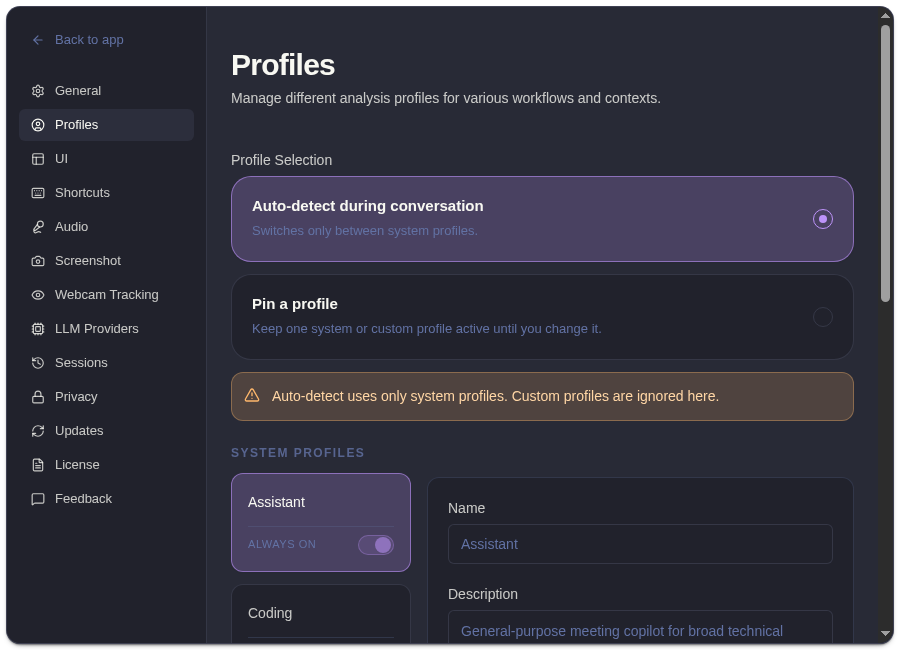
System Profiles
Section titled “System Profiles”| Profile | Use It For |
|---|---|
| Assistant | General live help across mixed conversations. |
| Coding | Implementation questions, debugging, code review, and algorithm discussion. |
| System Design | Architecture, tradeoffs, scalability, reliability, and product constraints. |
| Behavioral | Experience stories, STAR-style structure, conflict, leadership, and teamwork. |
| Meeting | Summaries, decisions, risks, follow-ups, and live meeting contribution. |
Auto Vs Pinned
Section titled “Auto Vs Pinned”| Mode | Behavior |
|---|---|
| Auto | ExtraBrain chooses among enabled system profiles based on detected context. |
| Pinned | ExtraBrain stays on the profile you selected until you change it. |
Auto mode is useful when a session moves between topics. Pinned mode is better when the whole session has a clear format, such as a coding interview or system design round.
Managing Profiles
Section titled “Managing Profiles”- Disable system profiles you do not want auto-detection to use.
- Pin a profile when you want stable response style.
- Cycle profiles from the main window when you need to switch quickly.
- Use custom profiles when Pro is active and you need reusable prompt guidance beyond the built-in profiles.
Related
Section titled “Related”- Set up general context and coding language
- Create custom profiles in ExtraBrain Pro
- Compare Free and Pro workflow controls
- Use follow-up questions
Common Questions
Section titled “Common Questions”Should I use Auto or Pinned mode?
Section titled “Should I use Auto or Pinned mode?”Use Auto for mixed meetings and exploratory sessions. Use Pinned when the session format is predictable and you want consistent answers.
Are custom profiles used in Auto mode?
Section titled “Are custom profiles used in Auto mode?”No. Auto-detect uses system profiles. Custom profiles are used when selected or pinned.