
ExtraBrain Blog
Local and Offline Interview Copilots: What Can Actually Stay on Your Computer
Short answer
No live interview copilot is fully offline, because the video call itself needs the internet. What can stay local is the processing: speech-to-text with an on-device model such as NVIDIA Parakeet, and answers from a local model such as Gemma. In ExtraBrain, Parakeet transcription runs on your computer and local Gemma runs on compatible Macs in direct-download builds. The hosted copilots we checked list only cloud models.
What a local or offline interview copilot can keep on your machine: on-device transcription, a local model, and the parts that still need a network.
ExtraBrain makes a competing product; we checked every claim below against public sources on November 21, 2026.
People who search for an offline interview copilot usually mean something specific: nothing about this conversation should leave my laptop except the call itself. That’s a reasonable thing to want when the transcript holds your salary history, your current employer’s projects and every hesitation you made. It is also achievable, with a few honest caveats.
The call needs the internet. The processing doesn’t
A live copilot does three jobs: turn speech into text, send that text (and sometimes a screenshot) to a model that writes a suggestion, and save the session. The video call obviously runs over the network, but each of those three jobs can run on your own machine or on someone else’s servers.
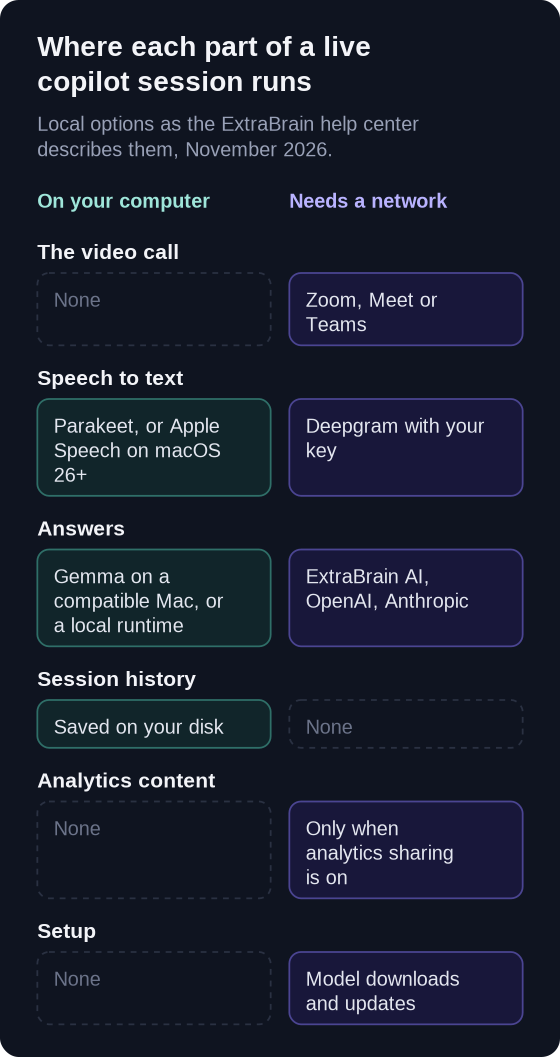
So “offline” in practice means local processing during a call that is online. The question to ask any vendor is where the audio goes, where the transcript goes, and where the model runs.
Local speech-to-text is the easy part
On-device transcription is mature. NVIDIA publishes its Parakeet speech models openly; the current model card for parakeet-tdt-0.6b-v3 describes a 600-million-parameter model covering 25 European languages under a CC BY 4.0 license. On Macs, Apple’s SpeechAnalyzer framework brings on-device recognition to macOS 26.
In our app, the transcription settings offer three choices. Local Parakeet transcribes on your computer after a one-time model download, with no API key. Apple Speech works on a compatible Mac with macOS 26 or later and an installed language asset. Deepgram sends audio to its cloud with your own key. The help page adds a caveat worth repeating: local transcription keeps speech-to-text local, but a cloud AI provider can still receive the transcript text.
One naming trap: ParakeetAI, the interview app, is a different thing from NVIDIA’s Parakeet model. Its pricing section says it is “Powered by OpenAI, Anthropic & Google,” which are cloud models.
A local model is the hard part
The answering model is where most copilots go to the cloud, because small local models are slower and less capable than frontier ones. Google’s Gemma 4 family includes compact E2B and E4B models built for efficiency, alongside larger 12B to 31B models aimed at personal computers.
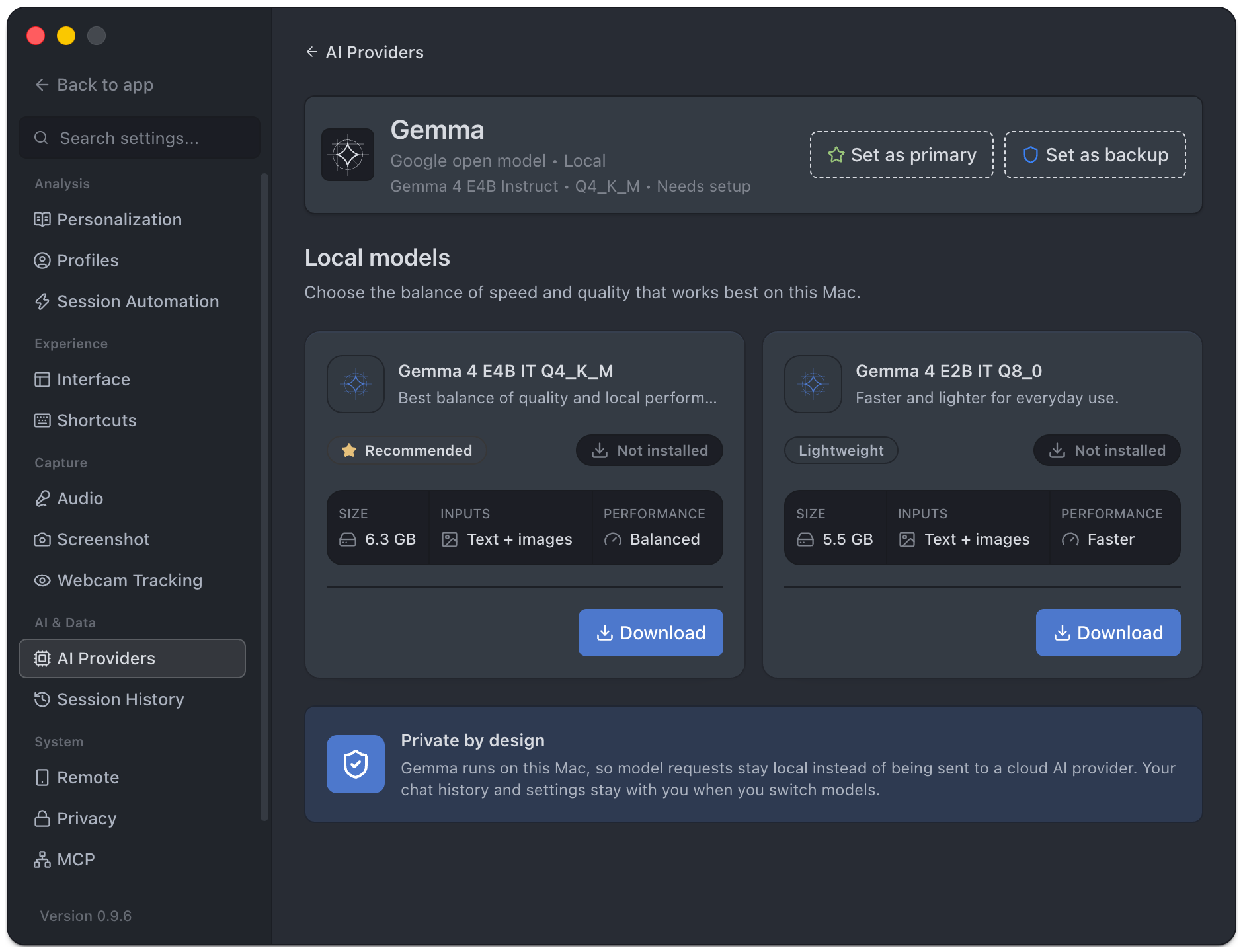
In our app, local Gemma is an advanced provider that runs analysis on your Mac. The Gemma help page is specific about the limits: it is available in supported direct-download builds and absent from the Mac App Store build, downloads need network access and disk space, and you should trust the compatibility status shown on your Mac rather than assume every model fits. Our download page puts local Gemma at Macs with 16 GB of RAM or more.
On a Windows PC, the help center doesn’t document local Gemma. The route it does describe for local processing is a custom OpenAI-compatible endpoint, which can be a “local runtime” on your own machine. Ollama’s docs, for example, show an OpenAI-compatible API at localhost:11434. Two conditions from our help page apply: the model must accept images for screenshot analysis, and “a local URL is only local if its service actually performs the processing locally.”
Local costs disk, memory and a little setup time
Local models move the cost from a monthly bill to your hardware. In the build pictured above, the two Gemma 4 variants are 6.3 GB and 5.5 GB downloads, and each takes memory and compute while it runs. The Parakeet model is a separate download. Do both at home on a good connection a few days before the interview, then confirm each shows a ready status, because a half-finished download is not something to discover five minutes before the call.
Local also isn’t the same as secure. Our data handling page says plainly that local storage “does not by itself establish encryption at rest or prevent access by other software or people with access to your computer.” If you share the laptop or use a work machine, that matters more than where the model runs. And deleting a saved session locally doesn’t retract anything already sent to a cloud provider, which is one more reason to set the local path up before the call rather than after.
Which copilots offer local processing
Few interview copilots document any local processing at all. This is what each vendor’s own pages said on November 21, 2026; “not listed” means we found no mention, not proof that it’s missing.
| Copilot | Local transcription | Local answering model | Source |
|---|---|---|---|
| ExtraBrain | NVIDIA Parakeet; Apple Speech on macOS 26+ | Gemma on compatible Macs (direct download), or a local runtime through a custom endpoint | Help center |
| Natively | Whisper, Moonshine and Parakeet ONNX models; Apple Speech on macOS 26 | Ollama models, for a “100% offline” mode | Its GitHub README |
| Hidini | Apple Speech among its listed engines | LM Studio, Ollama, Jan or another OpenAI-compatible server | Its homepage and FAQ |
| ParakeetAI | Not listed | No; models come from OpenAI, Anthropic and Google | Pricing and FAQ |
| Final Round AI | Not listed | No; plans list ChatGPT, Claude and Gemini Pro | Plans page |
| LockedIn AI | Not listed | No; plans list OpenAI, Claude, Gemini and DeepSeek models | Pricing page |
Natively’s README and Hidini’s homepage also advertise hiding the app during screen sharing, which we don’t recommend and didn’t evaluate.
A checklist for a local-only session
Local settings are easy to undo by accident, because a cloud backup or an analytics switch can quietly reopen a path. Our data handling page lists what to check:
- Choose local Parakeet (or Apple Speech) under Audio and confirm it shows ready.
- Set Gemma, or your local runtime, as the primary AI provider.
- Remove any cloud backup provider, or turn automatic failover off, since a backup “can receive context when failover uses it.”
- Turn off analytics content sharing under Privacy. Picking a local model doesn’t disable it on its own.
- Run a short typed question and a screenshot test well before the call.
Then accept the trade-off you’ve made: a compact local model gives shorter, plainer suggestions than a frontier model, and it uses your Mac’s memory while it runs. For interview practice and note-taking that’s often fine. For a hard system design round, some people prefer a cloud model on their own API key, which keeps the data under their account at least; our guide to a BYOK interview copilot covers that route. And whichever you choose, ask before transcribing anyone; why the transcript deserves this care is the subject of our post on interview transcripts as sensitive data.
FAQ
Can an interview copilot work with no internet at all?
Not during a video interview, since the call itself needs a connection. The processing can be local: on-device transcription and a local model mean the content of the conversation doesn’t go to an AI service.
Is local Gemma available on Windows?
Our help center documents local Gemma only for compatible Macs with the direct-download build. On Windows, a custom OpenAI-compatible endpoint can point at a local runtime instead.
Does the free plan include local processing?
Yes. The free core app supports local transcription, your own providers and local Gemma, with no session limits. Gemma still needs a compatible Mac and the direct-download build; it isn’t in the Mac App Store version.
Does the ParakeetAI app run NVIDIA’s Parakeet model on my computer?
Its pages don’t say so. The interview app’s pricing section says it is powered by OpenAI, Anthropic and Google, all cloud providers, so don’t read local processing into the shared name.
Is local transcription as accurate as cloud transcription?
It depends on the language, accent and audio. Test both on a mock call with your own voice and the interviewer’s likely audio quality before deciding.
Sources (checked November 21, 2026)
- parakeet-tdt-0.6b-v3 model card, NVIDIA on Hugging Face - 600-million-parameter speech model, 25 European languages, CC BY 4.0
- SpeechAnalyzer, Apple Developer Documentation - on-device speech analysis on macOS 26.0 and later
- Gemma 4, Google DeepMind - E2B and E4B efficient models, 12B to 31B models for personal computers
- OpenAI compatibility, Ollama docs - OpenAI-compatible API on localhost:11434
- README, Natively on GitHub - local Whisper, Moonshine and Parakeet speech models, Ollama offline mode
- Homepage and FAQ, Hidini - local models through LM Studio, Ollama or Jan, Apple Speech among transcription engines
- Pricing and FAQ, ParakeetAI - “Powered by OpenAI, Anthropic & Google”
- Plans, Final Round AI and pricing, LockedIn AI - cloud models listed in each plan
- Our docs: local Gemma, transcription providers, data handling, installation and download