
ExtraBrain Blog
Phone Interview Setup: Call Audio, Do Not Disturb and a Pre-Call Checklist
Short answer
ExtraBrain transcribes your computer's microphone and computer audio, so a call on a phone held to your ear gives it only your side. Taking the call on the computer, through FaceTime on a Mac or Phone Link on Windows, can bring in both sides, but test that with a friend first. Let the recruiter's number through Do Not Disturb, and get consent where the law requires it.
Set up a phone interview with ExtraBrain: choose how the call reaches your computer, keep Do Not Disturb from blocking the recruiter, and test it first.
Say the recruiter’s email ends with “I’ll give you a call at 2:00.” Then there’s no video, no share button and no meeting app, so most of the usual setup falls away. One problem remains: ExtraBrain runs on your computer, and a phone call doesn’t pass through your computer unless you arrange it.
This guide covers that arrangement, plus the notification settings that can stop the call from ringing at all. It assumes you’re allowed to use AI assistance in the interview or that you’re rehearsing; check the employer’s rules first, and see our responsible use page.
What the app can hear depends on where the call plays
A live session transcribes two sources: your microphone and computer audio (session guide). On a video call the interviewer arrives as computer audio. On a phone call, where the interviewer’s voice ends up depends on how you hold the call.
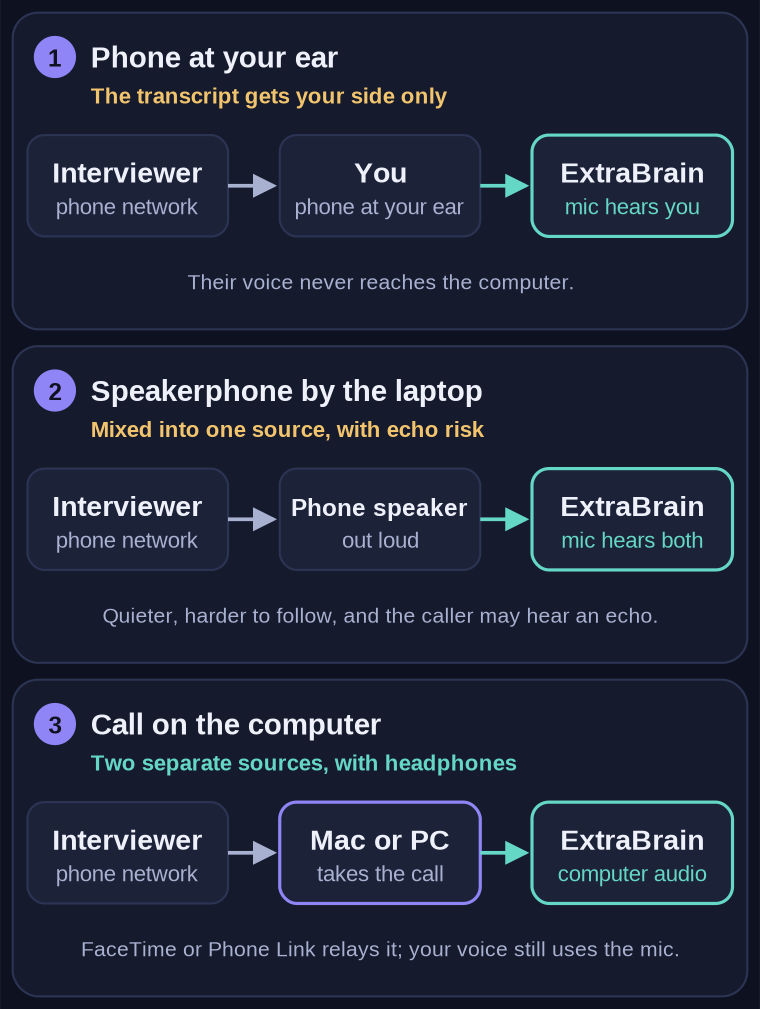
| Setup | What reaches the transcript | Trade-off |
|---|---|---|
| Phone at your ear, or earbuds paired to the phone | Your voice, through the laptop mic | The interviewer’s questions never reach the computer |
| Speakerphone next to the laptop | Both voices, mixed into the microphone source | Quieter and harder to follow; the caller may hear an echo |
| Call on the computer, headphones on | The interviewer as computer audio, you through the mic | FaceTime calling or Phone Link has to be set up and tested |
The help center describes the microphone and computer audio sources but doesn’t cover phone calls specifically. Treat the third setup as something to try with a friend a few days before, not something to discover during the interview.
Take the call on your computer
On a Mac, Apple’s guide to phone calls in FaceTime has two halves. On the iPhone, open Settings → Apps → Phone (on iOS 17 or earlier, Settings → Phone) and turn on Wi-Fi Calling; if you see Add Wi-Fi Calling For Other Devices, turn that on too. On the Mac, open FaceTime, choose FaceTime → Settings → General, and select Calls from iPhone. Apple’s requirements page adds that both devices must be signed in to the same Apple Account, with FaceTime turned on in iCloud settings, and both must be on the same Wi-Fi network.
On Windows, Microsoft’s Phone Link calling setup needs Bluetooth on both the PC and the phone, Android 10 or later or an iPhone on iOS 15 or later, and Windows 11 or the Windows 10 May 2019 Update. Microsoft’s calling page says you can pick up a ringing call on the PC instead of the phone. To call out, open Calls, enter the number and select the Dial icon. One quirk: if you move a call from the PC to your Android phone, you can only mute it from the phone.
Then set up the transcription side, keeping in mind that the help center is written for the Mac app, so Windows menus can differ. Grant microphone and system audio access (Mac permissions), choose your microphone in Settings → Audio (audio settings), and connect headphones to the computer so the interviewer’s voice doesn’t leak into the mic. For a recruiter screen, pin the HR Screen profile (profiles).
Test it properly. Call a friend through the same route and ask them to read a paragraph aloud while you stay quiet, then read one yourself. Their words should arrive as computer audio and yours through the microphone. If one side is missing, check the microphone and computer audio controls in the session toolbar, since a muted source doesn’t end the session. Then end the session and open it in Settings → Session History, because that’s where you’ll review the real interview afterwards.
Do Not Disturb can block the interview itself
On a video call, Do Not Disturb is simple: turn everything off. On a phone interview, the most important notification is the call. Apple says Do Not Disturb on iPhone “silences calls, alerts, and notifications” (Apple), so add the recruiter under Settings → Focus → Do Not Disturb → Allow Notifications as someone who can still reach you. On Android, the People filter in your mode’s settings can allow calls from chosen contacts, and Allow repeat callers lets a call through “if the same person calls twice in 15 minutes” (Google).
Watch for a trap on a Mac. If you keep Focus in sync across devices, Apple says turning a Focus on or off on your Mac does the same on your other devices (Apple). Silencing the laptop can silence the iPhone that’s about to ring. On Windows, the Do Not Disturb settings have a Calls and reminders option that lets incoming calls through (Microsoft).
None of this works for a number you don’t have. Ask the recruiter which number they’ll call from and save it as a contact.
Recording rules and the line to say first
Transcribing a call is close enough to recording it that you should treat it the same way. In the US, the Reporters Committee for Freedom of the Press recording guide says federal law requires one party’s consent, that “about 11 states primarily have all-party consent requirements,” and that when callers are in different states it’s safest to assume the stricter law applies. This isn’t legal advice, but a single sentence at the start covers most situations: “Do you mind if I use an AI notes app to transcribe while we talk?” Other countries have their own rules, so check yours. Our post on AI notetaker consent has more on wording.
If the call turns into a screen share
Some phone screens change halfway: the interviewer emails a link to a shared doc or suggests switching to video. If it becomes a video call, the Teams, Google Meet and Zoom guides cover sharing one window instead of your whole screen. For a document you’re only reading, Capture Region Screenshot grabs just the part you need (screenshot settings).
Checklist for the hour before
- Save the recruiter’s number as a contact and allow it through Do Not Disturb.
- Charge the phone and sit where the signal or Wi-Fi is strong.
- If the call will run through the computer, confirm FaceTime calling or Phone Link still connects.
- Plug headphones into the computer, confirm the microphone in Settings → Audio, and add your resume as a reference document.
- Press Start a minute before the call and check your voice appears in the transcript.
- Open the job description and close everything else.
Fixes when the call or the transcript fails
| Symptom | Likely cause | Fix |
|---|---|---|
| The call never rang | Do Not Disturb silenced it | Allow the recruiter’s contact; on Android, allow repeat callers |
| No Calls from iPhone option on the Mac | Wi-Fi Calling is off or requirements aren’t met | Turn on Wi-Fi Calling, then reopen FaceTime settings |
| Phone Link can’t place calls | Bluetooth is off on one device | Turn Bluetooth on for both |
| Only your voice in the transcript | The call is on the phone | Expected; route the call through the computer |
| No interviewer audio even with the call on the computer | System audio permission missing, or that source muted | Check Privacy & Security and the computer audio control |
FAQ
Can ExtraBrain transcribe a normal phone call?
Only the audio that reaches your computer. With the phone at your ear, that’s your own voice.
Is the phone app for phone interviews?
No. Phone Control pairs your iPhone or Android phone as a remote for the desktop app. The computer does the transcription, and the phone doesn’t receive transcript text.
What if the recruiter calls early, or from another number?
Answer wherever it rings and start the session when you can. On Android, Allow repeat callers helps if Do Not Disturb swallowed the first attempt.
Should I use speakerphone?
Avoid it. Both voices reach one microphone, the interviewer’s voice is quieter, and they may hear an echo.
Sources (checked November 21, 2026)
- Apple Support: Set up your iPhone and FaceTime on Mac for phone calls and FaceTime requirements on Mac
- Microsoft Support: Setting up calls in the Phone Link and Make and receive phone calls from your PC
- Apple Support: How to turn Do Not Disturb on or off on your iPhone
- Android Help: Limit interruptions with Modes & Do Not Disturb
- Apple Support: Turn a Focus on or off on Mac
- Microsoft Support: Notifications and Do Not Disturb in Windows
- Reporters Committee for Freedom of the Press: Introduction to the Reporter’s Recording Guide