
Configure ExtraBrain Audio Settings
Use Settings -> Audio to choose transcription behavior and microphone input.
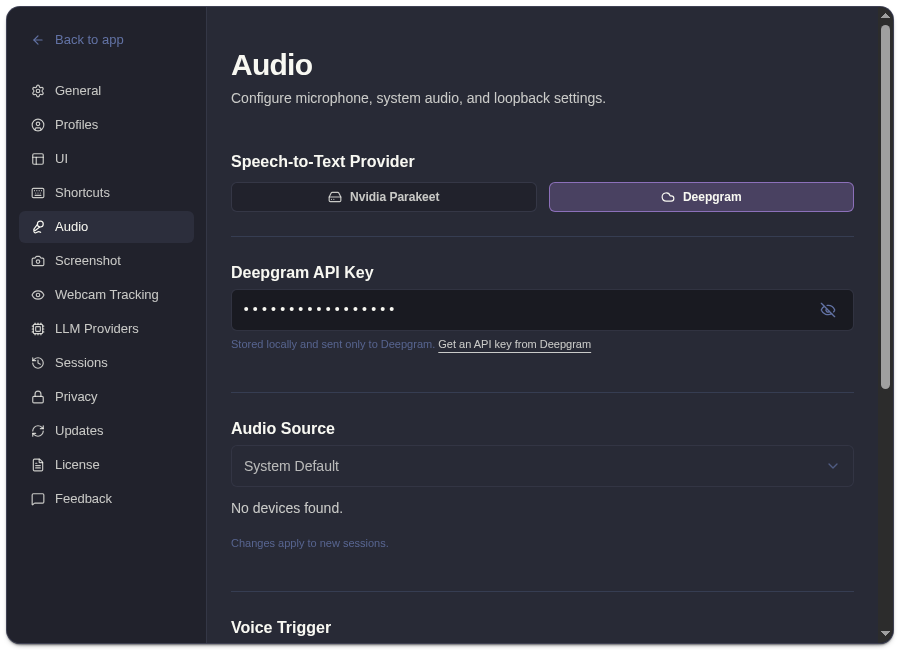
Audio Controls
Section titled “Audio Controls”| Control | What It Changes |
|---|---|
| Speech-to-text provider | Local Parakeet or Deepgram cloud transcription. |
| Deepgram API key | Required only when Deepgram is selected. |
| Audio source | Preferred microphone input. |
| Voice Trigger | Spoken phrase control for starting analysis during an active session. |
| Transcript Cleanup | Filler-word removal before transcript cards and analysis. |
| System audio permission | macOS permission flow for capturing app/system audio when required. |
- Audio device changes apply to new sessions.
- Local Parakeet keeps transcription local.
- Deepgram sends audio to Deepgram for transcription.
- ExtraBrain may need macOS microphone and system audio permissions before recording works.
Related
Section titled “Related”- Choose Parakeet or Deepgram transcription
- Grant macOS permissions
- Clean up transcripts and filler words
- Use voice trigger phrases
Common Questions
Section titled “Common Questions”Why does ExtraBrain say no devices were found?
Section titled “Why does ExtraBrain say no devices were found?”macOS may not have granted microphone permission yet, or the selected input may be unavailable. Grant permission, reconnect the microphone, then start a new session.
Does switching transcription providers affect the current session?
Section titled “Does switching transcription providers affect the current session?”Provider and device changes are safest when applied before a session starts. Stop recording and start a new session after major audio changes.