
Connect Anthropic Or Claude Subscription
ExtraBrain supports Anthropic API key mode and Claude Subscription mode.
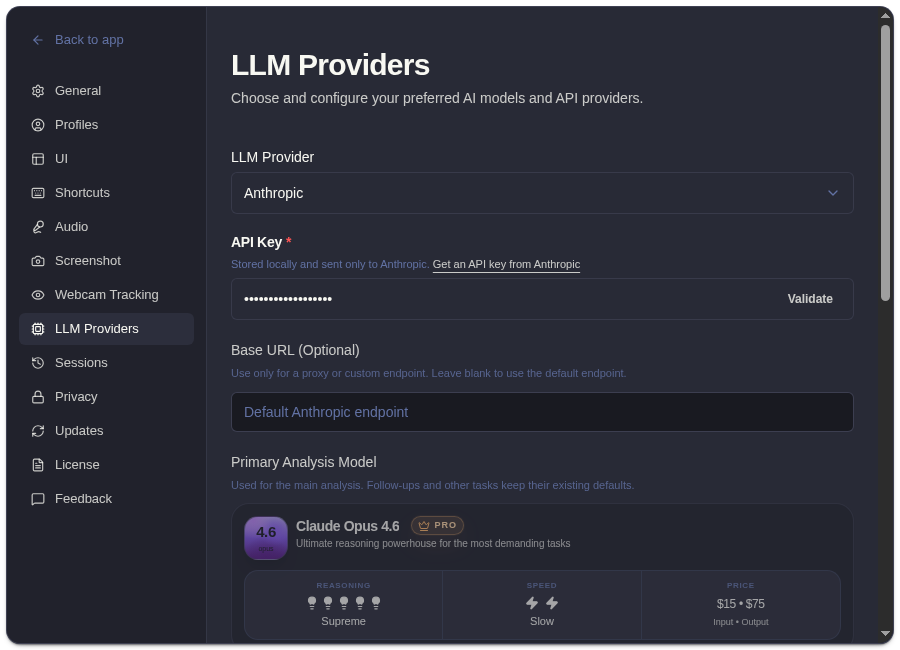
Anthropic API Key Mode
Section titled “Anthropic API Key Mode”Use this mode when you want ExtraBrain to call Anthropic through an API key you manage.
- Open Settings -> LLM Providers.
- Select Anthropic.
- Paste your Anthropic API key.
- Choose the model.
- Validate the key.
- Run a short test analysis.
Claude Subscription Mode
Section titled “Claude Subscription Mode”Use Claude Subscription when you want ExtraBrain to use your Claude Pro or Max subscription directly. This mode does not require an API key in ExtraBrain.
- Open Settings -> LLM Providers.
- Choose Claude Subscription.
- Recheck sign-in status.
- Choose the available model.
- Run a test analysis.
Troubleshooting
Section titled “Troubleshooting”If validation fails, confirm the API key belongs to the right Anthropic account, has model access, and is pasted without extra spaces. For subscription mode, confirm your Claude subscription is active and signed in where ExtraBrain expects it.
Anthropic And Claude Questions
Section titled “Anthropic And Claude Questions”Do I need an Anthropic API key for Claude Subscription mode?
Section titled “Do I need an Anthropic API key for Claude Subscription mode?”No. Claude Subscription mode is intended for Claude Pro or Max subscription access and does not require an Anthropic API key inside ExtraBrain.
What data can be sent to Anthropic or Claude?
Section titled “What data can be sent to Anthropic or Claude?”When selected for analysis, relevant prompts, transcript context, screenshot-derived context, and custom questions may be sent to Anthropic or Claude according to that provider mode.