
Use Voice Trigger Phrases In ExtraBrain
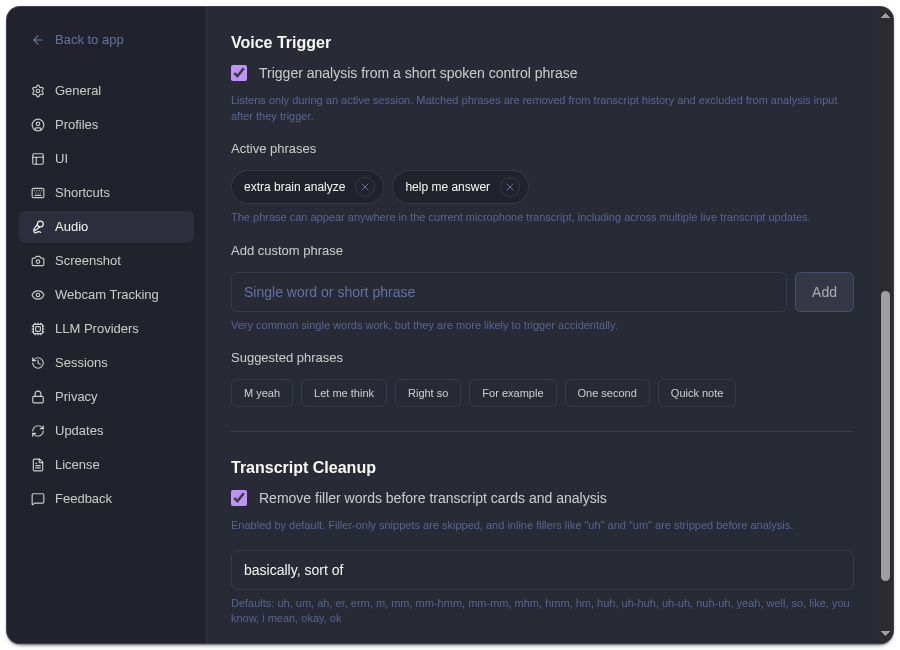
Voice Trigger lets ExtraBrain start analysis when it hears a short configured phrase during an active session. Find it in Settings -> Audio.
How It Works
Section titled “How It Works”| Detail | Behavior |
|---|---|
| Active-session only | ExtraBrain listens for trigger phrases only while recording is active. |
| Phrase list | You can use the default phrases or add your own short phrases. |
| Transcript cleanup | Matched trigger phrases are removed from transcript history and excluded from analysis input after they trigger. |
| Analysis behavior | The phrase acts like a spoken control for starting analysis. |
Phrase Tips
Section titled “Phrase Tips”- Use short phrases that are unlikely to appear in normal conversation.
- Avoid common words or phrases a participant might naturally say.
- Test the phrase in a short session before relying on it live.
- Keep privacy expectations the same as recording: microphone capture must be active for trigger detection.
Related
Section titled “Related”Common Questions
Section titled “Common Questions”Does Voice Trigger listen when recording is stopped?
Section titled “Does Voice Trigger listen when recording is stopped?”No. Voice Trigger listens only during an active session.
Are trigger phrases saved in the transcript?
Section titled “Are trigger phrases saved in the transcript?”Matched phrases are removed from transcript history and excluded from analysis input after they trigger.