
Clean Up Transcripts And Filler Words
Transcript cleanup removes common filler words before transcript cards and analysis input. Find it in Settings -> Audio.
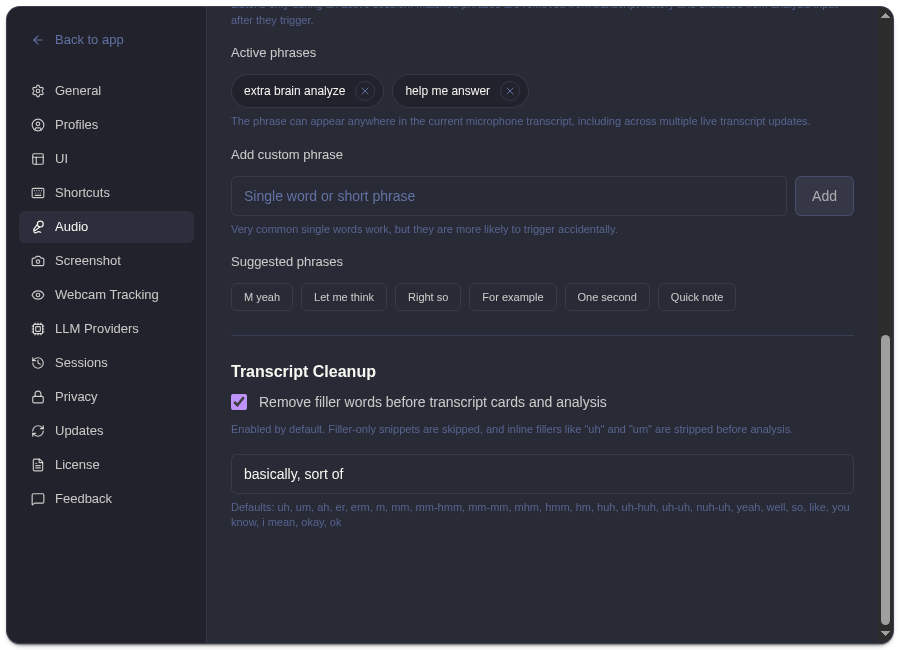
What Cleanup Does
Section titled “What Cleanup Does”| Control | Behavior |
|---|---|
| Remove filler words | Strips fillers before transcript cards and analysis. |
| Additional filler words | Adds your own comma-separated filler terms. |
| Defaults preview | Shows the built-in words ExtraBrain already removes. |
Cleanup is enabled by default. It can skip filler-only snippets and remove inline fillers such as “uh” or “um” so live transcript context is easier for both you and the model to read.
When To Customize
Section titled “When To Customize”Add custom filler words when your environment repeatedly transcribes non-useful phrases, repeated verbal habits, or meeting-room artifacts. Keep the list narrow. Removing meaningful words can make the transcript less accurate.
Related
Section titled “Related”- Configure ExtraBrain audio settings
- Start recording and ask for analysis
- View and delete session history
Common Questions
Section titled “Common Questions”Does cleanup change saved history?
Section titled “Does cleanup change saved history?”Cleanup affects transcript cards and analysis input. Saved session history reflects the processed transcript entries shown in the app.
Should I add every repeated word I dislike?
Section titled “Should I add every repeated word I dislike?”No. Add only words that are consistently noise. If a word can carry meaning in technical discussion, leave it out.