
Analyze Detected Topics And Questions
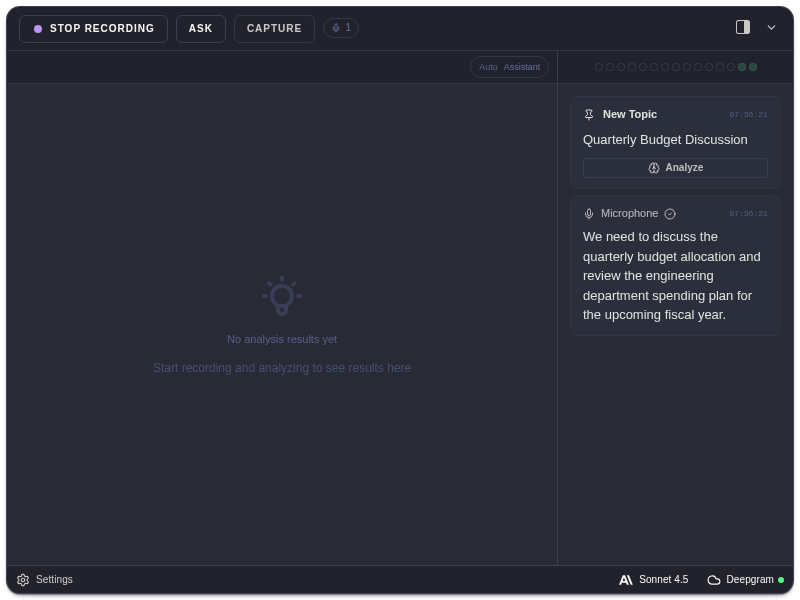
ExtraBrain can detect notable topics and questions in the transcript while a session is active. These appear as system cards in the transcript panel.
What The Cards Mean
Section titled “What The Cards Mean”| Card | Meaning |
|---|---|
| New Topic | ExtraBrain detected a topic worth analyzing or tracking. |
| New Question | ExtraBrain detected a question in the conversation. |
| Confidence | The estimated strength of the detection. |
| Analyze | Starts analysis using that detected topic or question as the focus. |
Good Uses
Section titled “Good Uses”- Capture a coding prompt after it is spoken.
- Track a system design requirement.
- Pull out a meeting question.
- Ask for a concise response to the latest topic.
Only the latest topic or question may show shortcut hints, depending on your shortcut settings.
Detection Questions
Section titled “Detection Questions”Why did ExtraBrain detect a topic instead of a question?
Section titled “Why did ExtraBrain detect a topic instead of a question?”Topic and question cards depend on transcript context. A broad discussion may become a New Topic, while a direct spoken question may become a New Question.
What should I do with a detected topic card?
Section titled “What should I do with a detected topic card?”Use Analyze when the topic is important enough to ask the selected AI provider for structure, tradeoffs, next steps, or a concise answer.